



Thiago Guimarães
Participating Frequently
June 18, 2024

After Effects Freezes after some time with error: "Direct2D Drawbot Error. HRESULT:-2005270523"

  • June 18, 2024
  • 159 replies
  • 52670 views

I can't say for sure, but after two or three more recent versions of AE Beta I started to get a random error, after working for a few minutes the whole computer crashes and then this Direct2D Drawbot Error box. HRESULT:-2005270523 appears, but I can't close it, it keeps reopening endlessly and then I have to force close the program.


I've been using AE Beta since they redid the interface, it's just become another program! It's very fluid and enjoyable. I'm not using to use the retail version because he not received the interface update., but I can say that the problem is in the beta, because when i use the reail version there is no issue i don't have any errors or freezes.


Here's a picture of the error I get when I close.
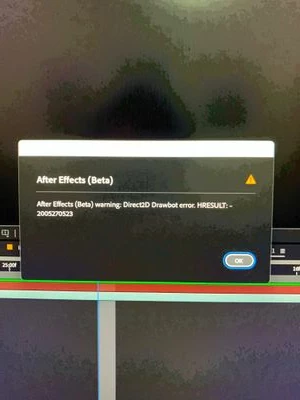


AE Beta V24.6.0 b23

Windows 11, i7 9750H, GTX 1660TI 6GB, 32gb de RAM, 512gb SSD.

Driver Nvidea Studio  555.99.


159 replies

Known Participant
January 29, 2025

Same Error with this System, that used to run an 3090 Ti with 24 GB VRAM. I tried to switch the card to an Quadro 4000 RTX since the quadro card was having the issue on another system. My system that runs fine crashes with this Quadro card, so I assuem its the Quadro GPU.


The Other System that had the problem at first that runs with the 3090 Ti now just for testing and it has no problem so far:


Other PCs dont have any problem only the one with the Quadro card.

Community Manager
January 29, 2025

Hello @ndelacalle,

I don't have any additional news past what was pinned on January 24th.

There is one more potential workaround that was sent to me. For this user, running the application as administrator seemed to fix the issue for them. Maybe an additional option beyond what was mentioned on the 24th (beta, or running in Win 8 compatibility mode).

We will keep updating here as this progresses.

All the best,Jessica McMillan - AE Engineering
Participant
January 29, 2025

Same here guys.

After Effects freezes, then my screen goes black. When the display returns, I see an "UNKNOWN ERROR" in After Effects, and after closing that error message, I get the "Direct2D Drawbot error. HRESULT: -2005270523." This locks me into an endless loop, forcing me to close the program via Task Manager.

I'm to far in AE25 to go back to AE24. 


  • After Effects Version: 25.1
  • Graphics Card: NVIDIA RTX 2080 Super (NVIDIA Studio Driver - 566.36)
  • Processor: AMD Ryzen 9 3900XT 12-Core 3.80 GHz
  • RAM: 64 GB
  • Windows 11 (updated)


Is there any updates on this issue @Jessica McMillan ?


Thank you!

Participant
January 28, 2025

Bonjour, j'ai le même soucis : erreur direct2d drawbot. hresult 2005270523

Ce qui est sûr, c'est que le défaut persiste même en mode sans plug-in.

Ce qui, par la même occasion bloque aussi Première car je fais des ponts entre AE et PP.

Participant
January 27, 2025

Hi, 

I have got the same issue of 

Direct2D Drawbot Error. HRESULT:-2005270523

I noticed that the problem occurs when switching to another application, e.g. Chrome.

I release rended, click on the Chrome icon in the taskbar and AE hangs + the known process continues.
Also it appears randomly.

The only UI stuff I used is Motion Tools Pro.
Working only in 2D (non 3D Advanced  modes) and no matter I am using or not using any 3rd party plugins.  

I have the impression that for some time now (I have been working in AE since 2008), the software has been getting more and more unstable from version to version.
Adobe, maybe instead of adding fancy features it would be worth working on the stability of a given version before it reaches users. I think that every user waits for it and expects it first.
Also, when starting a new project on a new update, it is not always possible to downgrade to an older version, because the earlier version simply does not read the project.
It also seems to me that for many people, including me, uninstalling all additional plugins and working on a clean version is not an option.

New PC, new Windows Edition Windows 11 Pro Version 24H2 OS build 26100.2894 and latest gpu drivers 556.36 (studio)

Processor AMD Ryzen Threadripper PRO 7975WX 32-Cores 4.00 GHz
Installed RAM 512.0 GB

NVIDIA GeForce RTX 2080 Ti but soon 5090 (and I am afraid of this that Adobe apps are not ready for this GPU)

_Maik
Known Participant
January 27, 2025

The problem in Adobe After Effects has been present since version 2022. I have tested version 2022, and the error persists in this version, as well as in 2023, 2024, and now in 2025. It seems that this issue does not occur in versions 2021 or 2020.

It is possible that one of the new features introduced in 2022 and carried over to later versions is causing this problem. You should analyze this and identify which features were added in 2022 that were not present in 2021 to determine if one of them is the cause of this issue. @Jessica McMillan 

Participant
January 25, 2025

I had the same issue, running on windows 10 with an rtx 2060 and ae 25.1. Been dealing with this ever since updating to version 25 and finally the one fix that worked for me is using windows 8 compatibility mode with AE as mentioned by @WellsMcKenzie so really really thank you for that and I hope adobe can quickly come up with a proper solution for this with an update. 

Community Manager
January 24, 2025

Update in the Beta:
The new behavior will show an error stating that AE cannot continue, followed by a second dialog prompting to save the open project, a save dialog, and then the application will shutdown automatically. AE will no longer loop error messages in this scenario.

Workarounds:

  1. @WellsMcKenzie Run AE in Windows 8 compatibility mode This might be due to the disablement of DirectX 12 in Windows 8. Thanks WellsMcKenzie for posting that!
  2.  @Maxxxymiron found disabling GPU acceleration in windows settings worked for them. Thanks Maxxymiron.
  3. Unverified, but another user suggested running the application as administrator fixed the issue for them.
  4. Downgrade to 24.6.4. For instructions on installing previous versions see: Install previous versions of your Creative Cloud apps
    I've included an image of what the list of versions looked like in mid December.


    Description of issue:

We know that our dialog is being shown due to a TDR. For those curious of what that is, here is a document from Microsoft: WDDM Support for Timeout Detection and Recovery (TDR) - Windows drivers | Microsoft Learn. Though this article is directed towards developers of drivers for displays/graphics cards. 

The OS attempts some recovery steps which then are problematic for the application. In the release version, that results in the looping of this error dialog. We are not sure what causes this state. It could be due to a number of factors from GPU, drivers, other applications running at the same time causing an issue, workflows within AE that might be a trigger for this such as Advanced 3D or draft 3D, plugins, doing a very heavy gpu task, etc. It could also be different scenarios for different people. There are a lot things that are a part of this space that could produce the issue.

Request for information:

Thank you for providing your gpu, driver, and some workflows that you have experienced this through, such as switching application focuses. If you also happen to experience this with 3D workflows vs non 3D, that would be helpful for us to know as well.

A simple way to capture your GPU & driver info is to do the following: Windows + Start -> DxDiag
Save All Information...
Provide us with the DxDiag.txt
You can send the DxDiag.txt in a DM to myself, and I can attach it to our ticket.

Thanks again for posting all these details as it does a lot for our investigation avenues.

All the best,Jessica McMillan - AE Engineering
Participating Frequently
January 24, 2025

@add_a_little_ease 

I recommend setting the Adobe apps you use to run in compatibility mode with Windows 8 by using the properties window. See if that works at all, maybe it can get you through this project and then you can try v24 after those are complete? I still had issues on v24, it wasn't a version issue in my case, it was an issue with the RTX 20xx series card playing with Adobe. 

Participant
January 23, 2025

Leaving a comment so Adobe is aware of this constant issue.


I am also getting "Direct2D Drawbot" error. Like everyone else is experience the same thing: screens freeze, goes black, and comes back—but have to restart. I'm gambling against my deadlines wherever I click and it freezes!


My GPU and BIOS are update to date. I cannot downgrade to version 24 because it will not open my current 25.0.1 aep working files. I am stuck in a cycle working every 10 minutes on repeat: freeze, reboot, open files, freeze again, and reboot.


Third-party plugins:

  • Bodymovin
  • GifGun 2
  • EaseCopy
  • PuppetTools 3


My system specs:

  • Operating System: Windows 11 Pro
  • Motherboard: ROG STRIX B550-F GAMING (Wi-fi)
  • CPU: AMD Ryzen 3950X 16-Core Processor
  • RAM: 64 GB
  • GPU: GeForce RTX 2080 Super
  • Power Supply: 800 Watts