

Matorototo
Participating Frequently
June 23, 2023

Strange cropped/repeated edge when exported in media encoder

  • June 23, 2023
  • 42 replies
  • 26397 views

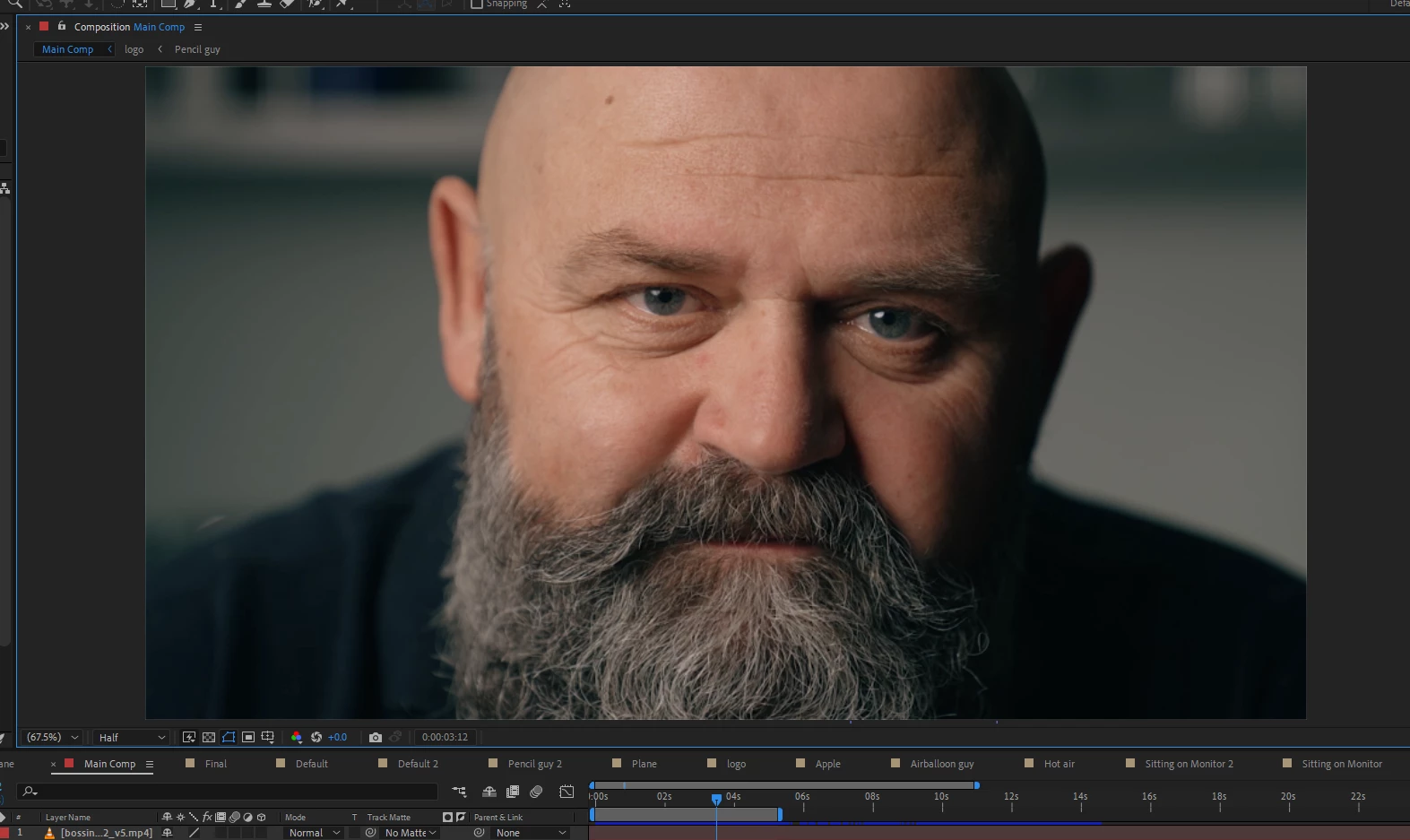
For some reason media encoder changes the position and repeats a section of my composition when exporting.

After effects Preview
Media encoder output
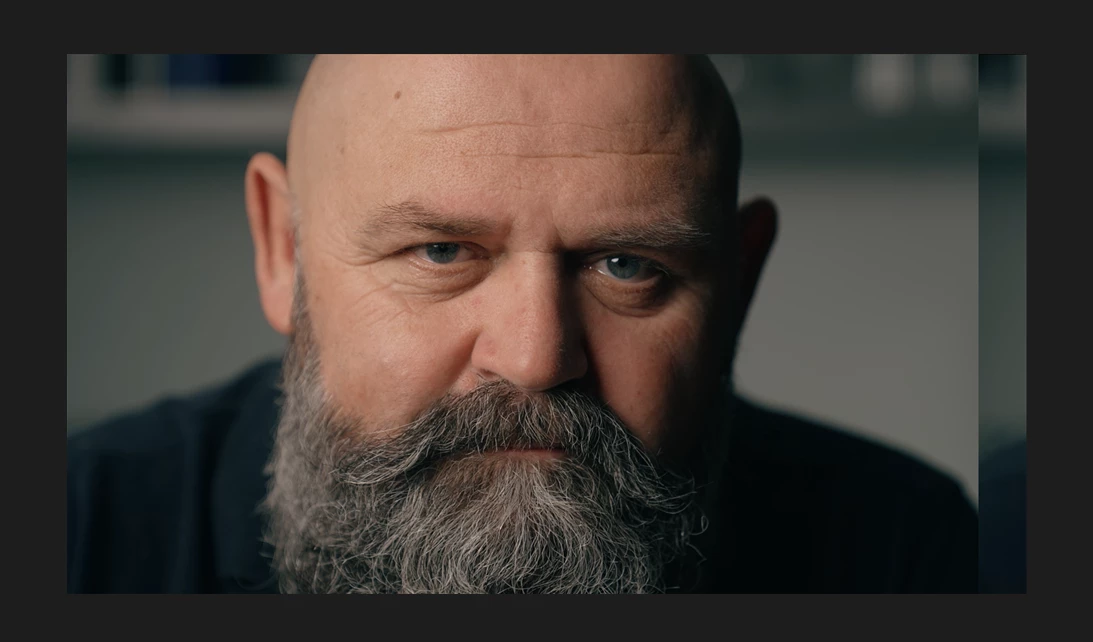


This issue occured when I tired to render the composition in Quicktime Format. It affects the output of the video, and when I try to switch back to H.264, the updated position+repeated edge persist.

I managed to replicate this exact issue with a totally different composition using the same steps which makes me think its a media encoder issue.

42 replies

Participant
July 4, 2023

Hi

I'm not very proffessional on after effects. When I try to export my after effects composition that I prepared as 1080p, it seems to shift to the left in the source section. I checked my composition settings. Frankly, I don't know where else to look. Do you have any idea about solving this? I'm posting screenshots.


Mylenium
Legend
July 4, 2023

This is a known bug/ issue. You need to disable hardware acceleration or downgrade to 23.4.


Mylenium 

Participant
July 1, 2023

Video is fine until rendering, the video  moves off screen to the left and places the off side to the right. Its happen with the last 3 projects. Im not sure how to fix it, help please

Warren Heaton
Community Expert
Community Expert
July 1, 2023

This appears to be happening under Windows with After Effects 23.5 and Media Encoder 23.5.


Try using the one of the H264 Output Modules in the After Effects Render Queue instead of sending the Composition to Media Encoder.  If that still has issues, render Best Settings/High Quality (the file will be large) from After Effects and then encode that to MP4 in Media Encoder.


Another option is to roll back to an older version.  As long as you stay at version 23.x or above, the 22.5 After Effects project file should open.  If rolling back to After Effects version 22, use File > Save As > Save a Copy as 22.x in After Effects 23.5 - checking any newer features that are different in prior versions like Track Mattes.


Also, if you have a moment, add what you posted here to this thread:


This thread has the participation of Adobe staff and will likely include news of a fix once it becomes available.  Please be sure to include your operating system version, After Effects version, and Media Encoder version.


Participating Frequently
June 30, 2023

Hello!! I am doing an after effects project which I have linked to premiere pro, the problem started today when I activated some 3D layers (apparently). It turns out that when I am in my AE file the preview does not have any problem, however, when I enter PR or even when I export through Media Encoder, the scene has a mirror error, I leave the image below so that it is understood better


After Effects File (NO PREVIEW ISSUE)


Premiere Pro (PREVIEW ISSUE) 


The render generates a "mirror" effect to the right of the image, shifting everything else to the left.


Within what I have tried, I have changed the bit depth and this decreases the size but does not eliminate it completely, any idea what it could be?


Mylenium
Legend
July 1, 2023

It's a known bug. Turn off hardware acceleration and/ or downgrade to 23.4.


Mylenium

Participating Frequently
June 28, 2023

Hello -


I have a square composition I would like to export. However, it is off-center. I cannot figure this out.

My issue is easy to re-create. For the example screenshot, I just have two solid layers - top is white, red is bottom. I shifted the top white layer over and down a few pixels to demonstrate the issue. There is nothing else I modified within the settings. Everything else is default. You can see the preview below.


Why is the camera off-center? I'm not doing anything crazy with the composition. It is a simple 2D, 1:1 composition. Nothing else was moved.


Ishan Y
Inspiring
June 28, 2023

Hey Brent,

I'm sorry to hear about this. We are currently investigating a similar issue. Do you also see this issue if you export through After Effects instead of using Media Encoder? Does it make any difference if you change the Format to Quicktime? This will help us better understand the issue.


Thanks,

Ishan

Pamplemuss
Known Participant
June 27, 2023

Hello, maybe it's After Effects trick, maybe Media Encoder one, but I have some strange case:  when I create video in After Effects, everything is fine. If I render in right in After Effects the same, all good.


But as soon as I render the same file via Media Encoder, I have some additional part of the video on the side -- impossible to explain by words so I enclose the picture: 


Anydoby know what the issue is that ? 


Thanks ! 

Mylenium
Legend
June 27, 2023

Known issue in 23.5. Downgrade to 23.4 or try to disable hardware acceleration.


Mylenium

Participant
June 27, 2023

Any1 had this issue and know how to fix?

Working in AE and the frame looks fine but when i use a dynamic link or export directly from AE the frame gets cut from the right and placed to the left?  


keiko.yamada
Community Manager
Community Manager
June 28, 2023

Hi DULF,

Thank you for reporting the issue.

Could you please tell us which version of After Effects and Media Encoder (I assume you used AME to export) you were using when you saw this?

Is it Windows or Mac?

Thanks.

Keiko

Participating Frequently
June 26, 2023

I have noticed this problem since yesterday evening I have no idea why this is or have done it I have already downloaded the program again and it shows the same problem can you maybe help me I don't understand it anymore that thing on the right side the format is not good

Community Manager
June 26, 2023

Hi Abbie

Thanks for reporting this, are you seeing this in After Effects export or in Media Encoder exports?

Participant
June 26, 2023

This is screen shot from After Effect


And this is what happened on Media Encoder as you can see on the right side there is an extra section


Do you guys have any idea how to fix this?


Participant
June 26, 2023

I am sorry for the wrong photo. This is After effect screenshot


Participant
June 27, 2023

Hi Lough10812440, I've had the same issue for a couple of days and only rendering from AE resulted in the right export.

I have just uninstalled AME and updated to the new AE (23.5.0 build 23) and re-installedd AME everythings good now.

Participant
June 26, 2023

I don't really know how to describe this but the screenshot really is self explanatory : 
When exporting with media encoder the very left of my comp end up at the very right ( doesnt happen in preview )
Any insights ?

Thanks a lot 

Mylenium
Legend
June 26, 2023

This is apparently yet another stupid bug with hardware acceleration. Downgrade your AE to the previous version or turn off GPU acceleration to see if it improves.


Mylenium

Participant
June 25, 2023

Hello there, I am trying to get this rendered and it's not going so well. I tried the After Effects Render Queue and it goes into a BIB error since it is one composition with several little compositions inside. Everything is a vector and has been animated so it's quite large.


It is a minute and a half long video so the only option I have is the Adobe Media Encoder. I exported it once and it works beautifully except for the fact that the right side of the video gets cut off and shows up on the left as seen in the photo below. The wing of the girl on the right side is flapping and can now see a portion of that wing show up on the left.


The work area on After Effects shows the correct view. It is only when I go to Media Encoder that does it this. I messed around with the format and preset settings but it still shows this. Some just show it more extreme than others. Can anyone offer any advice because I can't find any issue similar to this while doing an internet search? I need to have this ready by late tonight.

kglad
Community Expert
Community Expert
June 25, 2023

in the future, to find the best place to post your message, use the list here, https://community.adobe.com/


p.s. i don't think the adobe website, and forums in particular, are easy to navigate, so don't spend a lot of time searching that forum list. do your best and we'll move the post if it helps you get responses.


<moved from using the community>