


New Participant
January 7, 2025

UI bug - Source text edit field in Essential Graphics panel truncated when edit field is active

  • January 7, 2025
  • 4 replies
  • 562 views

Since v25, active text edit fields are truncated in the essential graphics panel.
1. create text layer
2. drag text>source text to the essential graphics panel for mogrt authoring.
3. click on the edit field for the source text in the essential graphics panel

result:  As soon as you are editing the text string, only ~14 characters are displayed.  No edit cusor is displayed.

Windows 11 pro versio 10.0.26100, After Effects v25.1.0 build 68
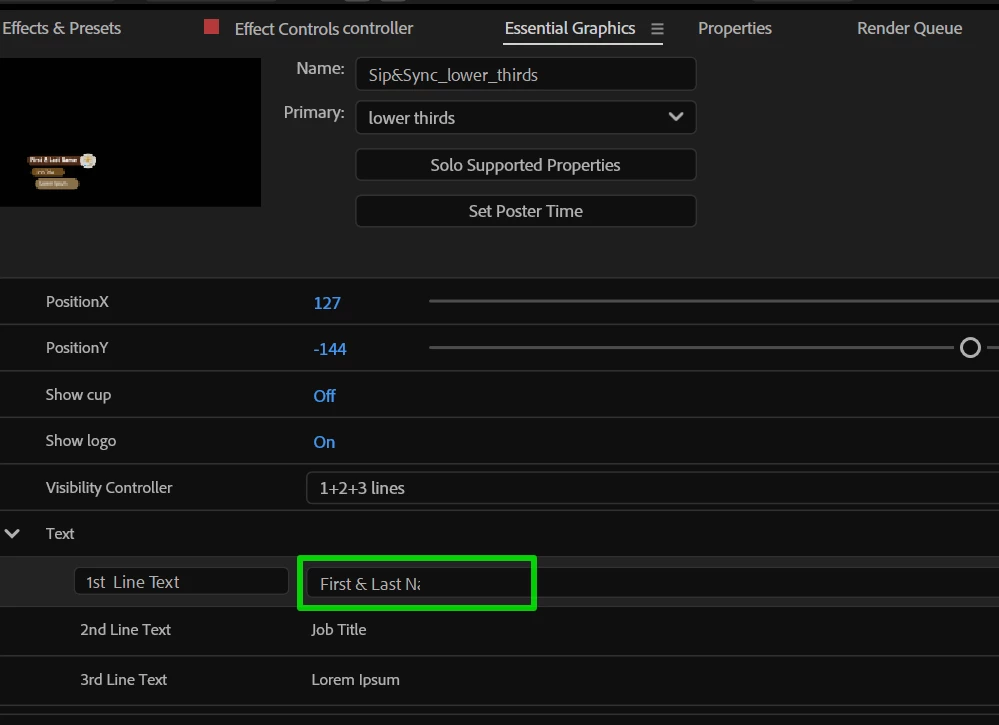


It's annoying.  Workaround is composing your text string in notepad, then copy/paste.

4 replies

Mike Choo
Inspiring
March 4, 2025

Hey Theresa,

Thanks for the update, and sorry I missed the existing post!

Cheers,

Mike

Theresa Rostek
Community Manager
Community Manager
March 4, 2025

Hi @Mike Choo, Thanks for reporting. We have a ticket open to investigate a fix, and have merged your post into another to track users affected.


Cheers,

Theresa

Mike Choo
Inspiring
March 4, 2025

Hiya! When sourcetext is added to the Essential Graphics panel and there is no selection on or in that property the label and value fields are displayed as expected (screengrab 'EGP Text field not active').


If the label, value, or just the property itself is selected, the text in the value field is truncated at around 17 characters and broken onto multiple lines as if the panel was very narrow, the text cursor is not visible in that field, and the scroll arrows are very compacted in y and difficult to interact with (screengrab 'EGP Text field active').


This happens regardless of the width of the EGP, and also is the same when docked and undocked.


If I nest that comp and access the essential properties through the regular Properties panel the text editing field displays as expected - this only happens in the Essential Graphics panel.


Expected behaviour: the value field in the EGP for text would display to the available width of the panel before wrapping, with a visible cursor and the scroll arrows in their normal proportions.


This is important because it slows down workflow in the EGP.


Cheers!


Win 11, Beta 25.3.0

JohnColombo17100380
Community Manager
Community Manager
January 7, 2025

Hi @Christiana26768464jl2q,

Thank you for reporting this issue. This is one we are aware of and we have a ticket open to investigate. Once a fix is available in the Beta version, we will update this thread.


Thanks again

- John, After Effects Engineering Team