


Participant
May 23, 2023

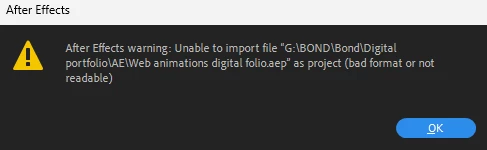
unable to import file as project bad format or not readable

  • May 23, 2023
  • 6 replies
  • 1713 views

I have been working on a project and tried to open it next day. The message I see when I try to open the file: unable to import file as project bad format or not readable. I closed and saved the project before turning off my PC. Could anybody help me? I lost 1 day of work.
Can

6 replies

Kyle Hamrick
Community Expert
Community Expert
May 23, 2023

Update for anyone reading this later: I got the same error on my machine, in both the current release and beta. I think this person is out of luck, unfortunately! 


This is a good time to underline the importance of a good backup strategy, because sometimes the worst happens! 

You can increment save in After Effects, so even if one file gets corrupted, you'll have previous versions of the file to go back to. It's basically a manual Auto-Save. File > Increment And Save.

Also, having automated system backups of some kind is advisable for ... pretty much anyone who values what's on their computer, but especially anyone making a living off of digital creations. I personally use BackBlaze, but there are a variety of solutions available. Most of these services allow you to look back at earlier versions of files from your hard drive, up to 30 days ago, which will hopefully get you back to a usable version. 

Participant
May 23, 2023

Yes, exactly the same error.

Kyle Hamrick
Community Expert
Community Expert
May 23, 2023

Did you get the exact same error after attempting ALL of these? 

If you're able to DM me the file, I can see if there's any difference on my system.

Participant
May 23, 2023

I get the same bug with all auto-saved files.

Participant
May 23, 2023

Hi Kyle,

Thanks for reply, but none of these worked.

Kyle Hamrick
Community Expert
Community Expert
May 23, 2023

I can't make any promises, but here are some things to try, roughly in the order I'd attempt them.

- Do you have AutoSaves? They should be in a folder right next to your project file.
- Try creating a new, empty AE project, and import this existing .aep into that. Sometimes it works! 
- Have you tried opening this file in the Beta version of AE? You can install from your Creative Cloud App -> Beta Apps.
- Do you have any unqiue file types being referenced here? Maybe especially large files? If so, you could try moving them to another location on your hard drive, and see if the file will open then. 
- Are you using any third-party plugins for this project? Sometimes those can be finicky, and temporarily uninstalling them can help salvage an otherwise un-openable project.
- Try resetting preferences to see if something in there is causing a conflict. 
- It sounds like there might be a font-related bug currently, so you could try disabling the fonts used in this project through the Creative Cloud app. 


Obviously, a few of these will block your ability to keep working, but if you can at least narrow things down and find your culprit, that's progress!