
Participating Frequently
October 21, 2018
Question

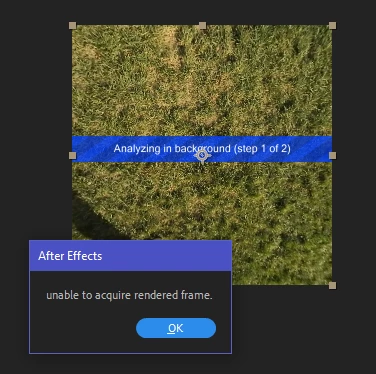
3D Camera Tracker: unable to acquire rendered frame

  • October 21, 2018
  • 25 replies
  • 36503 views

I can't stabilize any 360 footage using the 3D Camera Tracker from VR Comp Editor. 95% of the time, I run the analysis to create the camera for stabilization, it fails with the incredibly non-descriptive and undocumented error message "unable to acquire rendered frame." The error appears for videos of any length and any resolution. It also appears at various progress stages of the process and even within the same file (it can be at 5%, or at 55%, or at 98% completion).

At this point, I've exhausted any possible solution I could find:

  • Reduced the Comp width down to 260 pixels and aspect ratio to 1:1: it speeds up processing but doesn't guarantee success even with a 6-second video
  • Converted the video to sequences of JPEGs and PNGs: the success rate is slightly higher (the process is likely to complete than not) but this slows down the process exponentially (a 20-second video takes 5+ minutes to get converted into images then takes longer to analyze and re-encoded)
  • Played with every combination of settings when creating the 3D Edit
  • Disabled the antivirus (Windows Defender)
  • Turned off all cloud syncing and took the computer offline
  • Moved the source files to an M.2 SSD from RAID0 (2x7200rpm WD Black drives)
  • Moved disk cache to the M.2 SSD
  • Increased paging file size to 16GB
  • Tried changing from CUDA to OpenCL and back

The source camera is Nikon KeyMission 360. The videos are stitched in-camera and exported as equirectangular 2:1. Tested video resolution was 3840×1920 and 3840×2160.

Computer specs: Dell XPS 8930, i7-8700, 32GB RAM @ 2667MHz, GeForce GTX 1070 8GB, AE 16.0.0 build 235 with 429 plugins.

Every single tutorial talks about how easy this feature is and has no tips for troubleshooting. I'm hoping an actual Adobe (or Mettle) developer chimes in on this.
This topic has been closed for replies.

25 replies

bsinedAuthor
Participating Frequently
January 9, 2019

This is incredibly frustrating. People in this thread so far have different hardware (Windows and Macintosh) and different file formats and footage quality, which means the bug is a lot more common than it should be.

I tried downgrading all the way to CC 2017 and installing the standalone SkyBox version of the VR Comp Editor (one of the YouTube tutorials has the "super-secret" download link on Adobe servers, which saves time dealing with e-mail support). In both CC 2018 and CC 2017, I could not stabilize the file, which I had miraculously stabilized in CC 2019 (happened only once). The earlier AE/SkyBox versions fail at the Solving Camera stage regardless of the resolution I use. They either outright fail with the appropriate message or the entire application hangs up after 10 minutes of analysis on a 20-second video. A clean install of CC 2019 still brings the "unable to acquire rendered frame" error.

RameezKhan, can you please ask someone from the VR tools team to join the discussion?

Community Expert
January 9, 2019

I can't really offer anything other than saying how important it is to start looking at the footage when you are having tracking problems. If the footage contains enough fixed geometry to track and you are getting failures then look at the detail level, contrast, check for reflections and see what can be done to mitigate those problems. If you are still having problems and the footage compressed then think about rendering a visually lossless copy using a standard production format. No matter what kind of tracking you are doing it's important to remember that not all shots can be tracked, camera tracked or stabilized. If you are planning on tracking you owe it to yourself to run a few tests before you get into production and then carefully plan and execute your shots.

As others have said, there also seem to be a lot of system and version inconsistencies. I actually kind of expect that because VR footage is far from standardized and a very small segment of the post-production world. I always keep at least 3 versions of my compositing software on my production machines so I have some easy options to try if things are not working as expected.

bsinedAuthor
Participating Frequently
January 9, 2019

Rick Gerard, thank you for the great idea! You mentioned the completely irrelevant limitations of the camera tracker for 2D shots (geometry, composition, etc.), which gave me the idea of how we all can standardize our troubleshooting. The official Adobe tutorial for this tool has sample footage. In the tutorial, it stabilizes nicely as expected. When I tried to run it on my machine, the analysis failed.

If anyone wants to contribute to troubleshooting and testing this issue, head over here: Stabilize and track 360/VR footage with VR Comp Editor and download the sample files in the "What You'll Need" section right above the video. Follow the tutorial and post your results here.

P.S. Rick, "stabilization" for 360 video means that the image "sphere" is rotated to maintain the horizon at a constant level. This can be done manually with GoPro VR Horizon plugin and many-many keyframes but VR Composition Editor is supposed to make that a lot easier.

bsinedAuthor
Participating Frequently
January 8, 2019

zeno_more, krabaz, ShiverMeTimbers, crookedfoot: I installed CC2018 (15.1.2) and the tracker finishes the analysis without the annoying error. I'm having trouble with camera solving but that's progress.

RameezKhan , Sumeet Kumar Choubey : What's the word from the development team? This is clearly a bug that was introduced in CC2019.

Participating Frequently
January 8, 2019

So far tracking and solving have gone 10/10 on my end.

Do you use a third party plugin, or the native 'immersive video' / Mettle dialogue box ?
Try setting the camera tracker to 'specify angle of zoom' - adjust to the same angle as your camera zoom (its written in pixels and then in angle degrees within ( ) brackets)

bsinedAuthor
Participating Frequently
January 8, 2019

VR Comp Editor is the only plugin applied to the composition. Did you uninstall CC2019? I'm running 15.1.2 and 16 side-by-side.

krabaz
Participant
December 29, 2018

Same problem here. I have tried all the tricks from this forum.

1000 frames in 360° 6k/4k/1080 29,97fps as mp4, tiff, jpg and png sequence etc.

It didn't help at all. => "unable to acquire rendered frame."

Also the 24th Tracker start did not bring any improvement. it always breaks off. once earlier, once later.

The basic problem: we work here on client projects.

It can't be due at the PC.  (i9-9900, 32gb-ram 3200mhz, 7000 cuda cores, m2 system and m2 data etc.)

i despair of it. o.O

Community Expert
January 8, 2019

I have not tried the camera tracker with 360º footage but I have serious doubts about getting a reliable track. Here's why. AE's cameras have no distortion. AE does not have a spherical camera. The Camera Tracker is going to look at parallax changes in the fixed geometry it finds in a scene and try and figure out where the camera is and how it is moving. If you are camera tracking footage show with wide angle lenses that have a fair amount of barrel distortion you never get a very good track. I almost always try and remove any lens distortion if I need to do accurate camera tracking.

I think you are going to have to look for other options for most 360º footage.

bsinedAuthor
Participating Frequently
January 8, 2019

It's literally an advertised and documented feature of After Effects: Stabilize and track 360/VR footage with VR Comp Editor | . We aren't discussing how to improve the quality of the stabilization but the fact that it doesn't work as advertised in AE 16.0.

Shawn Zeilenga
Known Participant
November 2, 2018

So I changed the format of the file and that almost worked. 

It got hung up on "solving camera".

I took the mp4 file I was using, imported it into Media Encoder and rendered it as a jpeg sequence.

Then I imported that file into After Effects. Then the usual, >Add 3D Edit >Properties >Analyze Background

Thanks
Shawn

bsinedAuthor
Participating Frequently
November 2, 2018

I've tried export as an image sequence. I think it worked more consistently but the time drain of exporting the images, analyzing them, and then re-encoding into a video is too much.

I searched again for mentions of the original SkyBox by Mettle and it looks like the bug pre-dates 360 video production. The earliest mention on this forum is from October 2011 and relates to Warp Stabilizer, no answer found. Another guy had the same issue with 3D Tracker in CS6 on Mac in August 2012 but he found it to be related to another software. When Mettle introduced camera tracking in SkyBox Studio 3 years ago, some folks commented about it but never got a response beyond "Some folks have had problems with this technique most have not."

I guess, I can start killing every user-launched process until the camera tracker works but I would rather have Adobe tell me what causes the error message in the first place.

Shawn Zeilenga
Known Participant
November 12, 2018

Hey bsined,

So I was messing around with the 3D Camera Tracker function today and I had some success, but still had an issue.

Under the "Advanced" tab, select the option for "Detailed Analysis".  It pushed the analyzing passed step 1, which is better than before. However, it still failed after "stabilizing" a few times.

Hopefully someone from adobe can offer some advice, since this is critical for a lot of projects moving forward.

I did get success after the 3rd time through.

As you can see the motion tracking points on the bottom image. It was a stable 360 camera rather than a moving one.  And the footage was only 47 seconds long.

Thanks

Shawn

Rameez_Khan
Legend
October 31, 2018

Hi bsined,

Sorry to hear about your issue and thanks for a detailed post.

Great job trying to troubleshoot the issue so far.

Let us try to reproduce this issue in-house. We'll get back to you for additional questions.

Thanks,

Rameez

bsinedAuthor
Participating Frequently
November 1, 2018

RK, do you guys want my source files for testing?

Community Manager
November 1, 2018

Hi bsined,

Yes, a download link for the source files would be helpful in reproducing the issue and diagnosing it properly.

Regards

Sumeet