


Exit
  • Global community
    • Language:
      • Deutsch
      • English
      • Español
      • Français
      • Português
  • 日本語コミュニティ
  • 한국 커뮤니티
0

3D: Precomp Visible in Active Camera But Not in Custom View

Community Beginner ,
Jul 13, 2024 Jul 13, 2024

Hi everyone,


I've encountered a 3D behavior in After Effects that I'm unfamiliar with. There's a 3D layer I can see in the active camera but not in custom view (or any other preset view, such as Front, Left, Custom View 2, etc. However, Default does work). After some testing, this only happens with precomp layers where I enable "Collapse Transformations". The 3D room is precomped to keep it self-contained (and I need to reuse it for multiple comps), but that seems to make it invisible to the custom view. I did not mark the precomp as a 3D layer, as collapse transformations is all I need to make it 3D (plus I don't need to move the room). Interestingly, if I do enable "3D layer" on the precomp while it has collapse transformations enabled, I can see the wireframes of the objects in the custom view though they're still invisible.


Below is a screenshot of what I see. The left view is the active camera and the right is custom view 1. I lined up the custom view to roughly the same area as the active camera to show the comparison:
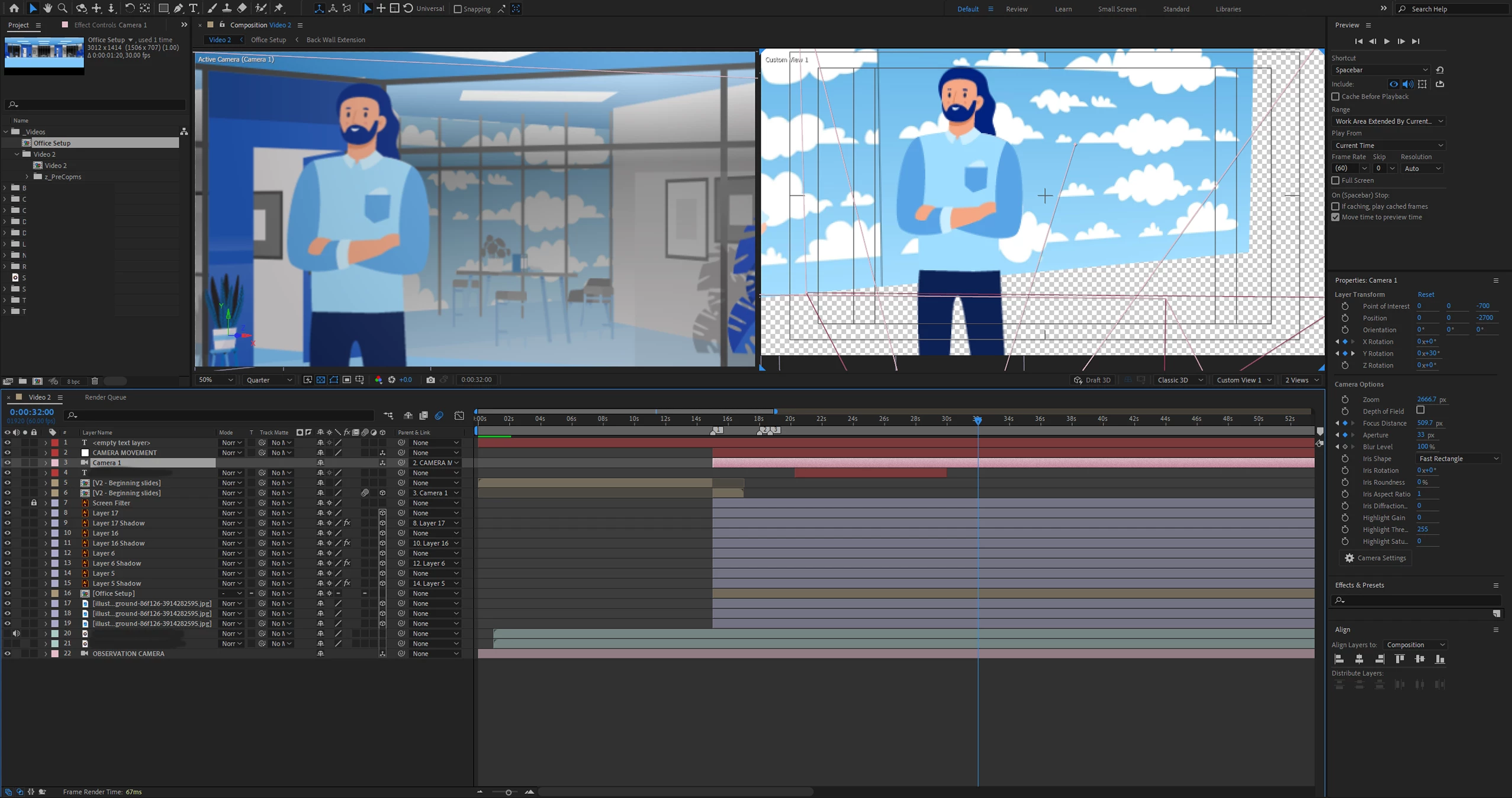
Screenshot 2024-07-13 133844 edited.png


I'm pretty sure I was able to see this layer several days ago before I reinstalled After Effects. I was having some consistent crashing and figured reinstalling would help (which it did). However, I didn't notice this behavior until after I reinstalled After Effects. Perhaps resetting flipped some setting I don't know about? Or maybe this is standard behavior? In the meantime, I've created an extra camera to move around but it would be nice to use the custom views.


Thanks in advance!

TOPICS
Error or problem , Preview
618
Translate
Report
Community guidelines
Be kind and respectful, give credit to the original source of content, and search for duplicates before posting. Learn more
community guidelines

correct answers 1 Correct answer

Community Beginner , Jul 13, 2024 Jul 13, 2024

Actually, I just figured out that the Time Remapping of the precomp was causing the issue, though it doesn't make sense to me. Since my Office Setup composition never moves, I made it a one-second comp and had it Freeze Frame in my regular comp. This worked as intended for the render, with the 3D office visible for the whole duration. However, the custom view acts as though the precomp is still only one second long, despite being a freeze frame, so you can see it for the first second of the time

...
Translate
Community Expert ,
Jul 13, 2024 Jul 13, 2024

I see the wireframe from the camera in the Custom View. You may have rotated the custom view or placed the camera in an unusual position.


The other views are only helpful in lining up the layers on the virtual 3D set. They will not render, and what you look at in those views has nothing to do with the final render. They only show the relationship between the 3D layers. 

Translate
Report
Community guidelines
Be kind and respectful, give credit to the original source of content, and search for duplicates before posting. Learn more
community guidelines
Community Beginner ,
Jul 13, 2024 Jul 13, 2024

Hi Rick, I appreciate your reply. Yes, I placed my custom view very close to where the camera happens to be at this timestamp (simply for the screenshot, normally it's not like this). My intention with the views (in this case, custom view 1) is to adjust objects in the 3D scene without moving the official camera. The regular camera object is the one that will render. I have no intention of rendering with the custom view.


I'm curious why the precomp (named "Office Setup" in the screenshot) isn't appearing in the custom view, as I'd like to shift objects around that precomp. It's difficult to make adjustments when I can't see the precomp.

Translate
Report
Community guidelines
Be kind and respectful, give credit to the original source of content, and search for duplicates before posting. Learn more
community guidelines
Community Beginner ,
Jul 13, 2024 Jul 13, 2024
LATEST

Actually, I just figured out that the Time Remapping of the precomp was causing the issue, though it doesn't make sense to me. Since my Office Setup composition never moves, I made it a one-second comp and had it Freeze Frame in my regular comp. This worked as intended for the render, with the 3D office visible for the whole duration. However, the custom view acts as though the precomp is still only one second long, despite being a freeze frame, so you can see it for the first second of the timeline but it vanishes after that. Weird.


To solve this, I simply made the precomp have a duration of ten minutes, which is longer than the final video will be, so I can forego using Time Remapping.

Translate
Report
Community guidelines
Be kind and respectful, give credit to the original source of content, and search for duplicates before posting. Learn more
community guidelines