Copy link to clipboard
Copied
Friends and family, good afternoon.
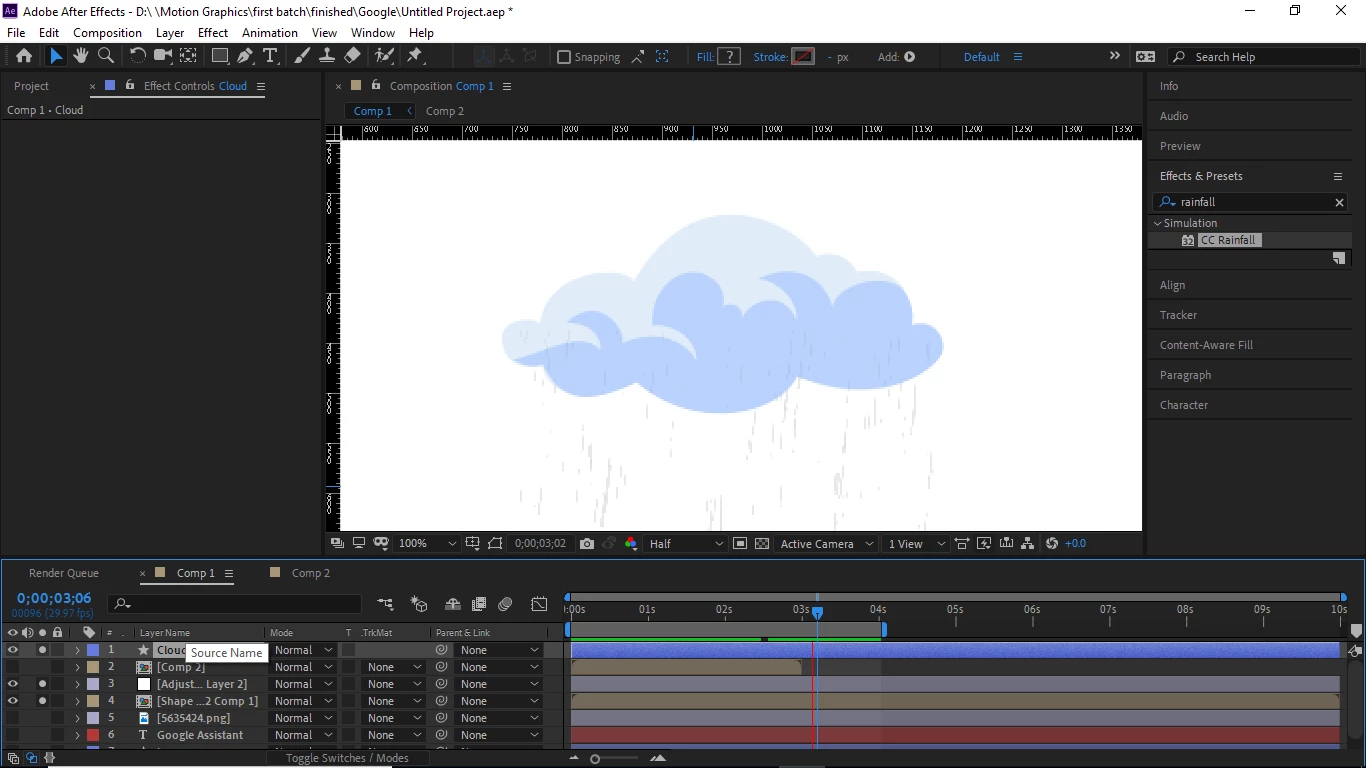
I have put a CC Rainfall simulation effect on an adjustment Layer. From what I have learnt, the Adjustment Layer only affects layers below it. If you zoom into the photo, you will notice that in as much as the Cloud Layer is above the adjustment Layer in the layer panel, the rainfall simulation is still reflecting on it. Is there something I can do about it? Hopefully you understand my question. Thank you.
Hi
Yes, it should only affect the layers below. Have you checked if the cloud layer is transparent? Check opacity on either the layer or in the shape groups.
- Jakob
Copy link to clipboard
Copied
Hi
Yes, it should only affect the layers below. Have you checked if the cloud layer is transparent? Check opacity on either the layer or in the shape groups.
- Jakob
Copy link to clipboard
Copied
OMG! Thank you so much, Jakob. The opacity of the cloud was at 61%. I must have forgotten to adjust it. I'm very grateful. Thank you very much.🙏
Copy link to clipboard
Copied
It is rarely a good idea to put simulation effects on an adjustment layer. Adjustment layers are for adjusting everything below, and good compositing requires that the effects interact with various layers by layering the effects.
Adjustment layers are good for overall color correction. Other than that, I hardly ever use them. If I need a global effect on a bunch of layers that make up one object in a scene, I'll pre-compose the layers and apply the effect to the pre-comp.
I hope this helps with future projects.
Get ready! An upgraded Adobe Community experience is coming in January.
Learn more