

Participating Frequently
May 22, 2018
Answered

AE 2018 Master Properties

  • May 22, 2018
  • 4 replies
  • 1324 views

Is there any way to kern type in Master Properties. If not will it be added in near future.

    This topic has been closed for replies.
    Correct answer Roei Tzoref
    but I was hoping I was missing the drag and drop ease of adding it to the Material Property.

    it's actually a fun project. you can set it up really quick using this expression on the start and end ot the range selector of the tracking property.

    set this for the Start:

    thisProperty.propertyGroup(1).propertyGroup(1).propertyGroup(1).propertyIndex-1

    set this for the End:
    thisProperty.propertyGroup(1).propertyGroup(1).propertyGroup(1).propertyIndex

    now you will get values of 0,1 1,2 2,3 3,4 as you duplicate the range group. like this
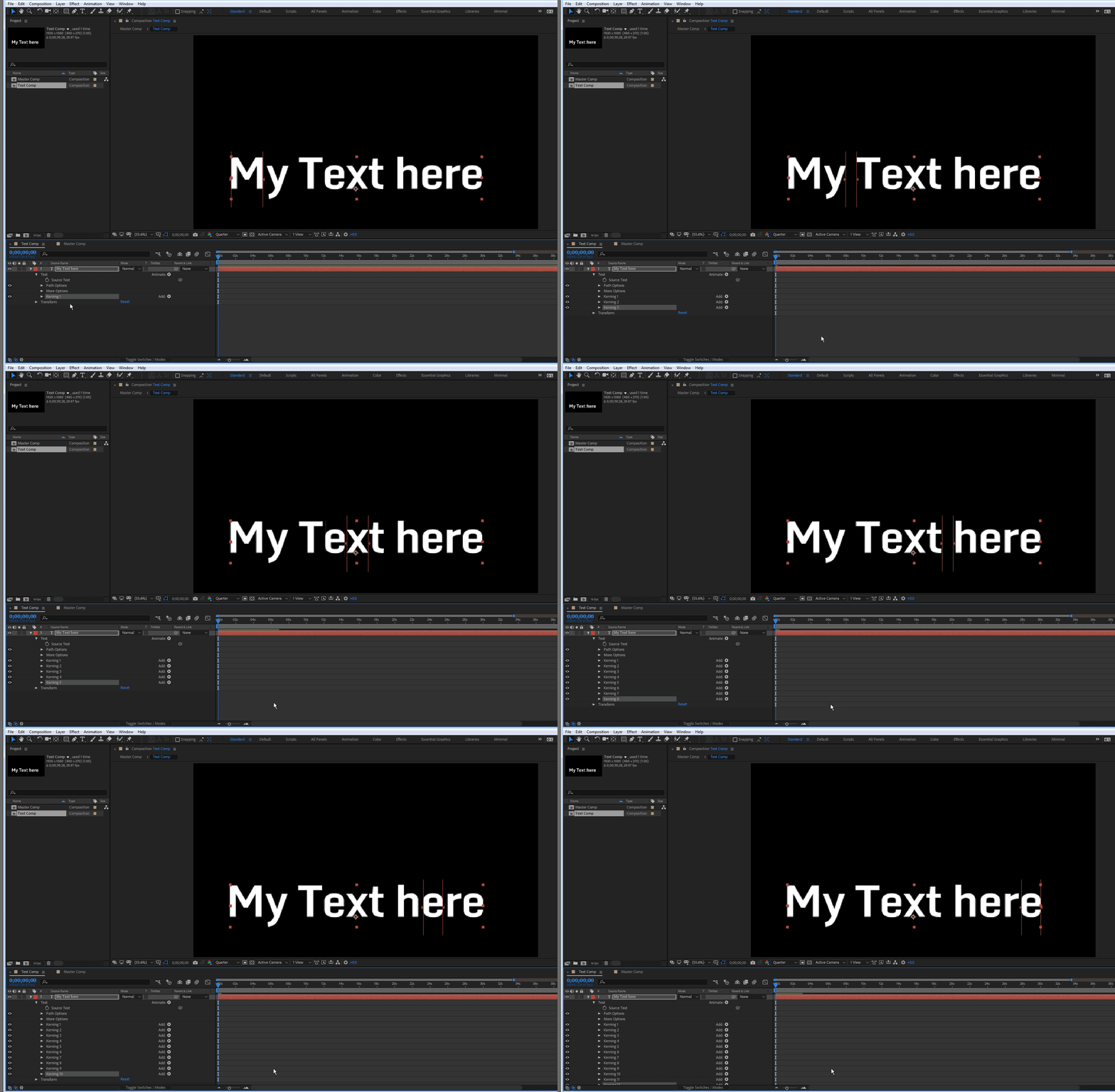
    now search for "tracking amount" in the timeline and add them like this:
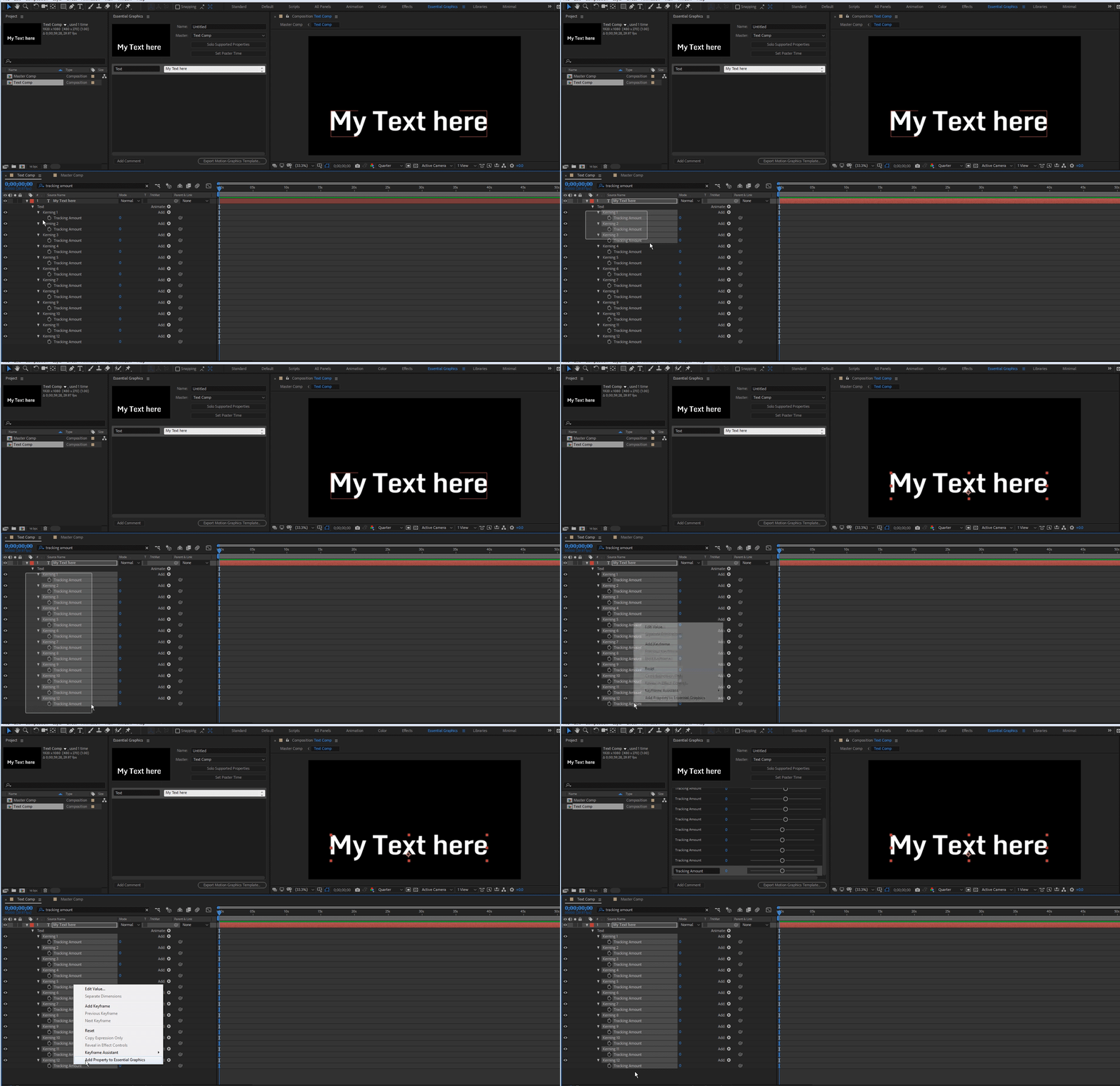
    and after a little renaming in the EGP, you have this in your MP
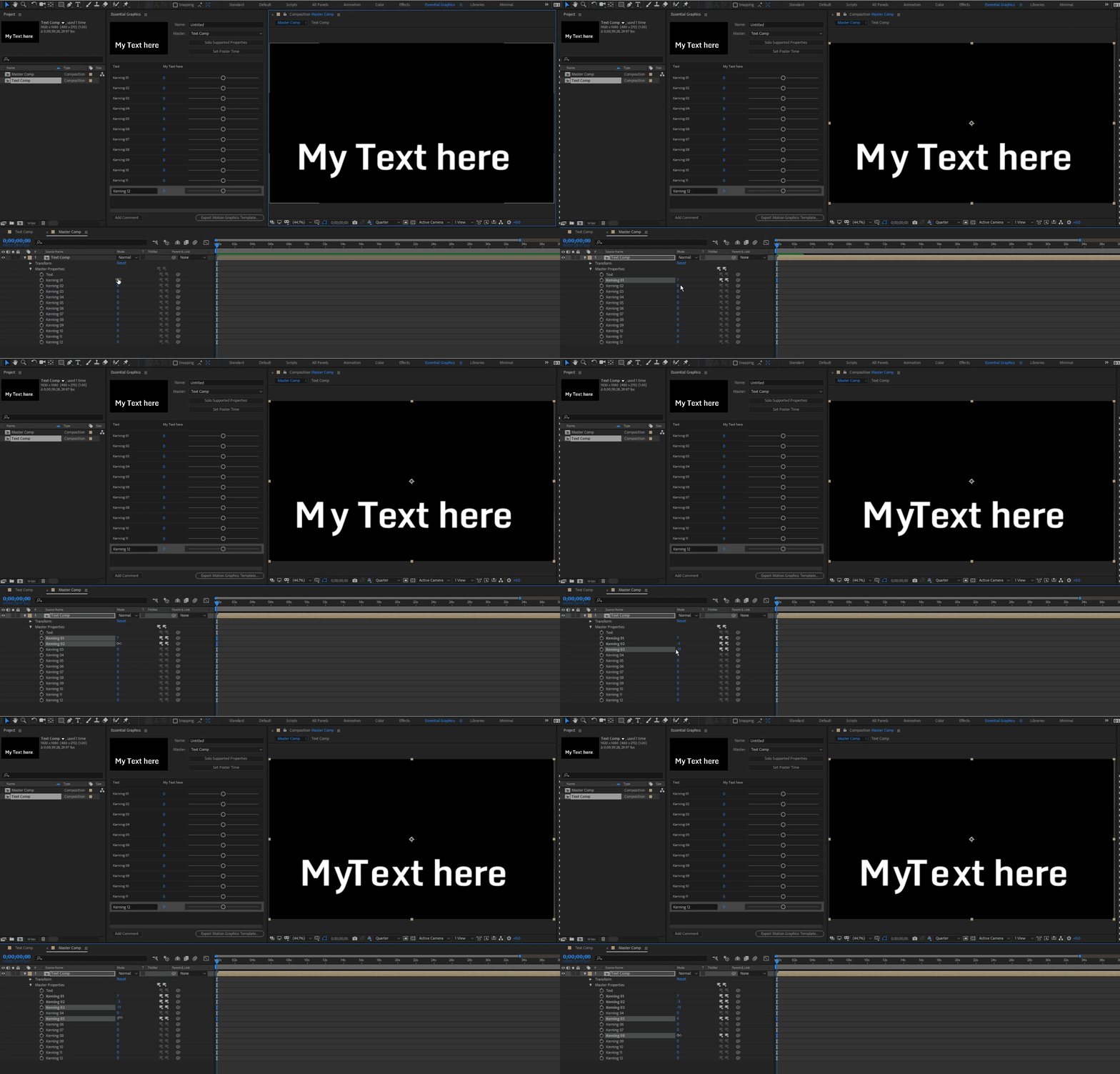
    the project file is same as before.

    4 replies

    janudAuthor
    Participating Frequently
    May 23, 2018

    Never mind I got it. thanks Again

    janudAuthor
    Participating Frequently
    May 23, 2018

    Thanks. As I duplicate the range group it does not jump to the next character. Am I missing a step?

    janudAuthor
    Participating Frequently
    May 23, 2018

    Thanks Roei that is definitely the control we need for kerning but I was hoping I was missing the drag and drop ease of adding it to the Material Property.

    Roei Tzoref
    Roei TzorefCorrect answer
    Legend
    May 23, 2018
    but I was hoping I was missing the drag and drop ease of adding it to the Material Property.

    it's actually a fun project. you can set it up really quick using this expression on the start and end ot the range selector of the tracking property.

    set this for the Start:

    thisProperty.propertyGroup(1).propertyGroup(1).propertyGroup(1).propertyIndex-1

    set this for the End:
    thisProperty.propertyGroup(1).propertyGroup(1).propertyGroup(1).propertyIndex

    now you will get values of 0,1 1,2 2,3 3,4 as you duplicate the range group. like this

    now search for "tracking amount" in the timeline and add them like this:

    and after a little renaming in the EGP, you have this in your MP

    the project file is same as before.

    Roland Kahlenberg
    Legend
    May 22, 2018

    Kerning is not a Timeline property in AE — kerning only exists in the Character Panel. Perhaps you're confused with Tracking?

    If it's tracking you are after, then it is possible to make it a Master Property by creating a Text Animator Group with the Tracking property - you should also want to add Line Anchor into the mix; to allow you to set the anchor for the Text Tracking.

    Very Advanced After Effects Training | Adaptive & Responsive Toolkits | Intelligent Design Assets (IDAs) | MoGraph Design System DEV
    janudAuthor
    Participating Frequently
    May 22, 2018

    Understood Kerning is a Characters property. But because we do a lot of versioning for instance (Today, tonight, Tomorrow, Wednesday, etc we need the ability to kern type in each comp. Currently there doesn't seem to be an option for that using Master Properties.  Without the ability to kern type Master Properties won't be of much use, with that ability to kern it could change our entire process for the better.

    Roland Kahlenberg
    Legend
    May 23, 2018

    You should be using the Character Panel to make kerning changes. You're making it seem as though it's impossible to make kerning changes and this is incorrect. So, with or without Master Properties, there is no way to make changes to kerning in the Timeline or Effects Control Panel.

    Very Advanced After Effects Training | Adaptive & Responsive Toolkits | Intelligent Design Assets (IDAs) | MoGraph Design System DEV