Participant
November 25, 2019
Question

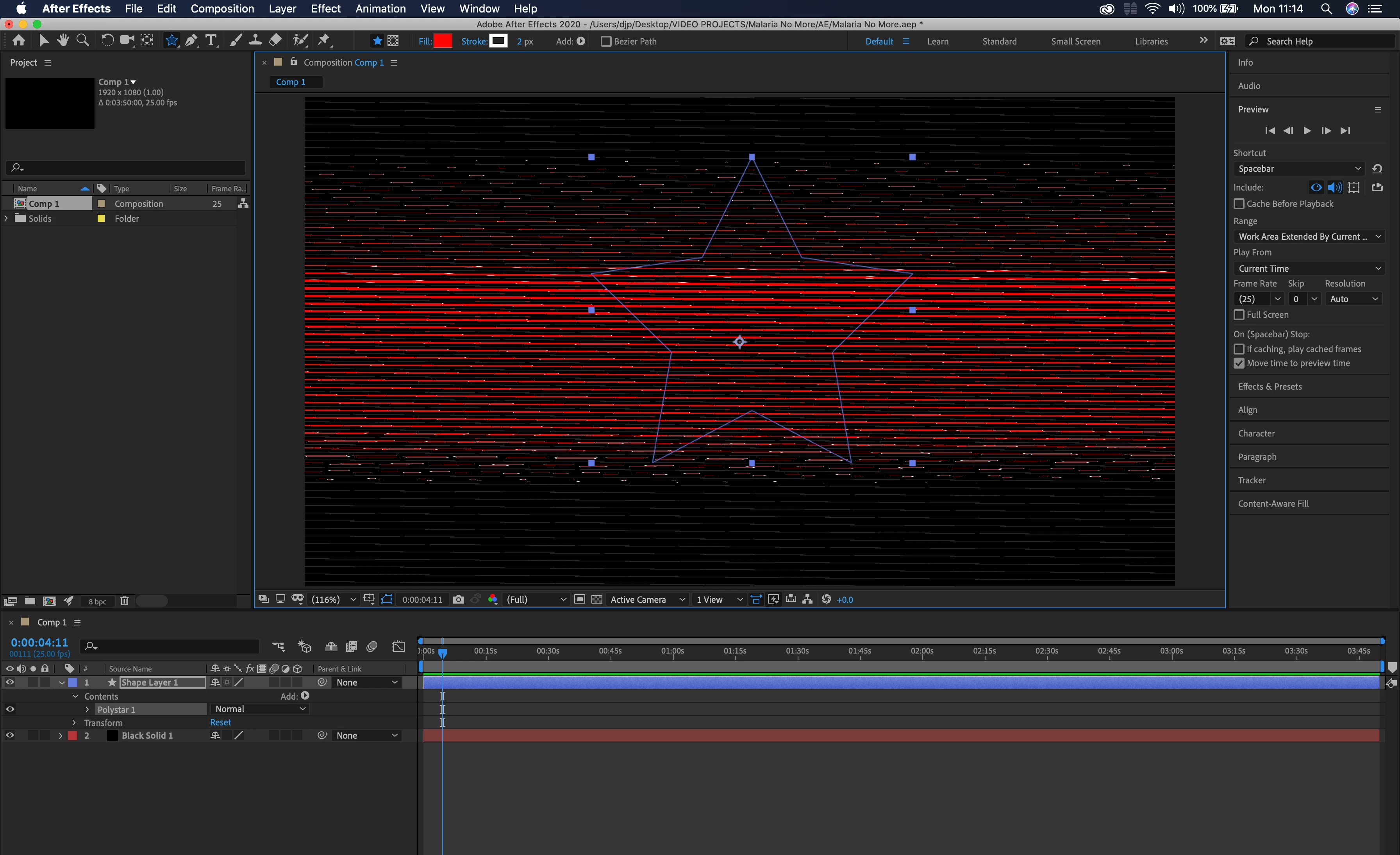
AE 2020 not working on brand new 16 inch Macbook Pro

  • November 25, 2019
  • 7 replies
  • 7201 views

This topic has been closed for replies.

7 replies

Participant
February 13, 2020

I'm having this exact same issue. February 2020 and still no fix for that. Half of the renders are wasted. 

Participant
February 17, 2020

For some reason, it is impossible to use the box blur effect. Instant glitches. 

Community Manager
December 11, 2019

Hi all,


Thanks for your patience. As mentioned by @john, Adobe After Effects has released a patch update which provide a fix for the preview issues on 16" MacBook Pro. For more information, please check https://helpx.adobe.com/after-effects/kb/fixed-issues.html


Thanks,

Shivangi

Participant
December 23, 2019

this isnt fixed. Been using AE native effects like glow and still ahving these issues. please help 

Participant
December 28, 2019

Doesn't seem to be fixed.

16" MacBook Pro
After Effects 17.01

Mac OS Catalina 10.15.2

Simple native box blur shows up as stripes. Not just preview, renders this way too.


Inspiring
December 10, 2019

This is now fixed in version 17.0.1! A fix for premiere is next I hope.

Participating Frequently
December 2, 2019

Same here. seems to be an incompatibility with some of the new cards. I was on the phone with adobe for an hour the day i got this machine, the verdictfrom the tech on the call was:  'use AE2019 for now, call AMD about updated drivers'. !!

Participating Frequently
December 2, 2019

Strangely, turning on 'Show Rulers' in AE2020 will fix this problem. Which makes me think it' not a driver issue at all.

alano87986020
Participant
December 2, 2019

Yeah that works, Also if you resize the window I noticed it would fix it. You have to find a certain breakpoint in the window where it works. 

Vishu_Aggarwal
Participating Frequently
November 25, 2019

Try changing the Video Rendering and Effects from Mercury GPU Acceleration (Metal) to Mercury Software Only from the Project Settings. Project settings can be accessed from the File menu. 


Also, check the System Compatibility Report under the Help menu.


Vishu AggarwalAdobe Certified Instructor, Professional and Expert
Participant
November 25, 2019

That's the first thing I tried. Nothing changed. Rolled back to CC2019 on both Premiere and AE, and just accepted that Adobe release beta versions now (but still charge you the full whack).  

Participant
November 25, 2019

I'm having the same issue. Is 2019 working for you?

BenSCR
Inspiring
November 25, 2019

I'm having the exact same problem with a MacBook Pro (16 inch-2019).

Participant
December 2, 2019

I'm also having this issue, but its intermittent which is more frustrating, when I export it or dynamic link it to premerie it renders perfectly.

November 25, 2019

Moving to the After Effects forum from Get Started