


Participating Frequently
August 23, 2022
Question

AE and Media Encoder super slow in Macbook 2022

  • August 23, 2022
  • 4 replies
  • 314 views

Excuse me for posting this again, but the problem is beyond frustration. This particular project is a simple 30 second comp with 4 layers 3 text + 1 image layer, with just 1 fx (CC Light burst) and 3 keyframes on it. I clicked add to media encoder queue, and here's the time it estimates to render. Already 10 minutes elapsed. I also notice that the elapsed counter seems to freeze in between. 



This is happening on a Macbook 2022 : 
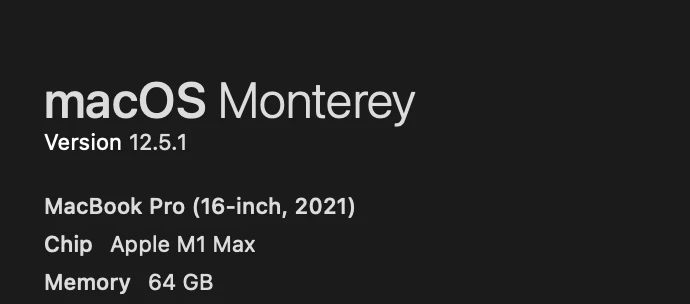
 

Windows laptop which is literally 10% of this spec power rendered 10x faster than this macbook. 


What am I doing wrong?


This topic has been closed for replies.

4 replies

Participating Frequently
September 5, 2022

My Windows laptop with 16 gb RAM never showed this error message. 64 GB, M1 Chip Macbook upon hitting play button in a 10 second comp with just 1 layer and 2 keyframes. What's wrong?

Participating Frequently
August 24, 2022

Hi @nishu_kush 

I tried tweaking all possible settings prescribed all over the internet. Still no help. 


Here are screenshots of my configurations. 


I left my laptop on to see if the video renders at all ( a very simple comp as mentioned earlier) 

More than 1 hour still no progress. 


Same happens with similar other comps as well. 


nishu_kush
Community Manager
Community Manager
August 24, 2022

Thanks for trying and sharing the screenshot. Where the project and footage are saved? Locally or in external storage? I tried to reproduce the behavior at my end but After Effects worked as expected. If possible, please share the project (with media files) so that we can check at our end. Feel free to DM me the download link if you don't want to share it publically.

Also, please try clearing the media cache and resetting the preferences if you haven't tried already.

Let us know.


Thanks,

Nishu

Participating Frequently
August 25, 2022

Thank you for your continuous support. This file is stored in the primary SSD of the macbook. 

I disabled the light burst plugin and checked, but still it takes 14 minutes to render this, but much better than hours. 


I will share the project files here:


nishu_kush
Community Manager
Community Manager
August 24, 2022

Hi johneh5FC4,


Sorry for your issue.

Something is definitely not right. Please try the suggestion given by Mylenium and let us know the outcome.

We're here to help.


Thanks,

Nishu

Mylenium
Legend
August 23, 2022

Start by checking hardware acceleration settings in AME and AE as well as multiframe rendering settings. Such a behavior typically indicates that the program tries to render a frame, but fails over and over again and then eventually reverts to software-only rendering after twenty attempts or so until the game begins again for the next frame. Also check your render settings. Overriding switches and quality settings or forcibly changing the framerate can have a huge impact on render times.


Mylenium