


Known Participant
February 22, 2017
Question

AE Not Caching

  • February 22, 2017
  • 5 replies
  • 4626 views

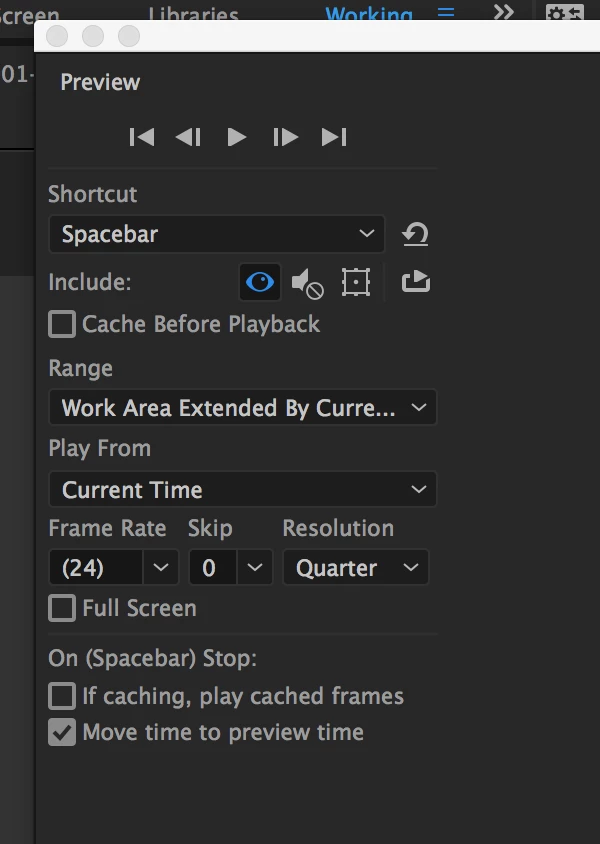
I'm having issues with AE caching. The playhead keeps on looping a random portion of the work area and not progressing. The sequence is simple as it's using a proxy also it has lots of disk cache and hard drive space, video and settings attached.

Usually it works fine but on occasions it does this. Ideally i want it to work like AE2014 and just play the work area caching as it goes.

I'm using a MBP 2015 running latest AE 14.1.0.57 with all updates.
    5 replies

    New Participant
    May 18, 2021

    I'm having this issue on Win10. Had it on 18.2 and rolled back to 17.5 and 17.0 and ALL versions are doing it. For me it seems to cache about 32 secs from wherever the playback head started from.IS there a fix for this. This makes AE pretty much usable as it currently is.

    New Participant
    May 18, 2021

    OK so for me the issue seems to relate to working from a local Dropbox folder. Copied the files to a local HD and it works fine and as expected. However I've previously used AE with Dropbox on a MacBook so seems like there's a conflict with Win10/Dropbox and AE

    Jim Meston
    New Participant
    February 9, 2021

    2021 and the problem is still here. 

    128gb of ram 

    Each frame is 60mb... will only cache 3 frames and then it does it very randomly.

    New Participant
    May 17, 2021

    I'm having this issue on Win10. Had it on 18.2 and rolled back to 17.5 and both versions are doing it. For me it seems to cache about 32 secs from wherever the playback head started from.

    Known Participant
    May 28, 2019

    Hi. It's 2+ years after this post. I am having the same issue. AAE 2019. Inexplicable. 64GB RAM. All previews half res or less. Have turned off FX not in use. Classic 3D renderer. Using Region of interest. All Media cache purged. System restarted. Absolutely no clue.

    Szalam
    Braniac
    February 22, 2017

    How much RAM do you have in your system?

    Boris2016Author
    Known Participant
    February 22, 2017

    16BG, ram really isn't the issue it's caching a prores HD proxy.

    Szalam
    Braniac
    February 22, 2017

    When you do a preview, the source footage is irrelevant. AE works internally with fully uncompressed data. So, even if you were using a highly compressed h.264 file, when AE works with it, it rebuilds all of those empty frames and works on every single pixel of every single frame - if that makes sense.

    So, if you're working on a 4K image at full resolution, 16 GB of RAM can only hold so much.

    I mean, we can't see much from your video, but it looks an awful lot like it's just doing a normal preview, running out of RAM to cache the whole thing, and so it plays back what's cached.

    Dave_LaRonde
    Inspiring
    February 22, 2017

    If you haven't purged your memory & caches, you should do so.

    Boris2016Author
    Known Participant
    February 22, 2017

    Thanks - i've purged the cache, how do I purge the memory? just restart? If so done that also.