


Answered
after effect preview not work
Hi
yesterday this problem happen when press play bottom the review not work
also timeline not moving
i use AE cc 2018
Windows 10 64 bit
Ram 8 GB
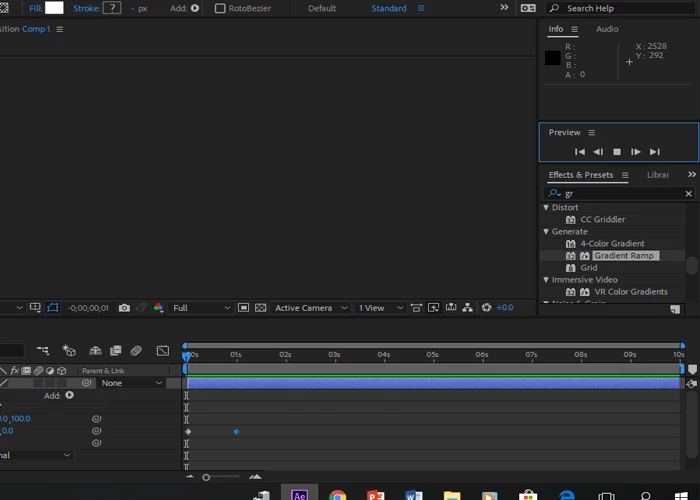
you can see the play bottom is square shape and no motion appear

Hi
yesterday this problem happen when press play bottom the review not work
also timeline not moving
i use AE cc 2018
Windows 10 64 bit
Ram 8 GB
you can see the play bottom is square shape and no motion appear
I've said previously, it's best that you contact support, to have someone take a closer, hands-on look at your system and this includes taking a look at your OS settings and AE settings.
Meanwhile, when you say "no playback", exactly what happens when you initiate a Preview?
What happens in the Timeline, does the Preview Time Indicator (vertical red line) move across the timeline?
What happens in the Comp Panel?
Please take a screen grab of your Comp and Timeline Panels.
When I leave AE open and take a break, a lunch (or leave it open overnight ), when I come back and hit the spacebar, it will play it once without sound and when I stop it and try to play it again, it does nothing. I can scroll the timeline and it composition updates, but can't play it back anymore. When I purge all the cache and memory it cleans it up and it also caches/renders it internally (green bar fills up) but it won't play it. When I check  "cache before playback" on Preview panel then it time cursor will follow the caching process, but no way to really play it back in realtime with sound.
Restart always repairs it. My fellow animator next to me has the same issue.
Not really the dealbreaker type of thing, but kind of interrupts the flow every time it happens.
But, I figured it out
 It seems to be an issue with audio hardware (and monitors connected with audio-supported cables). When I (1) removed external devices from windows audio settings and (2) changed audio hardware (File > Preferences > Audio Hardware) back to Speakers it started to playback my preview (AE needs restart to get the audio back though). (3) If you have headphones connected to the monitor audio output, then
This kind of explains the issue (and my situation after leaving AE open):
"When an audio-supported video cable is being used such as a DisplayPort or HDMI cable, Windows may change the default audio device to the audio-supported cable thinking another audio device is being used. The issue may be seen to occur when a portable is coming out of sleep as the system is detecting the audio-capable cable first."
Already have an account? Login
Enter your E-mail address. We'll send you an e-mail with instructions to reset your password.
 AdChoices