New Participant
March 10, 2019
Answered

After Effects crashes at startup: Executing startup/shutdown scripts

  • March 10, 2019
  • 6 replies
  • 16446 views

Hi! !

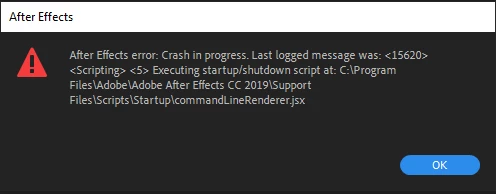
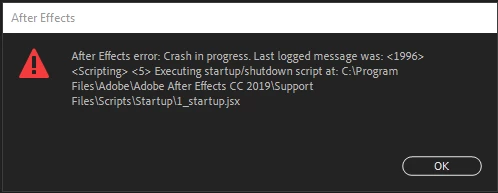
After Effect almost always crashes at startup it takes me between 4-5 time until I stop getting the error.

The error I get is a script error and always with those two scripts commandLineRenderer and 1_startup the are located in startup folder within the scripts folder.

The guides that dealing with this problem saying to delete them and it only made things worse.
This topic has been closed for replies.
Correct answer morm56827530

I just set it to compatibility mode of windows 7

6 replies

dumaker
Inspiring
September 24, 2023

September 2023 and same problem here 😞 After formatting my computer, I got this error that I never had before.


Participating Frequently
September 24, 2023

Can you show us the log ?

dumaker
Inspiring
September 24, 2023

Sure.  I have reinstalled After Effects 23.6 on my newly formatted laptop on windows 11 with an Nvidia 3070 graphics card. It is the same computer on which AE was running perfectly. In this installation there are no plugins or external extensions installed. The LOG:


[2023-09-24_15-28-27][11668][Warn] [general] We are going to deprecate hostInfo access soon. Please use HostInfoController instead.
[2023-09-24_15-28-27][11668][Warn] [general] We are going to deprecate hostInfo access soon. Please use HostInfoController instead.
[2023-09-24_15-28-27][11668][Warn] [general] We are going to deprecate hostInfo access soon. Please use HostInfoController instead.
[2023-09-24_15-28-27][11668][Info] [general] UXP will use the WebView2 runtime in the system as no WebView2 runtime path is provided by the host.
[2023-09-24_15-28-28][11668][Error] [general] The Host version is lower than what plugin: com.adobe.ccx.start is compatible with

New Participant
August 22, 2023

Easy solution:

1. Close your after effect.

2. Just open an after effect project (.aep) 

it should run smoothly with no problem. 
I had the same issue as you all, and found this fix online, while Adobe employees struggle about every single question 🙂 i hope it works for u as well

Participating Frequently
August 22, 2023

Yeah, This does indeed work But,
1) it shouldnt need to do this
2) in an education envinonment its dificult to comunicate this to 20k students 
I wish Adobe would try to sort it out.
Its clearly not an Isolated thing...


Participating Frequently
April 12, 2022

I have the same problem and i have the log

[2022-04-12_20-46-10][4392][Info] [general] WebView2 runtime in system will be used to create a webview as no webView2RuntimePath is provided.

And i can't solve it with compatibility mod

My computer configuration is an I7 with a GTX 1070

Participating Frequently
December 9, 2022

Did yo uresolve this in the end?
I'm seeing what looks to be the same issue.


Participating Frequently
December 12, 2022

yeah i solve it by reinstalling it.


Thanks for the reply.
Sadly not a practicle option in my case, 
Oh well, I'll keep digging,


morm56827530AuthorCorrect answer
New Participant
April 1, 2019

I just set it to compatibility mode of windows 7

Rameez_Khan
Braniac
April 1, 2019

Hi morm,

Sorry for your issue. Can you check if After Effects has generated any crash logs on your machine? FAQ: How to find After Effects crash logs on your computer?

If so, please share a recent crash log with us so that we can check what's going on.

Thanks,

Rameez

Mylenium
Braniac
March 10, 2019

Impossible to say much without exact system info. since scripts are extremely sensitive to user permissions, though, I'd take a guess that you have insufficient user privileges on a folder, system driver, your network or whatever. I'm pretty sure it has very little to do with AE itself.

Mylenium