


New Participant
May 21, 2021
Answered

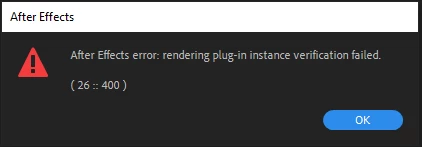
After Effects Error : Rendering plug-in instance verification failed (26::400)

  • May 21, 2021
  • 6 replies
  • 20480 views

Hey guys 

I constantly get this error and it has already become annoying that appears while I am working, the error appears and sometimes I have to restart After Effects to be able to move on ... Any idea what could be causing it?
thnks

This topic has been closed for replies.
Correct answer nishu_kush

Hi all,


Try to following steps:

  1. Open the project.
  2. Click anywhere in the Timeline panel to highlight it.
  3. Go to Composition > Composition Settings > 3D renderer and change it to Classic 3D.
  4. Restart After Effects and open the project.

If After Effects crashes right after you open the project, try importing your project into a new one.

Let us know if it helps.


Thanks,

Nishu


6 replies

con.cancan
New Participant
November 5, 2023

Tengo el mismo problema, tengo instalado 2024, conacctualizaciones de Adobe, Windows 11 pro, CPU: AMD Ryzen 7 5700G with Radeon Graphics 3.80 GHz, GPU: AMD Radeon (TM) Graphics, RAM: 16,0 GB (15,3 GB usable)


con.cancan
New Participant
November 10, 2023


Se suma a mis problemas ahora premier, acaso no me conviene pagar el paquete y bajarme el pirateado? Antes no tenia estos problemas, ayuda por favor! 

New Participant
March 1, 2023

Hey Ekimyda,

I had an old media encoder installed and when I uninstalled it and had the current one installed it fixed it. Hope this works if you haven't sorted it yet

nishu_kush
Community Manager
nishu_kushCommunity ManagerCorrect answer
Community Manager
June 3, 2021

Hi all,


Try to following steps:

  1. Open the project.
  2. Click anywhere in the Timeline panel to highlight it.
  3. Go to Composition > Composition Settings > 3D renderer and change it to Classic 3D.
  4. Restart After Effects and open the project.

If After Effects crashes right after you open the project, try importing your project into a new one.

Let us know if it helps.


Thanks,

Nishu


Community Manager
June 15, 2021

Hello everyone,


If you are still experiencing the issue, please test the issue on the latest beta version of After Effects. Check out this article for more info: https://helpx.adobe.com/x-productkb/global/creative-cloud-public-beta.html


Regards,

Shivangi


New Participant
September 2, 2021

omg 
I don't like the problems of experts, but when you buy the cinema 4d license outside, this error will disappear.

nishu_kush
Community Manager
Community Manager
June 2, 2021

Hi all,


Engineers think that it could be the related to the Cinema 4D renderer. Are you using the Cinema 4D renderer or do you have Cinema 4D installed separately? If so, which version?

Looking forward to your response.


Thanks,

Nishu

ekimydaAuthor
New Participant
June 2, 2021

Hey Nishu


Thanks, well I have After Effects with the classic 3d renderer, but when I need it I also use the C4D R19 separately.


Do I need to use or configure the CINEMA 4D renderer when using the C4D separately?


thnks

nishu_kush
Community Manager
Community Manager
May 28, 2021

Hi all,


I reached out to the engineers regarding this. They are looking for the following details so that we can get to the root cause:

  1. Is there anything specific that triggers the error or anything common in the projects that are having this issue? For example - any effect, plug-in, or does the projects contain 3d layers?
  2. A simple project that repeats the problem.
  3. After Effects log file. Here's how to collect it:
  • In After Effects, choose Help > Enable Logging
  • Restart After Effects and open your project that exhibits the problem
  • After you have successfully replicated the problem, choose Help > Reveal Logging File in After Effects. A bunch of folders will open revealing different kinds of After Effects logs
  • Look for the latest After Effects Log and share. Feel free to use any cloud service and share the download link.

Looking forward to your response.


Thanks,

Nishu

Inspiring
February 12, 2024

i an not suceeding in startin after effects 

i get the same message all the time

how do i proceed ?

Inspiring
February 12, 2024

my after version is the picture attached

nishu_kush
Community Manager
Community Manager
May 22, 2021

Hi ekimyda,


Sorry for your issue.

What's the exact version of After Effects you're using? Are you getting this issue while working on existing projects only or on new projects as well? Also, what are your system specifications (CPU, GPU, RAM, OS)?

We're here to help, just need more info.


Thanks,
Nishu

New Participant
May 22, 2021

Same thing here.

After Effects error: rendering plug-in instance verification failed ( 26:: 400)


AE version 18.2.0 (Build 37)

macOS 10.15.7

64GB RAM

Mac Mini 2018


I believe this started after I installed the beta 18.3.0. However, it occurs in the non-beta version. Could it have something to do with a debugger installed by the beta and affecting the other version?