
Jonah Lee Walker
Inspiring
October 4, 2018
Question

After Effects error: Unable to allocate enough memory to render the current frame

  • October 4, 2018
  • 9 replies
  • 17477 views

So I am running After Effects CC 15.1.2 on a MacPro 5,1 with 32 GB of RAM NVIDIA GeForce GTX 970 with 4GB of VRAM on MacOS High Sierra 10.13.4. I have 6GB reserved for other applications, so am running with 26GB of RAM.

I am running UHD 29.97 P ProRES HQ footage, and it mostly works fine while I am running, but I do get crashes sometimes, and the problem is either with a crash or with saving and closing and re-opening the project. When I re-open the project I get the error After Effects error: Unable to allocate enough memory to render the current frame.
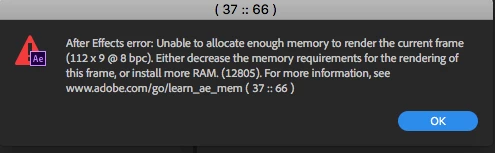
This happens as soon as the project has re-opened, and happens immediately as soon as the project opens, and it happening every time with different projects and different footage (though all UHD 29.97 ProRES HQ.

I have found 2 workarounds that let me keep working, but are both a major pain in rear end.

The first workaround is If I open a new project and import the old project things work fine until I close AE or it crashes, then the same problems occurs.

The second is to hold down shift-option-command and delete the preferences when I re-open, but this also trashes my custom workspaces. And it seems Custom Workspaces no longer sync anymore? As if I restore my Preferences from the Sync my workspaces don't come back (I know these used to sync, why don't they sync anymore?).

Any solutions would be greatly appreciated as this is really frustrating.

This topic has been closed for replies.

9 replies

New Participant
March 2, 2024

Hi, Nothing suggested worked but changing composition settings down to 24 fps worked for me.

lambiloon
Community Expert
April 17, 2019

how much ram you have in your computer which format you are getting as final output ?

Ali Sajjad / Graphic Design Trainer / Freelancer / Adobe Certified Professional
New Participant
April 17, 2019

I got 32gb of ram, the error just pops up as fast as creating a Comp, then creating a square shape and Walla ! Error and after that better close and open after effect again!

Windows 10 system say that I only have 7.2 GB occupied but After Effects, Preference/Memory/Details say that I have 31.94 used by AE

lambiloon
Community Expert
April 17, 2019
Ali Sajjad / Graphic Design Trainer / Freelancer / Adobe Certified Professional
lambiloon
Community Expert
April 17, 2019

its not matter try it

Ali Sajjad / Graphic Design Trainer / Freelancer / Adobe Certified Professional
New Participant
April 17, 2019

I really appreciate your help but I already made all these steps before writing this post.

lambiloon
Community Expert
April 17, 2019

hi check following video and see may be these settings can help you.

Ali Sajjad / Graphic Design Trainer / Freelancer / Adobe Certified Professional
New Participant
April 17, 2019

Thanks but this is a video from 2013... this is something related to the latest upgrade April 2019.

New Participant
April 17, 2019

Same here with the exact problem !! Try everything!, Still, don't know how to fix it! Very annoying !!!

Inspiring
April 3, 2019

Having the exact same issue.

Was running fine at 2pm on 16.0.

By 2:30pm after installing 16.1

Have done all the usual as mentioned above including deleting prefs. and updating Nvidia drivers.

Same issue on new project with 1 comp and 1 shape layer in that comp.

Windows 10 Pro

HP z840 - Xeon E5-2650 Dual Proc

64 GB RAM

Nvidia Quadro P6000

angie_taylor
Brainiac
October 5, 2018

It sounds like either an issue with your RAM installation or a bug with AE. Try this, allocate 16GB RAM to other applications so they have more. Install "Clean my Mac" - this allows you to clean your RAM using a menu bar app, it's very handy. Restart your Mac and then Open the project and use Clean my mac to see how much RAM it's actually using.

You can also use the Activity monitor to see if all of the RAM is being used and if so, by what. Hopefully you can, this way, determine whether you have a RAM issue. If not then please file this as a bug on the Adobe website.

CleanMyMac X: The Best Mac Cleanup App for macOS. Get a Cleaner Mac in Minutes.

Jonah Lee Walker
Inspiring
October 5, 2018

Well I ran Tech Tool Pro 10 and it shows no RAM problems, though it can't do anything about the active system ram (though I ran off of an e-drive), and checked after effects memory while it opened using istat menu pro and it never spiked above 7.28 GB for After Effects before getting the error, so i is looking like it is a bug.

- Jonah Lee WalkerVideo Editor, Colorist, Motion Graphics Artist
Impalaboy
Inspiring
April 3, 2019

I just upgraded After Effects to 16.1.0 and started getting this error immediate after the upgrade. As soon as I start to play my comp, this error comes up. Never seen it before the upgrade.

lambiloon
Community Expert
October 5, 2018

Hi please check following image where to clear ram also you can render in parts and combine later....Thanks.

Ali Sajjad / Graphic Design Trainer / Freelancer / Adobe Certified Professional
Jonah Lee Walker
Inspiring
October 5, 2018

It has nothing to do with memory, as I can save the project and restart the computer and open the project and the memory issue happens.  And I didn’t say but I have cleared the disk catch multiple time and the issue continues to happen.

It is not a render issue, i don’t need to render in parts, I can render and export. It is opening the project after closing it and this hapoens every time with different projects.

- Jonah Lee WalkerVideo Editor, Colorist, Motion Graphics Artist
lambiloon
Community Expert
October 5, 2018

Hi did you tried render it using media encoder i search for it found that method may be that help you try it....Thanks.

Ali Sajjad / Graphic Design Trainer / Freelancer / Adobe Certified Professional
ToolfarmJP
Community Expert
October 5, 2018

Hello,

It is also useful to implement the menu of Purge (Edit menu > Purge) each time after you finish your projects.