I THINK I'M IN TROUBLE!
The reason the original clips frame rate didn't match the ppro sequence, is....
my ORIGINAL clips all say 29.97 !!! But they were shot in 24p advanced?????
and the project panel also says 23.976 example:
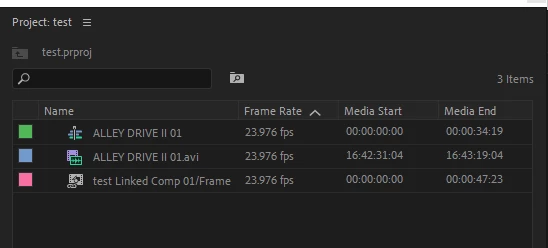
Why does the project panel show the AVI as 23.976 ??? When it's really 29.97? I've been fooled all this time?
I captured all the clips myself, from the camera to the computer and made sure they were captured at 23.976.
Am I totally screwed?
I used media info to confirm the properties of the original clips. 100's and 100's of clips shot in 23.976 now reading 29.97.
If the footage was some how changed to 29.97 will it still have the "film look" like in 23.976 movies?
I've made test discs and it seems to have the same "look" but I was burning them in 23.976 frame rate. Did the computer change the clips back to 23.976?
Sorry to dump this on you again.... Because of the project panel, and how the film was made, I was 100% certain the original clips were 23.976. That's why nothing is matching and I was so confused.
What do you think I should do now?? Just keep things the way they are, and only change the comp settings in AE to 29.97 so they now match the ppro seq settings?
And I should change my ppro seq settings to be 29.97 and BURN to disc in 29.97 ? OR Burn the 29.97 clips to 23.976 and the computer will delete the added frames? is that non drop or drop??? ahhhh!!!! LOL
Is my whole world now 29.97 ?? no more 23.976 ? What happened to my life's work???
THANK YOU FOR GETTING BACK TO ME!! I'M FREAKING OUT.
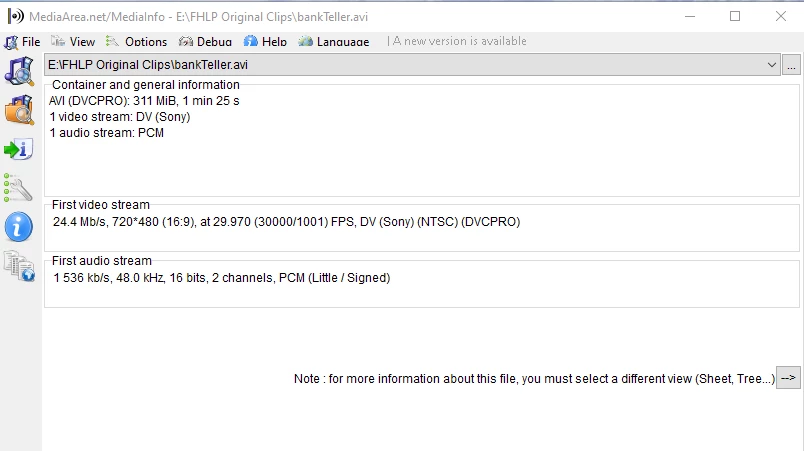
All my clips are reading this.... BUT.... it was shot in 4:3 native. This reading says 16:9 ?? COULD it be possible my clips are in a container ? and they have been converted or something?
If you shot with an older DVC Pro camera and you set the frame rate to 24P advanced then your footage was shot interlaced with 3:2 Pulldown at 29..97 FPS because that is how we got 24 fps movies transferred to videotape from the very first time film was broadcast on television. Premiere Pro read the framerate and interlacing metadata correctly if your footage looks 4:3 and that is how you shot it.
The "film look" is 99.97% color grading and about .03% frame rate when you are talking about interlaced footage. Your DVC PRO camera didn't shoot at 1/48 second exposure time, it shot at about 1/60. How do I know for sure and how do I believe that frame rate has so little to do with the film look? Because I owned a 35MM Arri BL for years, and I shot commercials for some of the biggest advertising agencies in the country for years, and they spent the extra money to shoot on 35mm film because they loved the look that they got from color negative film stock, and my film looked better than a lot of my competitors because I guy named Clive Tobin build an adaptor for the motor on my camera so that it would run at 29.97 fps so I did not have to do 3:2 pulldown when transferring my film to tape and it looked better.
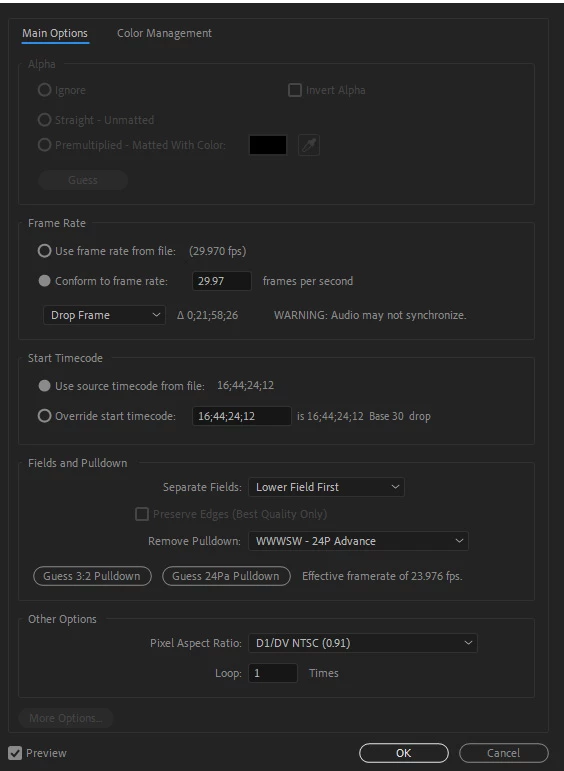
It looks to me like everything is correctly interpreted. Your original 24P advanced footage was interlaced, lower field first, wwwpw at 29.97 fps so that the frame rate would look as close as possible to the frame rate of film transferred to tape. The progressive output for that kind of project is 23.976 FPS Progressive. That is as close as you can get to having the original interlaced frames turned into progressive frames. The only possible problem you may have is that the footage is supposed to be 4:3 and it has been stretched to 16:9, but you have not mentioned that and the first screenshot you posted shows the PAR as D1/DV NTSC (0.91) which is correct for 4:3 video.
You can blame all of this confusion on the engineers in the US deciding that they needed to add 1 scan line to the TV so they could have color so they slowed down the frame rate to put the extra resolution (horizontal line) in the picture and maintain the same bandwidth. The PAL folks knew that color was coming so even though they had the same bandwidth, they got a higher resolution image and color without slowing down the frame rate.. They handled the problem of 24 fps motion picture film by just slowing down the projector (film chain or film to tape transfer) 1 frame per second and living with a slightly more baratone audio track. It doesn't look like anything at all is wrong with your project.



 AdChoices