


Participating Frequently
September 14, 2021
Question

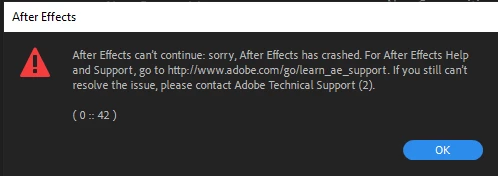
After Effects keeps crashing on startup. Please help?

  • September 14, 2021
  • 4 replies
  • 903 views

Hey, 

So after effects keeps crashing since today. I tried to reinstall, delete the preference folder, disabled the intel driver, updated Nvidia graphics drivers...

but nothing seems to work. 

Anyone got any ideas i can try?
This topic has been closed for replies.

4 replies

Mylenium
Brainiac
September 16, 2021

Then sign out of your CC app, delete the license files and sign in back again.


https://helpx.adobe.com/download-install/kb/activation-deactivation-help.html


Mylenium

Participating Frequently
September 16, 2021

Where are the license files? I cant seem to find a path listed in the link you sent me.

Mylenium
Brainiac
September 15, 2021

Any changce your MSHTML libraries are blocked by your administrator(s). There was/ is a critical security issue that was just patched today. Applying it and releasing the block may get things working. Otherwise the secondary warning could indeed indicate that the DLL is completely missing, which may require some messing with Windows repair functions and reinstalling AE after that. Regardless, could still be a fluke and just a local issue, so try booting into safe mode, delete your network connection and let Windows create a new one automatically. This usually fixes a lot of problems in a simple manner and Windows is surprisingly good at it even in adverse environments with bad networks or severe administrative restrictions.


Mylenium

Participating Frequently
September 16, 2021

But why would this suddenly start happening? The day before i posted i was using the trial version and that worked just fine, but when my license got approved, it suddenly made after effects crash. If the issue is with my connection, it should've been there before, no?

Mylenium
Brainiac
September 15, 2021

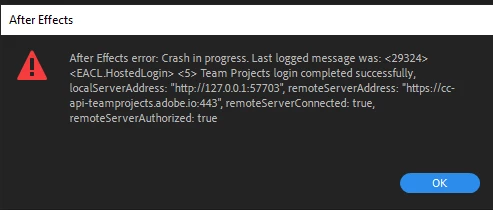
Well, it crashes on connecting to the Team Projects server, so naturally this would not affect Illustrator or Photoshop. Otherwise no need to make it complicated. Check the event viewer and provide basic info about how you connect to the Internet, possible firewall settings and all that jazz. Perhaps you really just need to un-block something.


Mylenium

Participating Frequently
September 15, 2021

no antivirus, windows firewall is turned off, but just to be sure i added adobe after effects to the exceptions list. No difference. 


Mylenium
Brainiac
September 14, 2021

Well, your network is apparently crashing. Impossible to say more than that since you haven't provided any system info or other details about your configuration.Start with the usual steps: Reboot your rooter, check your network connection.


Mylenium

Participating Frequently
September 15, 2021

Why would this only affect after effects? Photoshop, illustrator and indesign are unaffected by this supposed internet connection problem, but after effects suddenly is? 

I tried what you said but it yielded no results. 

Regarding this: 

quote

Impossible to say more than that since you haven't provided any system info or other details about your configuration.


Mylenium


By @Mylenium


I have no clue what you are asking for? Can you be more specific?