


Participant
November 2, 2021
Answered

After effects menu bar and mouse right click not working [macOS Monterey]

  • November 2, 2021
  • 13 replies
  • 16111 views

Hello everyone!
After i upadeted my macbook pro m1 to macos Monterrey my after affects stop working good.

This menu bar not working correctly when i try click on file, edit, compisition etc. I have to pess and hold the left mouse click to open the menu but it still not work correct.

Beside it, when i do right mouse click on for example composition menu - it doesnt work. Nothing happens when i do right clock. Its not open. 

please,help me.

p.s. i have macos monterrey 12.0.1
and all i said about doesnt working on AE 22 and old versrions too.
Correct answer Rameez_Khan

Hi all,


My apologies that you're experiencing this bug. Thank you for reporting this and sharing workarounds.

The After Effects team is working on this. I'll share an update as soon as the bug is fixed.


Meanwhile, I'm posting all the workarounds in this post so that it's easier for the community to follow them without having to go through all the comments.

Workaround 1: Open the project file in Finder (not from After Effects)

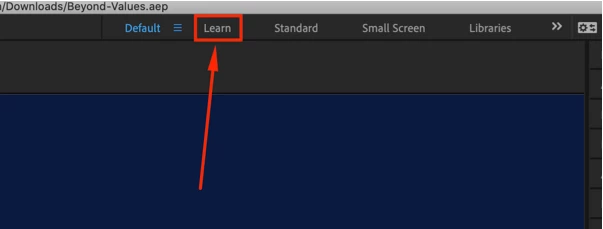
Workaround 2: Click the “Learn" workspace preset

Workaround 3: Unplug the secondary monitor (if you have dual monitors)

Workaround 4: Close the “True Layer Duplicator” plugin window (if you're using that)


NOTE: I'm tagging this as a Correct Answer for now. When the bug-fix is available, I'll unmark this as the Correct Answer.


Thanks,

Rameez

13 replies

Inspiring
July 5, 2023

Same issue with Windows 10 except NOW it happens no matter what AE version I roll back to. Character window change has no effect. The only thing that makes the menu accesible is unplugging my second monitor! Completely and incomprehensibly unaccpetable. Does Adobe actually test before rolling out new versions? Zero accountability or acknowledgement that we use this for work! We're not playing around here. I have a dealine to meet that's now compromised because Adobe has royally screwed up. 


Rolled back to a previous version I KNOW worked with second monitor and now that's corrupted. 

I would express myself more completely but the only thing forum mods pay attention to is bad language, not the issues being documented. 
Been using After Effects for almost 25 years. Have ALWAYS had a second monitor. Now I have to unplug it to use the software? 

Jeff Bugbee
Community Expert
Community Expert
July 5, 2023

Are you using any Windows display scaling features? (Not scaling within AE, actual OS display scaling). I've seen other issues where using native Windows display scaling at a setting other than 100% can break features in AE.

Inspiring
July 5, 2023

No. It's at 100%. I rolled back to 23.0 and was able to plug my second monitor back in without it disabling AE and turned off auto updates.

Participant
April 7, 2022

Same issue here. Opening from Finder seems to have worked for now. just did it, so we shall see...


JacoD
Participant
April 27, 2022

Same problems on my new MacBook Pro M1. First reported in November 2021 and still existing? My work is down. Ande there is no cure. What am I missing? 

Jeff Bugbee
Community Expert
Community Expert
April 27, 2022

Have you swapped workspaces? Specifically to the Learning tab? The engineering team is aware of this issue and is working to resolve it. A workaround isn't ideal but that's no excuse to not do any work.

Jeff Bugbee
Community Expert
Community Expert
March 4, 2022

Was working with one of my users today and he was showing me this issue. I noticed when he launched AE the "Home" screen or initial splash screen didn't show up and the issue manifested. I went in and unchecked Enable Home Screen and the issue appeared to stop. Can you guys uncheck this option, then quit and relaunch AE and see if that resolves it?


roger_habit
Participant
April 3, 2022

Thanks for starting this thread Andrey.  I have the same problem and none of the above workarounds seem to fix it for me.  It happens in After Effects 2020 and 2021 and started immediately after I updated to Mac OS Monterey.  On a side note, I also no longer have enough disk space for my after effects cache after the update.  It looks like Monterey takes up around 80 gigs more than the previous OS.  I'm working on a late 2013 Mac Pro, which can't be helped:)

Allucinari
Participant
February 15, 2022

I'm adding to this thread because it seemed there were a lot of solutions which didn't work for me, so I'm going to share what did.


1. Uninstall After Effects and check or enable uninstalling all the settings.

2. Install After Effects and do not migrate anything from any previous version.


Rameez_Khan
Legend
February 17, 2022

Thanks for sharing, Allucinari.

Rameez_Khan
Rameez_KhanCorrect answer
Legend
February 10, 2022

Hi all,


My apologies that you're experiencing this bug. Thank you for reporting this and sharing workarounds.

The After Effects team is working on this. I'll share an update as soon as the bug is fixed.


Meanwhile, I'm posting all the workarounds in this post so that it's easier for the community to follow them without having to go through all the comments.

Workaround 1: Open the project file in Finder (not from After Effects)

Workaround 2: Click the “Learn" workspace preset

Workaround 3: Unplug the secondary monitor (if you have dual monitors)

Workaround 4: Close the “True Layer Duplicator” plugin window (if you're using that)


NOTE: I'm tagging this as a Correct Answer for now. When the bug-fix is available, I'll unmark this as the Correct Answer.


Thanks,

Rameez

Participant
January 28, 2022

Same problem here, AE 2022 on macOS 12.2. Looks like the menubar AND any context menu through the app doesn't appear on first click, but on second click it shows the menu and the instantly disappears. 


POTENTIAL WORKAROUND

I can get the menubar and context menus to work again by clicking any of these workspace presets (specifically tested by clicking "learn") This seems to bring back context menus until AE restarts and then I need to click these again at least once to get them working again.

Participant
January 30, 2022

You beautuful human!!!! I have tried so many things over the last 8 hours and this is the only thing that worked!!! I may make my deadline now!

Participant
January 20, 2022

i kid you not!

i had the same problem... hoping that the adobe gods were in my favor. No no No! tried everything, restarts software/computer.


And then! found a solution what works everytime.


when in Finder. Double click on your project file. (so open the file in Finder) Boom!

For me, that worked, so thanks for nothing adobe and i truly hope that it works for you guys... i know how frustrating it is.

------

Short version: open project file in finder (not from after effects)

------

Known Participant
January 20, 2022

hahaha. That's hilarious! 


Well done. Will give it a go. Are you running dual monitors btw?


Participant
January 23, 2022

yes 😉


it works everytime... just checked it again 😉

Participant
January 16, 2022

Same issue here, got a new MacBook and after effects was working fine up until yesterday, ive reset my preferences, reinstalled after effects, tried using after effects beta even though I can't use my plugins with it, someone from adobe please help because I have deadlines and at this rate I doubt my project will be finished by then.

Known Participant
January 18, 2022

Same here. Completely buggy. On a deadline and it is f***ed. I am going back to 2021 to try that.


Running an M1 Mac Mini with 1tb drive and 16Gb mem

Known Participant
January 19, 2022

FYI - here is the current status of this problem. 

It has not ended on a 'happy note'


MaxAppian
Inspiring
January 12, 2022

Same issue.  AE 22.1.1 macOS 12.1


If I click on the tool bar, the menu drop down doesn't show up but if I click somewhere in where it *would have been* then that thing will happen.  Still can't right click on anything though.  Then sometimes fo rno reason it'll start working again.  This is extremely frustrating.

MaxAppian
Inspiring
January 13, 2022

I was able to get it to work when I closed my True Layer Duplicator plugin window

Participant
January 5, 2022

I'm also having the same problem with After Effect 2021. Top Menu Bar Function is not working. I can't Save, Import, Export. 


I've cleared my Preferances, Re-Installed each (22) new version on the list, and also the (21) older versions offered with the same result.


Is there a patch, to get this app back in track?