


Participating Frequently
May 10, 2018
Answered

After Effects will not render camera 1 view

  • May 10, 2018
  • 4 replies
  • 16592 views

I created a comp with 3d layers and Im trying to animate a camera moving around the environment I have created. I have only 1 camera and its the top layer of my comp. Everytime I try to render, it only renders the static "active camera" view. How can I specify which camera view to render? Using AE CC ver 15.0 Thanks!
Correct answer Rick Gerard

Your Active Camera is Camera 1 but you have Camera 1 turned off so you are not looking at the Active Camera.

Switch to Active Camera and switch the eyeball on and off for the camera and you'll see the problem. AE will look at any camera you select but it will only render the active camera. These are basic AE principals you should be familiar with. You should never judge your comp by looking at a specific camera view because you can get caught by this behavior. It's not a bug. It's been that way since AE had cameras.

4 replies

CEJLLC
Known Participant
December 8, 2018

@Rick Gerard-Thanks for the explanation.  This is also true for placing the comp with the camera movement in a new comp.  You lose the movement in the new comp. That what I was looking for a solution to.

New Participant
October 18, 2023

I'm baffled.  I have Camera 1 doing exactly what I want it to do.  There is NO Active Camera except in the viewer.  I cannot turn it on or off.  Camera 1's eyeball is ON, but all I get rendered is the Active Camera I cannot control.

New Participant
September 14, 2025

It’s true, I have the same problem. I’ve been an AE user for 24 years, and things like this still occur, reminding me how trashy AE is.

Participating Frequently
May 10, 2018

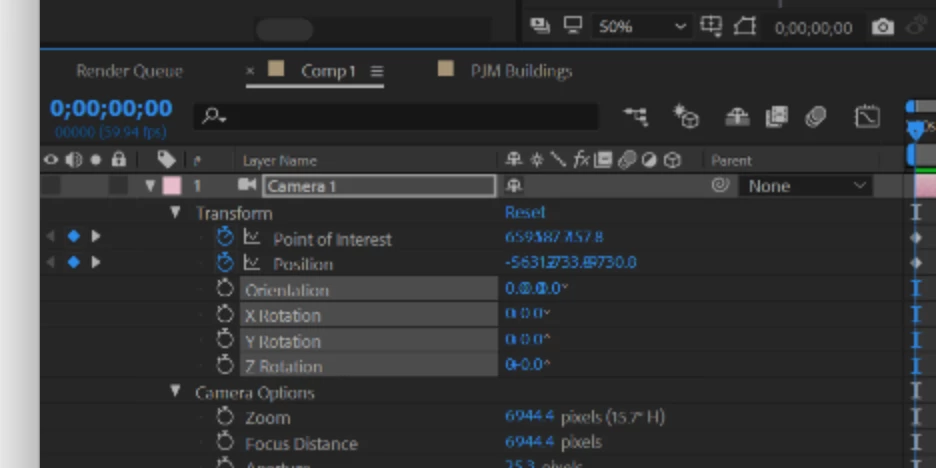
Expanded layer panel with properties

Rick GerardCorrect answer
Braniac
May 10, 2018

Your Active Camera is Camera 1 but you have Camera 1 turned off so you are not looking at the Active Camera.

Switch to Active Camera and switch the eyeball on and off for the camera and you'll see the problem. AE will look at any camera you select but it will only render the active camera. These are basic AE principals you should be familiar with. You should never judge your comp by looking at a specific camera view because you can get caught by this behavior. It's not a bug. It's been that way since AE had cameras.

Participating Frequently
May 10, 2018

ha! that was it. Thanks. I was thrown off by the camera movement showing up in RAM preview

Braniac
May 10, 2018

Only the Active Camera will render. The active camera is the camera with the lowest layer number (top camera) in a comp with multiple cameras. Unless needed for setting up a camera move you should always be using the Active Camera view. The Top, Left, etc., views will not render. Only Active Camera.

This is clearly explained in the documentation. There has never been an option to render anything but the Active camera.

Make sure you don't have a second camera in the comp. Reveal all shy layers. If you are still confused post a screenshot of your comp with all modified properties of the layers giving you problems revealed. Just select them, press U twice and PrintScreen and then paste to the forum.

Participating Frequently
May 10, 2018

seems like I have 2 view despite only having 1 camera in my layers.

Mylenium
Braniac
May 10, 2018

The active camera is your render cam and if you defined a camera layer, it will be used for rendering. If there's a specific issue, you will have to provide screenshots of the timeline and comp window with al lthe good stuff visible so people can diagnose your issue.

Mylenium

Participating Frequently
May 10, 2018

here is a screen shot!

as you can see, i only have one camera. as soon as I hit hit render from the render que the image switches from camera 1 view to "active camera" view. 

in render que

when i hit render.

thanks in advance