


Participant
July 29, 2015
Answered

Audio works in preview, but not when i render the video out! :( [ADOBE AFTER EFFECTS CC 2015]

  • July 29, 2015
  • 18 replies
  • 113033 views

Hey!

I'm pretty new to Adobe After Effects CC 2015. I have a video thats around 1 minute, everything works as it should when i preview it. But when i render it out, with right settings, The sound won't render out.

So basically i can hear all the sounds when i preview it, but when i render it out i can't here any sound at all. I have tried having the sound on Auto, and On. But nothing works.
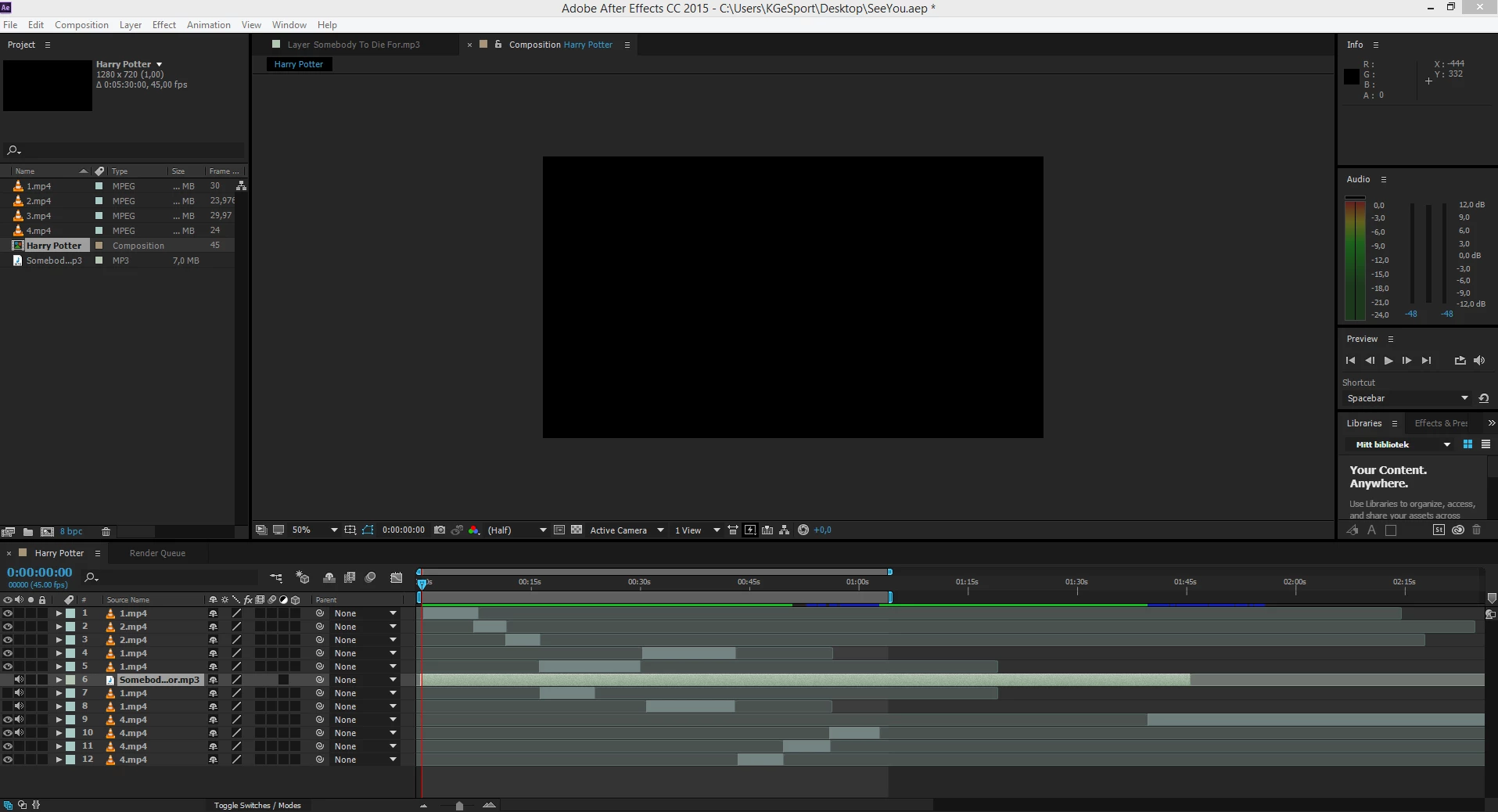
And yes, some of the mp4 files i use for audio aswell, but the mp3 audio file won't play either. Would love some help! I had this problem for some days now!

This topic has been closed for replies.
Correct answer Todd_Kopriva

Frankly, something as critical as this should never have been allowed to happen in the first place - meaning the program should not have been released with a bug of this magnitude in it, as it should have been caught in the testing phase.


We have a fix for this in the After Effects CC 2015 (13.6) update:

http://adobe.ly/1MVxHgX

Try it out and let us know how it works for you.

18 replies

Participant
October 25, 2016

Hi Jorrena,

Recently we have been having the same exact issue with Adobe After Effects CC 13.8. Adobe, is there any update on when there will be an update to this.

Thanks!

Szalam
Community Expert
Community Expert
October 25, 2016

kdr_ss wrote:

Recently we have been having the same exact issue with Adobe After Effects CC 13.8.

Have you updated to 13.8.1 yet?

There is a new release of After Effects coming "soon". Sneak peaks have been shown at trade shows and on Adobe's YouTube. It may solve your issue if 13.8.1 doesn't.

Szalam
Community Expert
Community Expert
March 7, 2017

Does 13.8.1 fix the problem though?

It doesn’t matter really, when lots of people are relying on a copy of AE that they don’t control (e.g., AE on centrally-managed school computers). I wish I had bought a copy of CS6 with AE. It’s a shame Adobe don’t even allow people to buy CS6 any more.


wpyarbc  wrote

Does 13.8.1 fix the problem though?

It depends on the underlying issue. Often similar symptoms can have entirely different causes. In most cases, I'd suggest using CC 2017 (14.1) anyway. It's the fastest, smoothest version of AE for me. I've been running it since it released at my freelance studio and it's been solid.

wpyarbc  wrote

It doesn’t matter really, when lots of people are relying on a copy of AE that they don’t control (e.g., AE on centrally-managed school computers).

Oh I feel that pain. At my full-time job, we're stuck on version 13.7.1. Very frustrating since I know how much better the version I COULD be using is.

CookieMonst3r
Participant
December 1, 2015

I have/had the same problem too I went through all the settings and what worked for me was setting the format to QuickTime then on the video output section click format options and set the video codec to H.264

Hopefully It Will Work For You To.

hristiand98271311
Participant
November 28, 2015

Half year - no patch? Seriously?  Video editor which cannot save the video sound? Seriously?  Shocked. Really....

MariusHS
Participant
November 27, 2015

Hello! If non if this helps, you can try render it out in Adobe Media Encoder!

Then the sound and video will be rendered perfectually!

Participating Frequently
November 27, 2015

Just to let you know that today, we still wait for the fix.

Just stumbled over it today - had not used AE for a while, so happily update in middle of project and sound is gone. Worked before the update a day ago...

At any rate, the .MOV export does have sound, luckily.

Still went back to original v CC2015. Let's see how that holds up.

BTW, share the sentiments on feeling like beta tester. It must be a complex problem, that they did not test the export with audio must mean that either they have not touched exporting and assumed it works, or have a cross coding issue that is not foreseen, or simply did not test.

Still, I do use all the other CC2015 stuff, so subscription works for me.

A discount would be in place, in this case though.

P.M.B
Legend
November 27, 2015

Your post is not very clear.   You updated AE today?  From what version to what version?  When you say sound is gone what do you mean? 

~Gutterfish
Known Participant
November 17, 2015

Hey adobe, will you refund me the year 2015. Because I did not use anything from the cc 2015.

I do not understand this subscription?!?!?! I'm paying you to be a beta tester or what?!?!?!

And what about statement that I'll always have the best and newest version?

After Effects cc2015 is still unusable.

Dave_LaRonde
Inspiring
November 18, 2015

I hope everybody saved their copies of bought-and-paid-for AE CS6.   If you're really antsy to cut the cord, you'll need it!  It's either that, or Adobe has you by the short hairs.

Mmmmmm, perhaps not.  Perhaps Blackmagic is working on something.  One can only hope.

Known Participant
November 18, 2015

The only reason why I moved to the CC is support for new codecs, especially for red dragon files.


Is there perhaps a plugin that would allow the CS6 version to import these files?


Funny thing is that adobe keeps saying that if you do not want to pay a subscription, you can use CS6. On the other hand they do not want to give support for new codecs in CS6.

Multipasser
Inspiring
October 12, 2015

Todd, this boggles the mind.

You find the audio export bug around 29 july?

And it is still not fixed in the latest version? My clients want me to export audio in separate layers in wav/aiff.

But now I have to make movies, extract the audio to wav/aiff. What a hassle in a stressy enviroment!

I have no words to say about the latest AE developments. I'm so angry (with lots of my collegues) I dont know were to start!

Please please stop investing time in new features only a FEW use, like character anim module. And FIX the problems that matter!

-a REALTIME preview player. I cannot play my ram previews realtime anymore, audio stotters! This is the most essential feature that should work!! I understand you want to rewrite the code, but release it when it is final. Not alpha like it is now!

- exporting audio

- bring back the codecs. We do not want to use AME for exporting!

Todd_Kopriva
Inspiring
October 12, 2015

> You find the audio export bug around 29 july?

And it is still not fixed in the latest version?

We have not released any updates since finding this bug. We are working on the fix now. The next update will have the fix, and that version is due for release next month.

Participant
October 9, 2015

Huge bug...3 months later no patch. I guess they are abandoning AfterFx rendering for AME.

Szalam
Community Expert
Community Expert
October 9, 2015

Slipangle10000 wrote:

Huge bug...3 months later no patch. I guess they are abandoning AfterFx rendering for AME.

I don't think that's the case. They said they are working on a bug fix and from what they've said, if all goes well, the next update is coming out next month. It will fix a lot of bugs and will include some new features. So it's way more than just a patch.

Todd_Kopriva
Inspiring
October 9, 2015

Szalam is correct.

Known Participant
October 8, 2015

The work around this bug I currently use: render it to a .mov (with video unchecked), and convert it with Quicktime Player 7.

Participant
October 5, 2015

I needed to export 2 large comps to lossless with audio for a client.

Both clips came out with no audio.

Ran multiple tests outputting using the default lossless setting and switching the audio output from "auto" to "on" -and same issue.

Can't output lossless with audio.

It this still an issue since the end of July?

Dave_LaRonde
Inspiring
October 5, 2015

Do a Quicktime movie in the PNG codec.  It's lossless, AND you'll get audio because it's a QT.

Participant
October 6, 2015

Thanks for the suggestion Dave, I ended up using the Animation Codec at 100 quality -which is also a lossless option.  

I'm on a PC and I'm using the AEScripts AEmpeg plugin to output to Prores422HQ for another editor using FCP

That script recommends an initial lossless export -hence my stumbling upon this.