


Participant
July 29, 2015
Answered

Audio works in preview, but not when i render the video out! :( [ADOBE AFTER EFFECTS CC 2015]

  • July 29, 2015
  • 18 replies
  • 113035 views

Hey!

I'm pretty new to Adobe After Effects CC 2015. I have a video thats around 1 minute, everything works as it should when i preview it. But when i render it out, with right settings, The sound won't render out.

So basically i can hear all the sounds when i preview it, but when i render it out i can't here any sound at all. I have tried having the sound on Auto, and On. But nothing works.
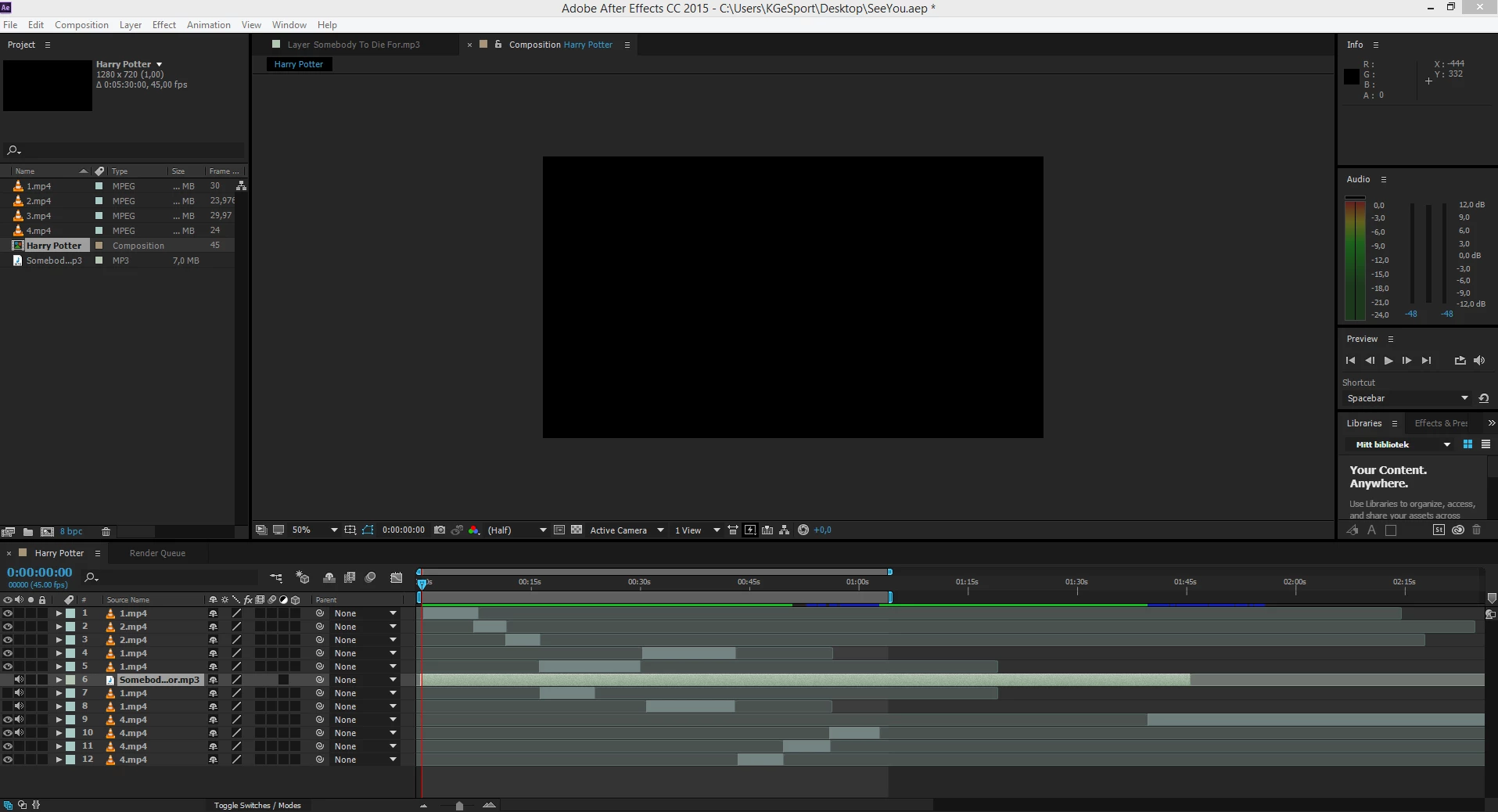
And yes, some of the mp4 files i use for audio aswell, but the mp3 audio file won't play either. Would love some help! I had this problem for some days now!

This topic has been closed for replies.
Correct answer Todd_Kopriva

Frankly, something as critical as this should never have been allowed to happen in the first place - meaning the program should not have been released with a bug of this magnitude in it, as it should have been caught in the testing phase.


We have a fix for this in the After Effects CC 2015 (13.6) update:

http://adobe.ly/1MVxHgX

Try it out and let us know how it works for you.

18 replies

Participating Frequently
August 21, 2015

Ok so I'm using AE cc 2015 13.5.1 and here's what works for me (as far as rendering audio w/ video w/o issues). Render in AE a QuickTime (.png codec)  w/ .wav for audio, then send to AME and render out a mp4 using a preset that fits where you plan to use it. Although I'm having slight issues getting it to YouTube, the mp4 on my desktop is working proper, audio IS present and synced well to the video

Participant
August 21, 2015

I should've mentioned, audio is there in preview (albeit choppy 'cos the new preview code is borked) but not there in the export. So a non-preview, if you will.

P.M.B
Legend
August 21, 2015

Reading through all these posts I have to say that I think NOT having to wait 25 seconds for frames to cache in order to able to hear audio is fully worth the audio being being completely broken in so many other areas.    Like Mama always used to say: "If it ain't broke, break it".

~Gutterfish
Participant
August 20, 2015

I think I've found a related bug in 13.5 and 13.5.1.

Exporting a comp to QT ProRes Proxy with the audio output set to mono results in a silent audio track in the .mov, switching to stereo renders correctly. The input audio is mono and for optimisation reasons (this is going into a game) I want to end up with a mono .OGV, the encoder I'm using doesn't do stereo to mono conversion and I don't want to have to find another encoder just for this reason.

Participant
August 5, 2015

I have the same issue... i have tried evrything since changing the audio file to MP3 still doens t work. We would like a step by step way to do it in adobe media enconder.

kristjanm88228450
Participant
August 6, 2015

Hi

I think you would be more happy if you just find a AEP 13.5 and do not use 13.5.1

13.5 works.

13.5.1 do not work with sound.

if you have a project fil stored in 13.5.1 You can still open it in 13.5  (it is convertible)

you can also wait. Adobe say : expect a fix in our next update, currently scheduled for this fall.

(and that is good. it not autumn next year)

Tim Kurkoski
Adobe Employee
Adobe Employee
July 29, 2015

What format are you exporting to?

We have identified a new bug in the After Effects CC 2015 (13.5.1) bug-fix update: exporting to audio-only formats WAV, AIFF, and MP3 create a silent audio file.

We intend to fix this in a future update. Until then, you can work around this problem by exporting to audio-only formats via Adobe Media Encoder. Choose Composition > Add To Adobe Media Encoder Queue. Or you can open your project file in After Effects CC 2014 (13.2) and export the audio file from the Render Queue in that version.

Apologies about the bug. If you are using a different format or having a different experience, please let me know so we can add the information to the investigation.

Participant
July 30, 2015

I'm exporting to a video file, AVI. No sound at all renders, only the video. I have every setting right, audio on. Must be some kind of bug or I'm just stupid Thanks for the answers though, but none worked

Tim Kurkoski
Adobe Employee
Adobe Employee
July 30, 2015

Jorren amaz wrote:

I'm exporting to a video file, AVI. No sound at all renders, only the video. I have every setting right, audio on. Must be some kind of bug or I'm just stupid Thanks for the answers though, but none worked

Thanks, Jorrena. I verified that exporting to AVI also has this problem.

This is definitely a bug, and we are investigating. You can work around the bug by using the methods I mentioned in my last post: send the composition to Adobe Media Encoder, or open the project in After Effects CC 2014 (13.2), where the bug does not happen.

Dave_LaRonde
Inspiring
July 29, 2015

I see the audio is an mp3 file.  Apparently AE STILL does not play nicely with compressed audio.  In a different application, convert the mp3 to wav or aiff, then import into AE and use it instead.

Community Expert
July 29, 2015

Have you installed the latest update? Also, what are your output settings? Make sure audio is enabled.