



Phi.Def
Inspiring
May 12, 2020
Answered

Automatically generate different timeless random numbers in duplicate effects on the same layer

  • May 12, 2020
  • 2 replies
  • 6889 views

If I want to automatically generate a different timeless random numbers on each instance of a duplicated layer, I know how to do that by referencing the index. For example:

seedRandom (index, true);
random ()

What I need to do is similar to that, but I need the different timeless random numbers to be generated in duplicated effects on the same layer.

Obviously, using 'index' won't produce different random numbers between the duplicated effects because the layer number will be the same for all instances of the effect. Instead, what I need is some way to either self-reference the effect name/number, or randomly generate a timeless number without specifying a seed. See what I mean?

Any suggestions?


Thanks!
This topic has been closed for replies.
Correct answer Rick Gerard

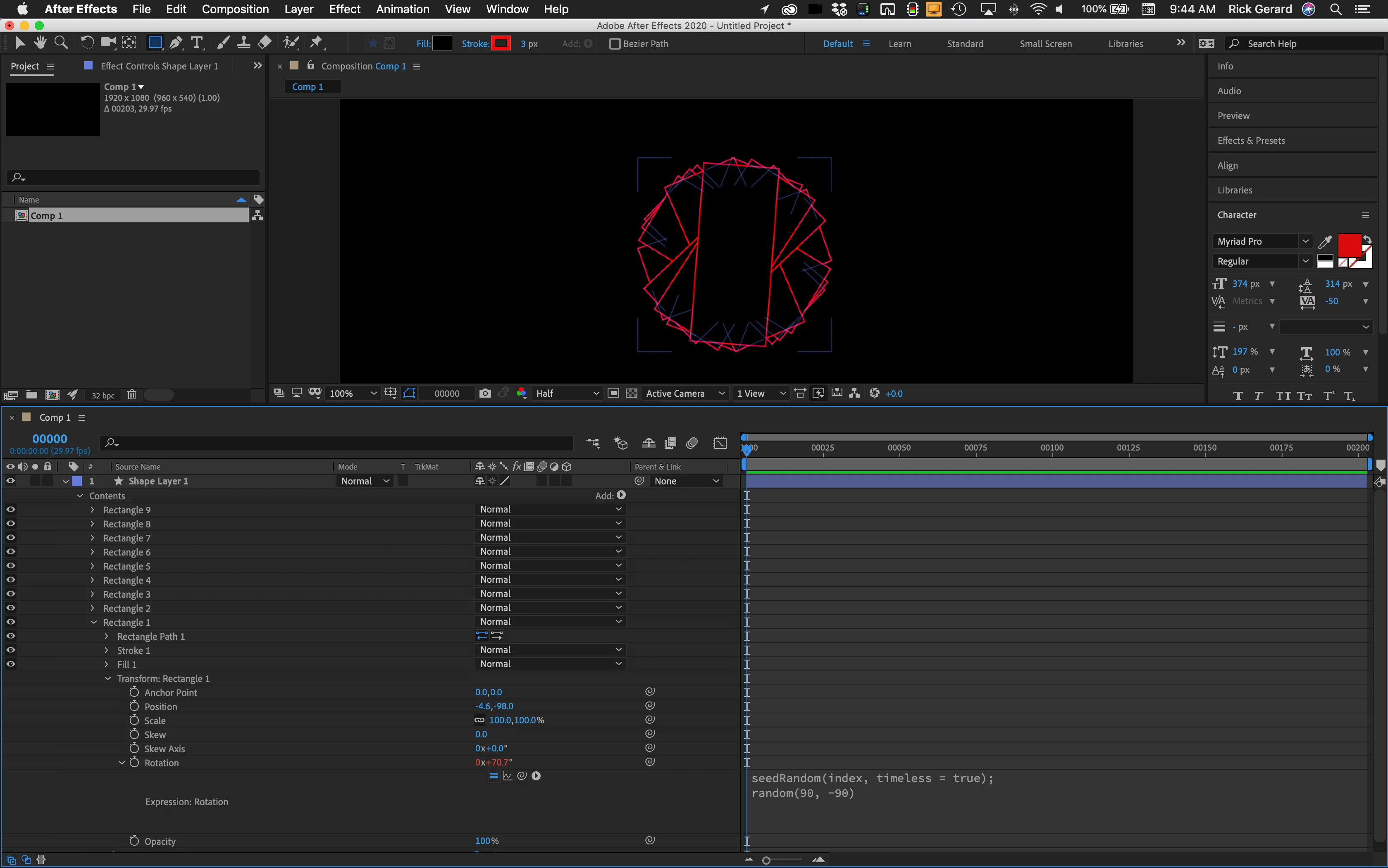
I'm not exactly sure what you are trying to do but if you add this expression to the Transform Rectangle 1> Rotation property

seedRandom(index, timeless = true);
random(90, -90)

you get this when you duplicate the rectangle:

That looks like random values on the same layer to me.


If that doesn't work for you we need more workflow and design details. 

2 replies

Rick GerardCorrect answer
Adobe Expert
May 12, 2020

I'm not exactly sure what you are trying to do but if you add this expression to the Transform Rectangle 1> Rotation property

seedRandom(index, timeless = true);
random(90, -90)

you get this when you duplicate the rectangle:

That looks like random values on the same layer to me.


If that doesn't work for you we need more workflow and design details. 

Phi.Def
Phi.DefAuthor
Inspiring
May 12, 2020

Strange. I was testing it with a text layer and got the following:


Strangely, while the index number remains 1 for all the effects applied to the top layer (as per the sliders), and you can only get a different random number by changing the seed between generators in the same expression, when you apply the same seed in a different effect you will get a different random number. I don't really understand why that is, but it works.

Thanks for your help.

Adobe Expert
May 12, 2020

A text layer only has one Source Text property so you need to change the seed every time you duplicate the random number generator. Pretty straight forward. 

Dan Ebberts
Adobe Expert
May 12, 2020

It should work. Have you tried it? If it doesn't work for you, what's the effect and the property?


Dan