

Inspiring
July 13, 2019
Answered

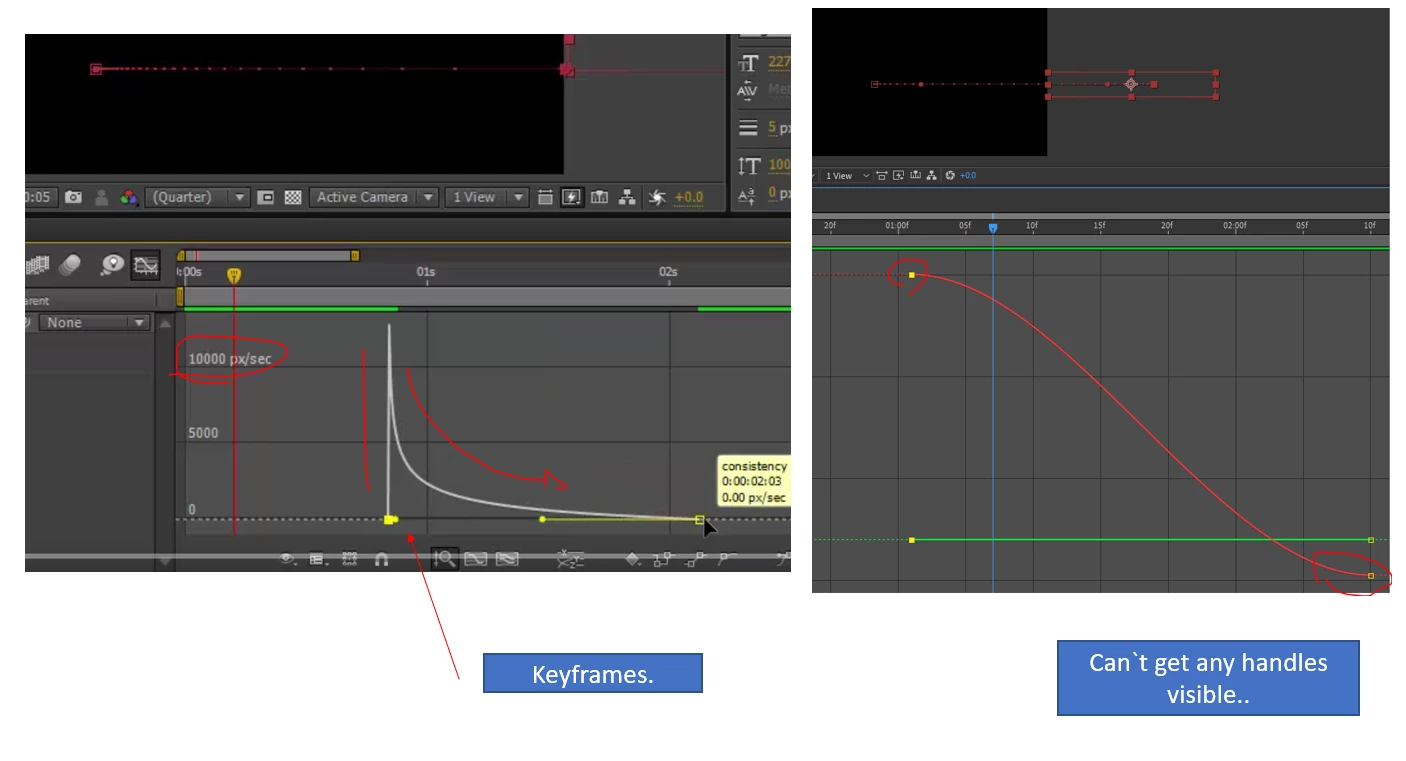
bezier handles not visible

  • July 13, 2019
  • 2 replies
  • 1969 views

How do I get these handles to show?

The video sample i`m watching has handles, I cant activate mine through selecting them...
This topic has been closed for replies.
Correct answer Byron Cortez

Those are not Handles are Influences, and you can see them by double clicking on the yellow square and you set an incoming value or an outgoing value. And in the graph on the left you can see them because it is the "Edit Speed Graph" and the one on the right is the "Edit Value Graph" where there is no modifiable influence. Look at my screenshots.

Clic in this menu:

Speed Graph:

Value Graph:

2 replies

Byron CortezCommunity ExpertCorrect answer
Community Expert
July 13, 2019

Those are not Handles are Influences, and you can see them by double clicking on the yellow square and you set an incoming value or an outgoing value. And in the graph on the left you can see them because it is the "Edit Speed Graph" and the one on the right is the "Edit Value Graph" where there is no modifiable influence. Look at my screenshots.

Clic in this menu:

Speed Graph:

Value Graph:

Byron.
Inspiring
July 14, 2019

aah,speed graph, thanks Byron.

Thanks Andrew for that, if you can explain the separate dimensions I can learn something from that...

Andrew Yoole
Inspiring
July 14, 2019

Byron was correct above, and I was not correct that you were working with seperate dimensions.

For the record, turning on Seperate Dimensions in the timeline graph does exactly that - separates the X, Y and Z (if in 3D) values of position keyframes so that they can be independently animated.  In the example below you can see the red X line and green Y line as separate editable graphs.

Andrew Yoole
Inspiring
July 13, 2019

It looks like you have seperate dimensions visible, while your example does not, so it would be good to switch this function off for continuity .  Can you post a screengrab of the whole timeline panel, rather than the cropped one you've posted?  It's hard to gauge what it is you're animating to assess the issue.
