

MahaB82A
Legend
September 12, 2022
Question

Bounding Box

  • September 12, 2022
  • 1 reply
  • 983 views

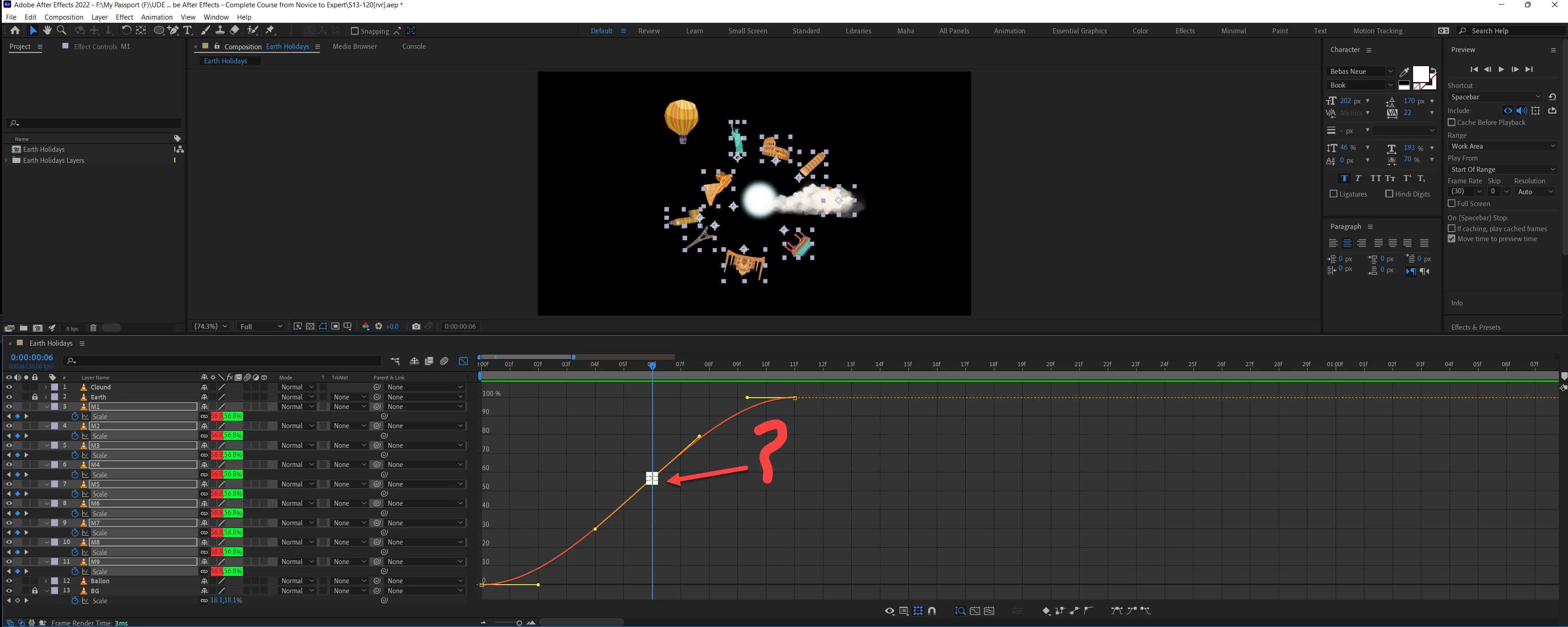
Keyframe is selected at this point, collection of white boxes are coming insted of yellow box. What is the reason for this?



This topic has been closed for replies.

1 reply

Community Expert
September 13, 2022

You have the same animation on several layers, and keyframes for multiple layers are selected. Select one property and the area selection icon will go away.

MahaB82A
MahaB82AAuthor
Legend
September 13, 2022

What you say is correct but in that tutorial only yellow box comes.

MahaB82A
MahaB82AAuthor
Legend
September 14, 2022

Drag a selection around the keyframes, live with the selection icon (boxes) and drag them all at the same time. 


There is some non-standard setting on the machine used for the tutorial that is hiding the boxes. That's all there is to it. 

I used the pen tool (g) and the selection tool (v). That's all there is to it.


I did like this. You can see shape of the cursor is changing inside the bounding box. So that in this way you can indentify the Anchor Point & move it out of the box. Now you can move the all 9 graphs together. Anchor point snaps to the centre of the bounding box again once you began to move the graph. I do not know how this can be explined. Also if it possible to zoom in the bounding box you can see the anchor point clearly. Video is attached. 


It is highly appereciated if you can attach the above video, because I do not have control over playhead.