



Gotta Dance
Inspiring
January 2, 2023
Answered

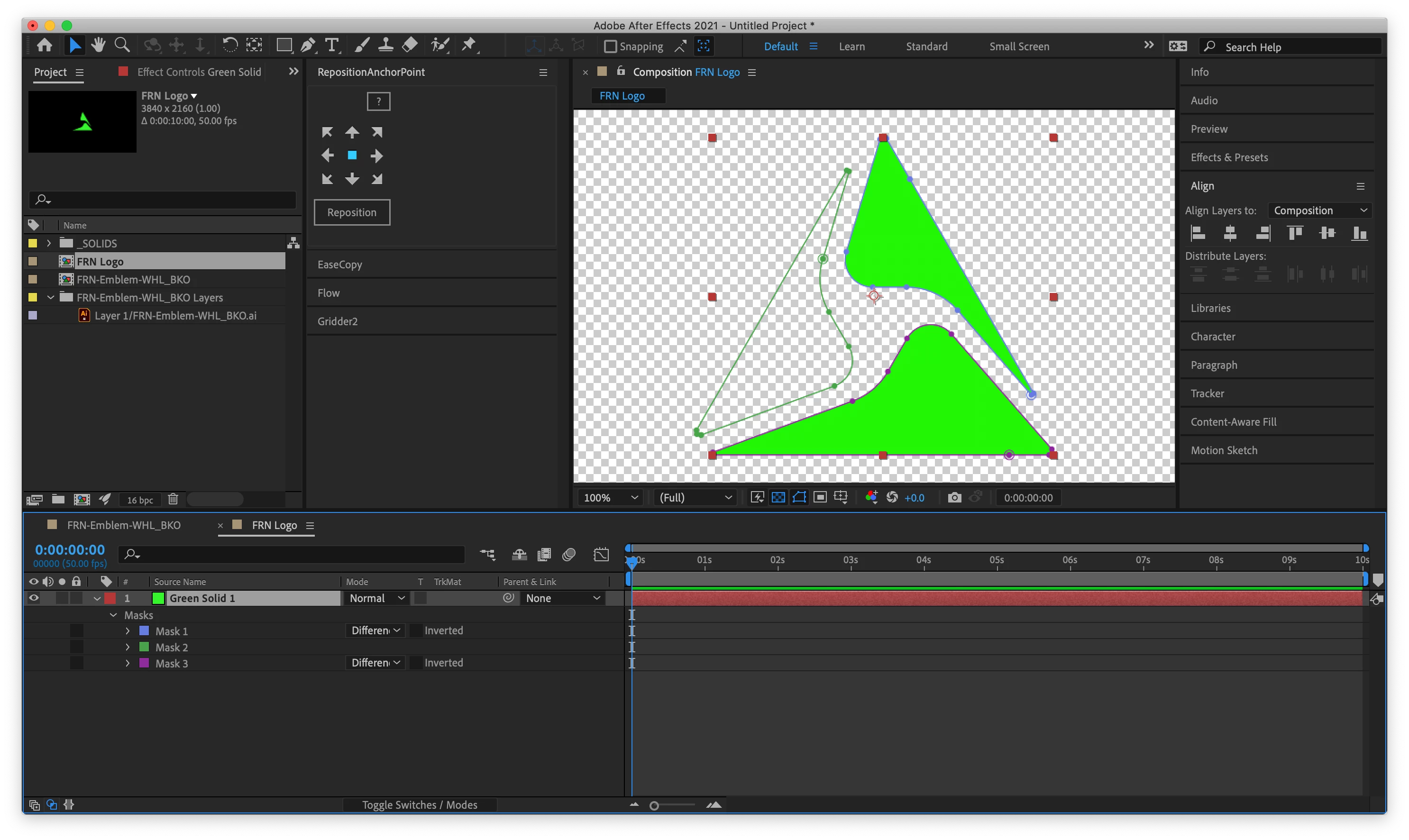
Can somebody please tell me why this imported vector shape isn't showing as a mask?

  • January 2, 2023
  • 2 replies
  • 391 views

Hi everybody,


I imported this logo from AI, and all the major beziered shapes are importing just fine. Except this one potion that's not displaying a blending mode or behving like a mask. 


The imported shapes are all identical in fill and stroke. There is no gap in the bezier. In AI all three shapes look black. But for some reason when I import or copy/paste the three wedge shapes the one on the left isn't registering the same.


Has anybody had this happen before?
 

This topic has been closed for replies.
Correct answer Mohammad.Harb

in Illustrator press Cmd + J to join the 2 anchor points.

then copy the shape and paste it again

2 replies

Mohammad.Harb
Community Expert
Mohammad.HarbCommunity ExpertCorrect answer
Community Expert
January 2, 2023

in Illustrator press Cmd + J to join the 2 anchor points.

then copy the shape and paste it again

Gotta Dance
Inspiring
January 2, 2023

You guys rock, thank you.

Mylenium
Legend
January 2, 2023

Your mask is not closed. The lack of a mask mode control is a dead giveaway. This stuff may not matter in AI, but it matters in AE.


Mylenium