Inspiring
April 29, 2019
Answered

Can't change/animate the colour of my text objects (I need Opacity set to 0% for the Range Selector animation to work)

  • April 29, 2019
  • 2 replies
  • 5821 views

I have text running out by character left to right in the standard way shown in many tutorials.

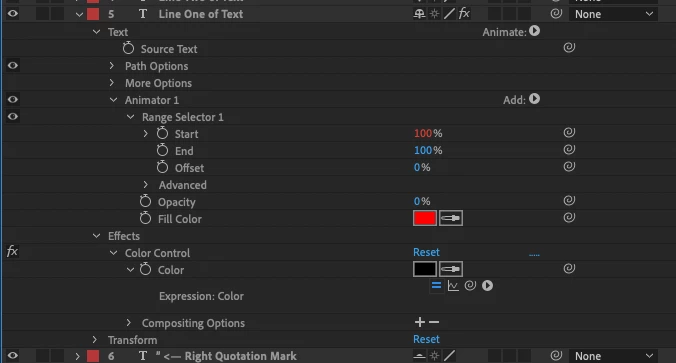
In order to set the start at 0% then interpolate it to 100% you have to have the Opacity property set to 0% (or you see all the text as soon as the layer comes on).

But in order to set the text colour (with an expression I might add not using the AE User Interface) I need the Opacity up higher.

There must be an answer but it isn't obvious to me. I can use expressions and a slider mapping to an RGB colour effect set of keys to do it on text layers I aren't animating and it works fine using:

thisComp.layer("[CONTROLS]").effect("Quote Mark Colours")("Color").key(thisComp.layer("[CONTROLS]").effect("Quote Mark Colour")("Slider"));

I tried adding a RGB Color Effect to the layer but it does nothing when I change it's color manually or programatically. I have an expression controlling the time of these layers in the Start property of the Range selector. It's not strictly relevant but it's complicated and I need it to stay as is (or functionally equivalent).

This topic has been closed for replies.
Correct answer Roland Kahlenberg

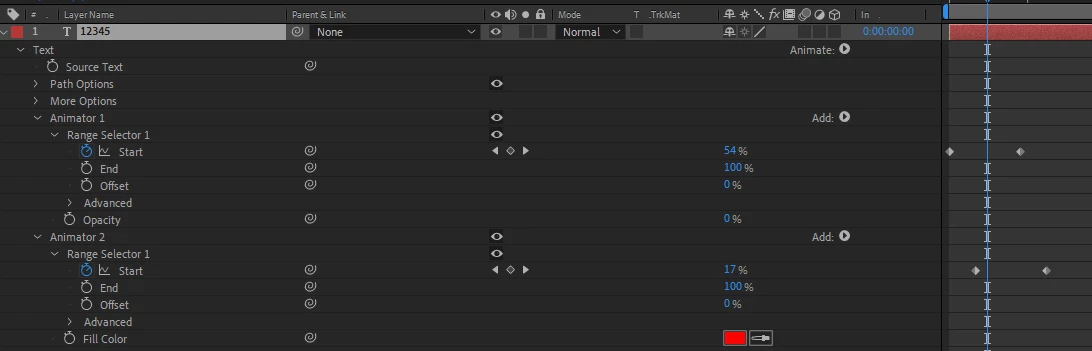
There is actually a change in color but it's very subtle and very quick cos your keyframes are not sufficiently distant. To get what you want within the duration specified, you will require another Text Animator Group, with the Fill Color Animator Property. Then, you offset its Start keyframes from the other Text Animator Group - see image below for a guide.

2 replies

Inspiring
April 29, 2019

Here's my control on the range animation, you mean I have to repeat the expression in the second Animator but subtract a bit from time from this to keep it a few frames behind or something?

TAT = thisComp.layer("[CONTROLS]").effect("Total Animation Period")("Slider");

delay1 = thisComp.layer("[CONTROLS]").effect("Bkgd fade period")("Slider")

delay2 = thisComp.layer("[CONTROLS]").effect("Quotation mark in/out period")("Slider");

delay3 = thisComp.layer("[CONTROLS]").effect("Period b/w lines of text")("Slider");

delay4 = thisComp.layer("[CONTROLS]").effect("Delay at End")("Slider");

startTime = delay1 + delay2;

timePerLine = (TAT - 2*(delay1 + delay2 + delay3) - delay4)/3;

startTime += 2*(timePerLine + delay3);

100 * (time - startTime)/timePerLine;

I realise I might have approached this exercise to build a controllable and flexible composition for displaying quotes another way, perhaps referencing layers above/below with `index` but I didn't know that trick when I started, and I'm still not sure it would have been easier.

Thinking about it more I must have misunderstood you because I'm effectively trying to do the same thing with Animator 2 as I can't do with animator 1. Thanks for your help, really appreciate it, wishing I'd made this in Quartz Composer and wrapped it with the Noise Industries API to make it an Adobe plugin for AE and PremPro, spent way to long on this!

Inspiring
April 29, 2019

I'm thinking of just using the colorise effect as a post effect on white animated type. This is pretty confusing for me.

Roland Kahlenberg
Roland KahlenbergCorrect answer
Legend
April 29, 2019

There is actually a change in color but it's very subtle and very quick cos your keyframes are not sufficiently distant. To get what you want within the duration specified, you will require another Text Animator Group, with the Fill Color Animator Property. Then, you offset its Start keyframes from the other Text Animator Group - see image below for a guide.

Very Advanced After Effects Training | Adaptive & Responsive Toolkits | Intelligent Design Assets (IDAs) | MoGraph Design System DEV