


Participant
December 1, 2019
Answered

Can't open Cinema 4d lite because of "Maxon License Manager" in AE v 17

  • December 1, 2019
  • 10 replies
  • 128569 views

Just started working with AfterEffects & interested in working in C4D Lite. When I open a Cinema 4D file, or use FILE > NEW > MAXON CINEMA 4D FILE, the Cinema 4d Launcher window appears. After a moment, a popup from Maxon requires me to register an account on their website. I made sure that I registered on their website with the same login as my Adobe CC account. However, no c4d files can be opened, it asks me to activate a Cinema 4D trial instead of reflecting some kind of Lite license. 


I'm not finding much information online about this license manager at all. In all the tutorials that I see, there is absolutely no mention of this License registration or MAXON account requirement - they all seem to just open straight into the 3d editor. 


Is Cinema 4D Lite no longer included with After Effects in v17? 
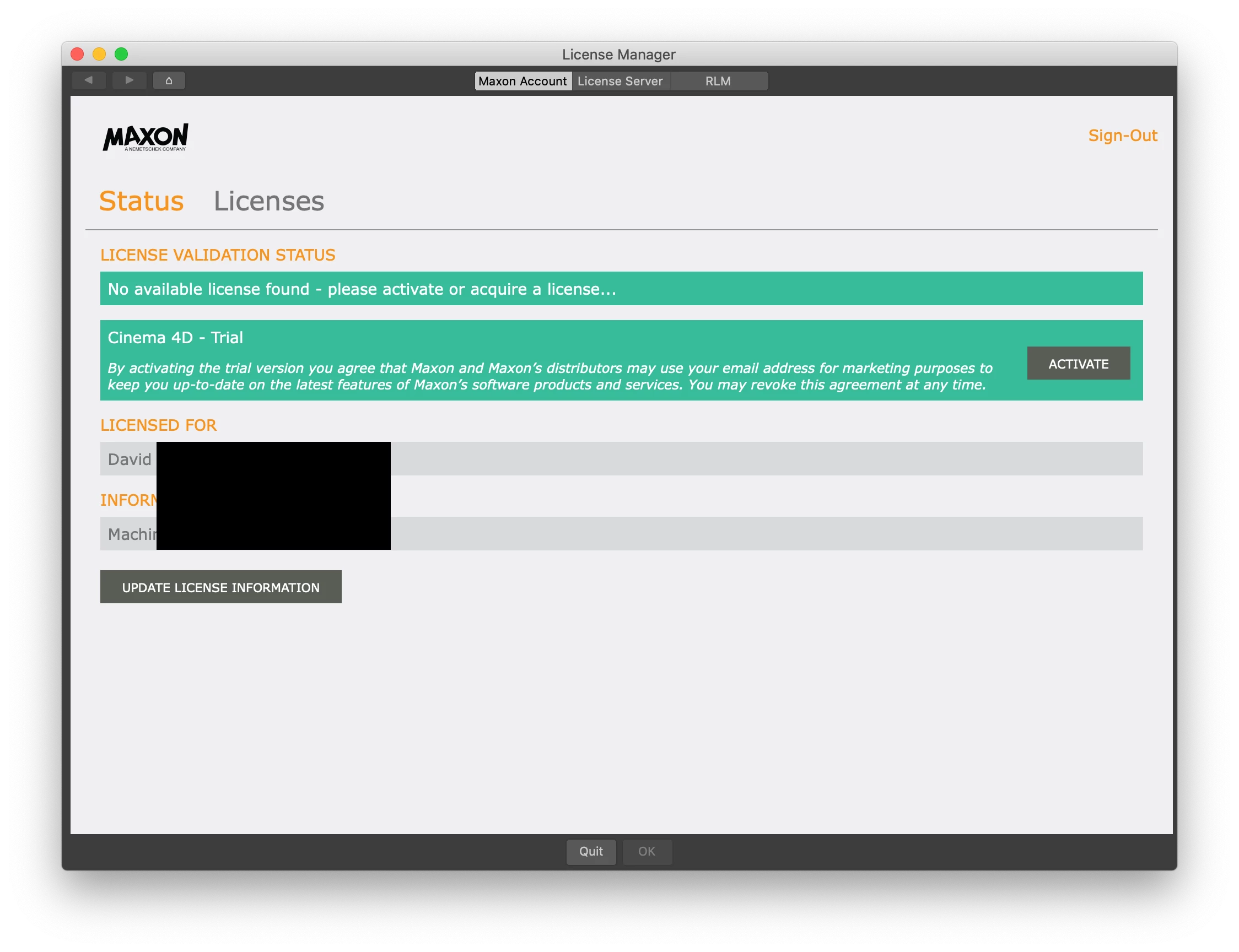


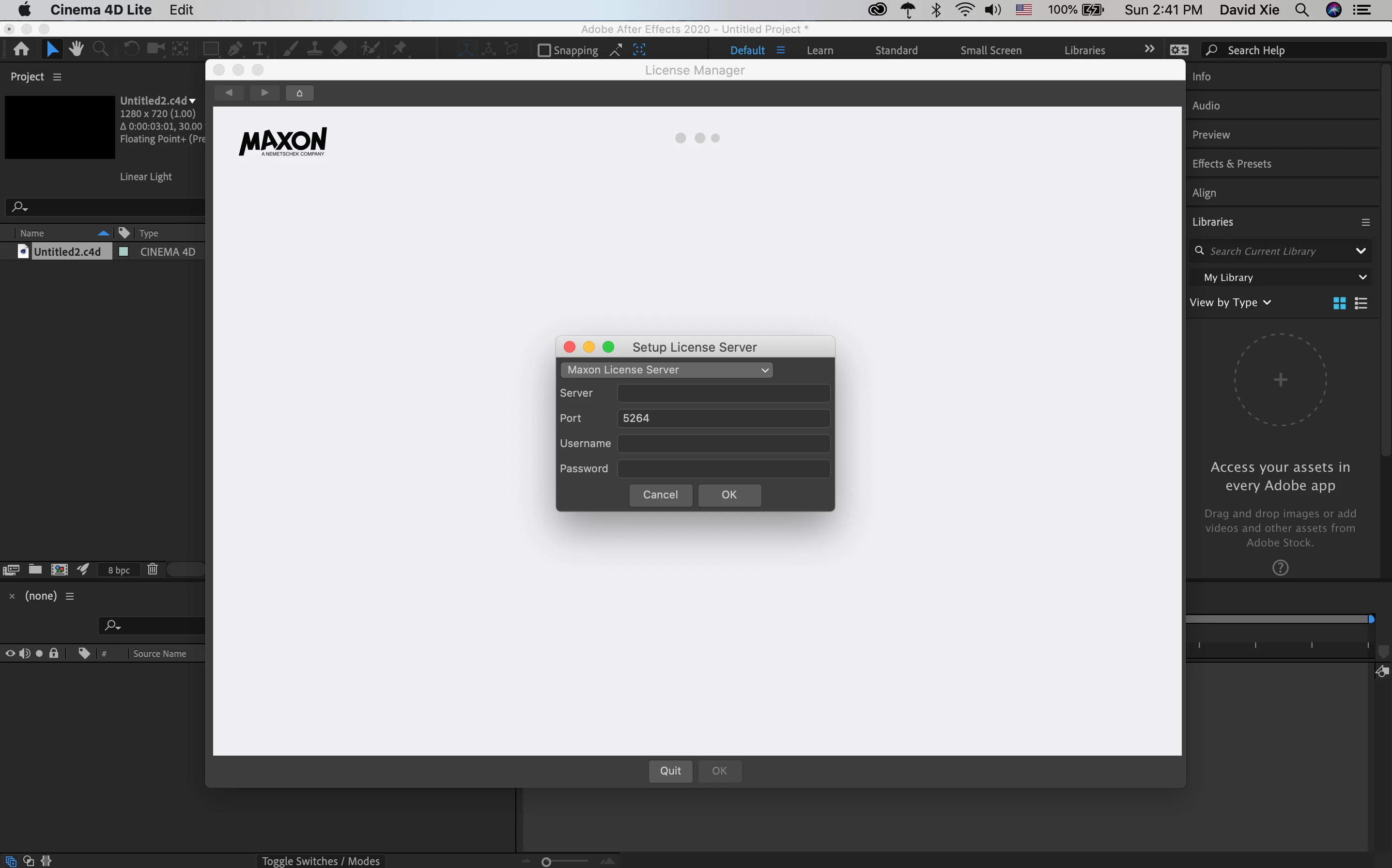
EDIT: I restarted the app again, and now when I open a Cinema 4D Lite app, this very confusing screen blocks me from doing anything:
Correct answer Brandon Loshe

Hey David,

I believe I have the solution for you. You don't have to do that "Setup License Server" part. This is from Maxon themselves:

"To fix this issue all you have to do is delete the C4D preferences to restore the defaults. Here's how to do that:

Open a Finder window and head to ~/Library/Preferences/MAXON via Finder's Go > Go to Folder command. Next, quit out of Cinema 4D from the Force Quit menu (this is a very important step as this process will not work if the application is running). Once you've done that you will need to select three items: The Cinema 4D folder, the "machines_rb_20.prf" and the "teamrender_rb_20.prf" (you need the last two even if you do not use Team Render as Cinema 4D still stores some preferences data in those files). Once you've selected those items, delete them and then launch Cinema 4D again. You should notice that the files you deleted are re-created when Cinema 4D launches, this is because if Cinema 4D cannot find these files on startup it creates them from scratch with the default settings (this is why you need to quit C4D before deleting them).

Once you do this it should present you with the standard Cinema 4D License Manager and give you the option to activate your Cinema 4D Lite license. Note that to use this you'll need to create a MyMaxon account as well, so just head to My.Maxon.net and create an account there at some point so that you can activate your Lite license via the account login."

For me personally, I didn't see those .prf files. But anyway, after I created an account at My.Maxon.net, I had an option to activate the Lite licence, which should show as unlimited. It all seems to work fine now. Hopefully the same works for you.


10 replies

@cesarqueb_
Known Participant
December 7, 2023

Why does Adobe install applications without asking the user if they want to install them? Today I see this application and I thought that I had already been hacked or I had gotten a virus. Worse if the application does not work and requests a license to work. What is this... shareware?

Participant
September 28, 2023

It took me so long to find the answer.  I tried to open After Effects and C4D many times but still don't see LITE license active button. But... after read more answers carefully and seriously, it's finally worked. 


I use Window 11. I clicked on search bar and type Maxon. Then it appears > right click " open file location" > doubled click " Maxon cinema 4d" > Cinema 4d will pop up and I saw the active for LITE license button. 🥳 Click active >  click OK ( a small text in the corner bottom)


Hope it helps❤️.


Dave8585
Participating Frequently
December 20, 2022

had the same problem im glad i found this treat... when i started c4d from the start menu (win) it showed no LITE licence...

AFTER i closed all maxon aplications, i went inside after effectss NEW - MAXON C4D file.... then the maxon licence manager poped up again and finally the LITE licene was there and i could activate it :D... then c4d started normally... 
now i can also start it from outisde of aftereffects.. 

Participant
June 22, 2022

Participant
October 24, 2020

Is there a windows version of this solution?


Brandon Loshe
Legend
October 24, 2020

Yes, it's several responses back, but I'll copy/paste it here again:


Personally, I'm not a Windows user and don't know much about Windows. But since I had a Maxon ticket already open on a similar issue, I went ahead and followed up with your question. Here is the answer from Maxon Tech Support:

On Windows the process is the same, but the filepath is different. You'd go to C:\Users\YourUsername\Appdata\Roaming instead (replace "YourUsername" with your username for the account in which you use Cinema 4D on Windows). You may have to click in the upper portion of the Explorer window and type this path in as some folders may be hidden; there should also be some guides online detailing how to unhide these folders.

Participant
October 24, 2020

Is this something that will be fixed? I wanted to include a lesson on integrating 3D and After Effects in the class I teach but had to nix it. Doing this work-around is too much to ask of students working remotely.

Participant
April 6, 2020

You need to open the cinema 4D Lite, only the "Lite version" is available to activate.


Regards,

pmse
Participating Frequently
June 22, 2020

I have an intallation problem the other way around: I'm running AE CC latest version and naturally you get C4D Lite with that and in my case all works fine. So far so good.


But:

now I want to UPGRADE to C4D R22. I just want the trial for now so I downloaded it from their website https://www.maxon.net/en-us/try/ and installed it. But now I'm opening R22 and it still just opens the LITE version with no option to switch to the full R22 version. 


Does anyone have a solution for that problem? Thanks!

pmse
Participating Frequently
June 22, 2020

Just got this from Maxon and it solved the problem:


Starting Cinema 4D directly instead from within AfterEffects should in general not open Cinema 4D Lite, but let you choose a license or the trial.

Unfortunately reinstalling the entire program does not change the license.
You can try to reset the program. Open Cinema 4Ds preferences first and from the preferences open the userfolder ("Open Preferences Folder..." at the bottom of the window).


Now the finder should open the userfolder called "Cinema 4D R22....".
Please close Cinema 4D and delete this folder.
If you restart the program it should be reset to defaults and you can choose a license again.


Participant
January 2, 2020

I downloaded after effects plug-in from the Maxon website. it worked for me

AlanMattano
Known Participant
June 21, 2020

Be aware that Maxon on the past some bad branding practice. Like WebSite Marker 4 that after purchase it later ask additional hiding cost at the end of the workflow process. And other examples of push marketing.

Brandon Loshe
Legend
December 6, 2019

Hey davidx1,

Can you confirm whether or not this worked for you so that other people will know?

Participating Frequently
December 6, 2019

I'm having the same problem but there isn't a MAXON folder/file in the library/preferences folder

Participant
December 6, 2019

Please check
/Users/[user name]/Library/Preferences

It ’s different from 

/Library/Preferences


Brandon Loshe
Brandon LosheCorrect answer
Legend
December 2, 2019

Hey David,

I believe I have the solution for you. You don't have to do that "Setup License Server" part. This is from Maxon themselves:

"To fix this issue all you have to do is delete the C4D preferences to restore the defaults. Here's how to do that:

Open a Finder window and head to ~/Library/Preferences/MAXON via Finder's Go > Go to Folder command. Next, quit out of Cinema 4D from the Force Quit menu (this is a very important step as this process will not work if the application is running). Once you've done that you will need to select three items: The Cinema 4D folder, the "machines_rb_20.prf" and the "teamrender_rb_20.prf" (you need the last two even if you do not use Team Render as Cinema 4D still stores some preferences data in those files). Once you've selected those items, delete them and then launch Cinema 4D again. You should notice that the files you deleted are re-created when Cinema 4D launches, this is because if Cinema 4D cannot find these files on startup it creates them from scratch with the default settings (this is why you need to quit C4D before deleting them).

Once you do this it should present you with the standard Cinema 4D License Manager and give you the option to activate your Cinema 4D Lite license. Note that to use this you'll need to create a MyMaxon account as well, so just head to My.Maxon.net and create an account there at some point so that you can activate your Lite license via the account login."

For me personally, I didn't see those .prf files. But anyway, after I created an account at My.Maxon.net, I had an option to activate the Lite licence, which should show as unlimited. It all seems to work fine now. Hopefully the same works for you.


Happy Motion
Participant
December 3, 2019

How can I do the stepts in Windows?

Brandon Loshe
Legend
December 5, 2019

Personally, I'm not a Windows user and don't know much about Windows. But since I had a Maxon ticket already open on a similar issue, I went ahead and followed up with your question. Here is the answer from Maxon Tech Support:

On Windows the process is the same, but the filepath is different. You'd go to C:\Users\YourUsername\Appdata\Roaming instead (replace "YourUsername" with your username for the account in which you use Cinema 4D on Windows). You may have to click in the upper portion of the Explorer window and type this path in as some folders may be hidden; there should also be some guides online detailing how to unhide these folders.

Brandon Loshe
Legend
December 2, 2019

Stuck on the same thing. I wonder if this a Maxon issue instead of Adobe. I'm waiting to hear back from Maxon about why this is. In the meantime, we'll see if anyone else has an answer for this. I will share any information I that I can find, but I haven't been able to find any information online, either yet.

Participant
December 27, 2019

Stuck with same problem

Brandon Loshe
Legend
December 29, 2019

Were you able to get it figured out?