kattyh25613779
Participant
April 7, 2019
Answered

Can't see "Allow scripts to write file and access network" in preferences

  • April 7, 2019
  • 1 reply
  • 72863 views

Hi,

I'm trying to import a VR video from C4D and I'm following a tutorial in which the person checks "Allow scripts to write file and access network" in AE under general.

When I go to mine, I can't see that line, I see others like "show tool tips", etc.

I already uninstalled and installed after effects and it's still not working so I haven't been able to import the  AEC file.

Please help!

Thanks.
Correct answer Rick Gerard

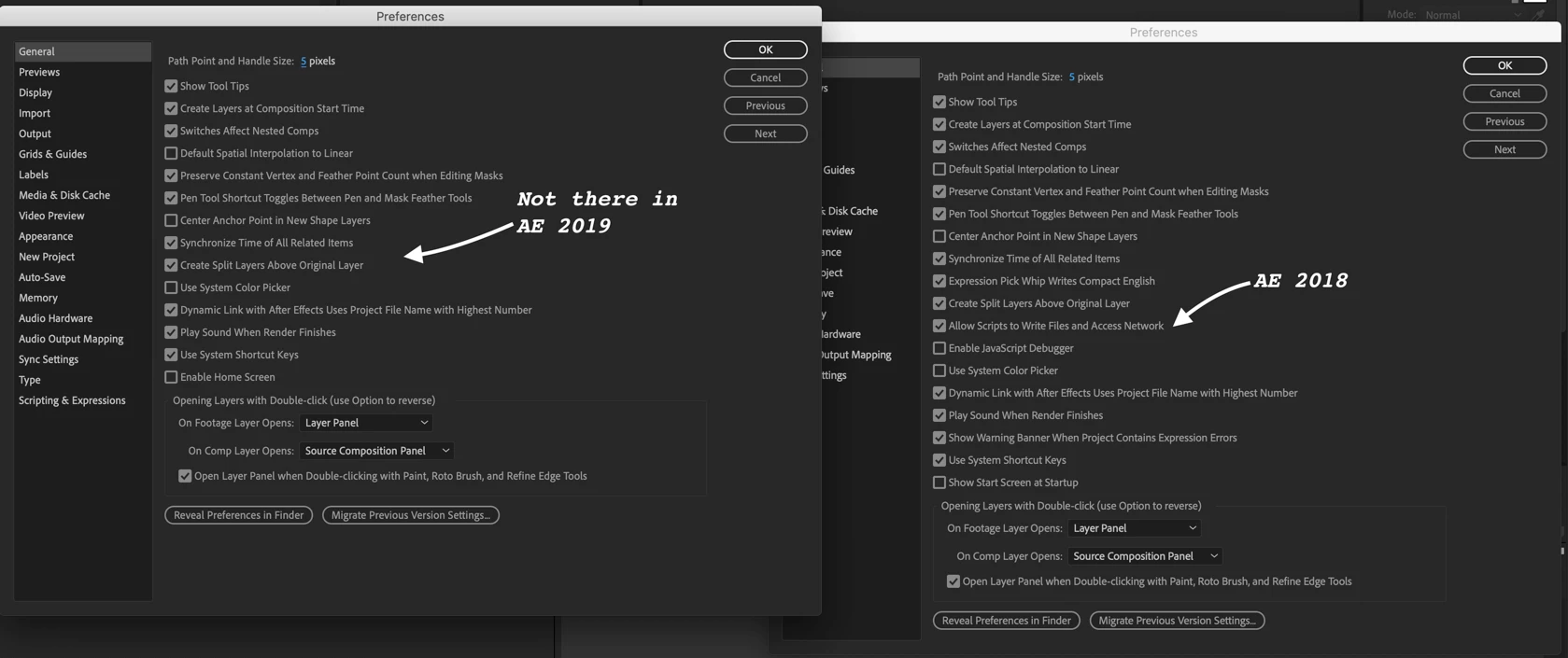
What version of AE? It has apparently been removed in CC 2019

If you check what's new Feature summary | After Effects (April 2019 release)

Scripting & Expressions

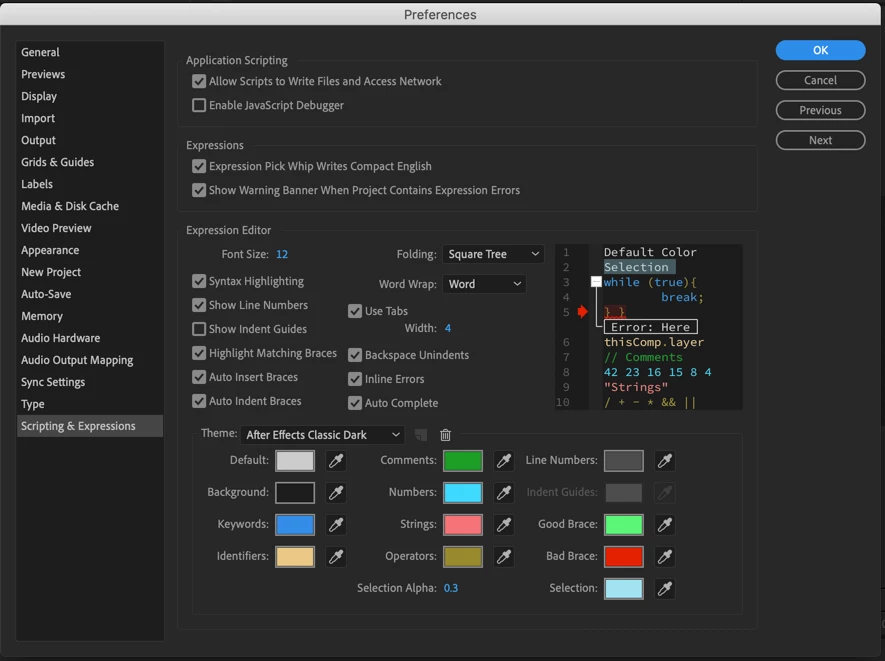
The following existing preferences related to scripting and expressions have been moved from the General preferences panel to the new Scripting & Expressions panel:

  • Allow Scripts to Write Files and Access Network
  • Enable JavaScript Debugger
  • Expression Pick Whip Writes Compact English
  • Show Warning Banner When Project Contains Expression Errors

The Scripting & Expressions panel also contains options related to the new Expression Editor.

For more information, see For more information, see General preferences, and Expression Editor enhancements.

And sure enough:

I am not trying to be a smart ass, just pointing out some of the amazing things you can learn if you spend just a few minutes with the new feature notes and user guide.

1 reply

Rick GerardCommunity ExpertCorrect answer
Community Expert
April 7, 2019

What version of AE? It has apparently been removed in CC 2019

If you check what's new Feature summary | After Effects (April 2019 release)

Scripting & Expressions

The following existing preferences related to scripting and expressions have been moved from the General preferences panel to the new Scripting & Expressions panel:

  • Allow Scripts to Write Files and Access Network
  • Enable JavaScript Debugger
  • Expression Pick Whip Writes Compact English
  • Show Warning Banner When Project Contains Expression Errors

The Scripting & Expressions panel also contains options related to the new Expression Editor.

For more information, see For more information, see General preferences, and Expression Editor enhancements.

And sure enough:

I am not trying to be a smart ass, just pointing out some of the amazing things you can learn if you spend just a few minutes with the new feature notes and user guide.

kattyh25613779
Participant
April 7, 2019

Thanks so much, you're right