


Known Participant
August 3, 2016
Question

change color according to value

  • August 3, 2016
  • 1 reply
  • 2712 views

Hey.

I want to make an expression for a randomly changing number, (so far so good), but each time it will change a value, I want it to change color relatively to the previous value it had. MEANING... if it will goes up, then it will change to blue and if down then to orange (for example).

one more thing. I want it to change value every few seconds and do it with a "hold interpolation" so it will jump to the next value instead of working it's way toward it...

now.. so far I got this: (for the first part anyway)

-----------------------------------------------------------------------------------------------------------------------------
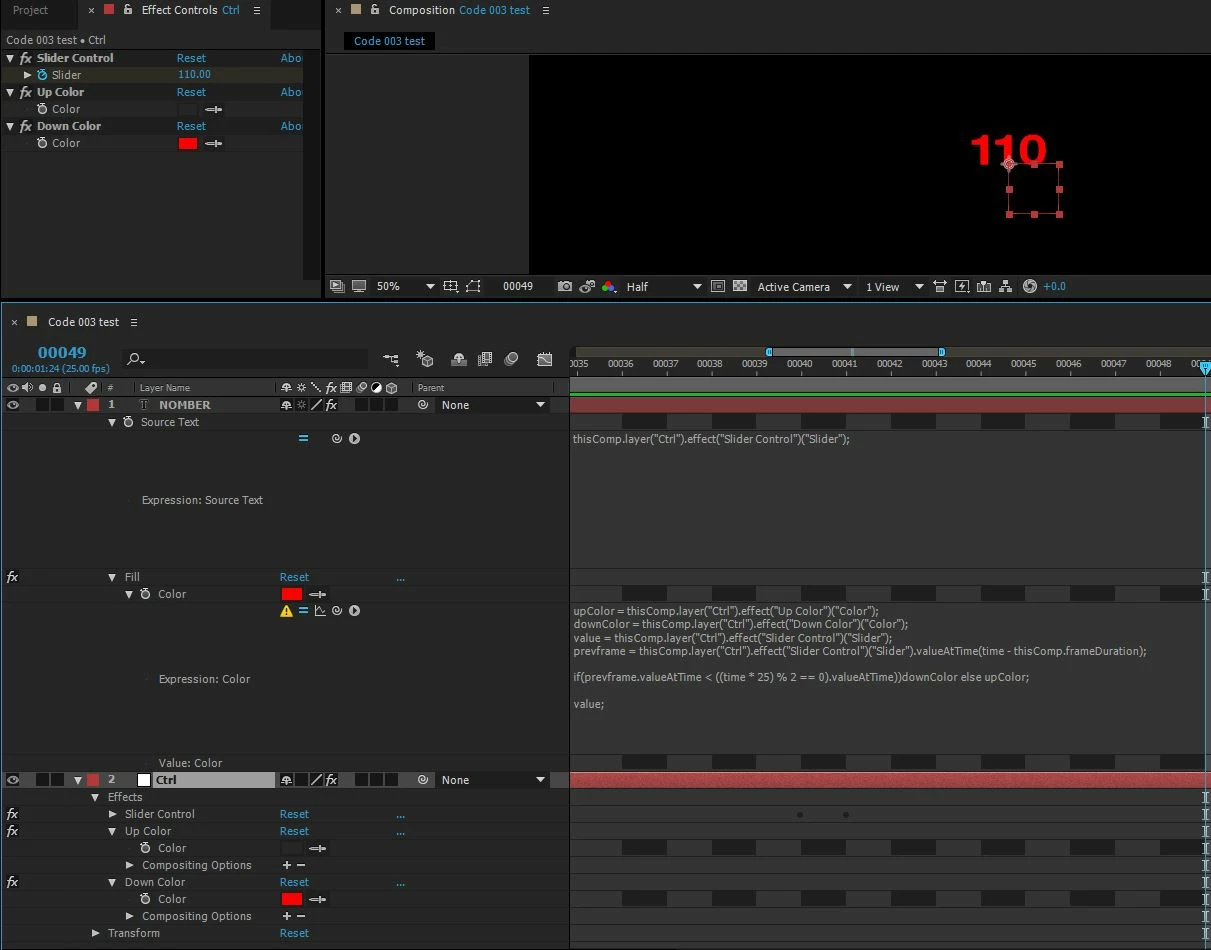
upColor = thisComp.layer("Ctrl").effect("Up Color")("Color");

downColor = thisComp.layer("Ctrl").effect("Down Color")("Color");

value = thisComp.layer("Ctrl").effect("Slider Control")("Slider");

prevframe = thisComp.layer("Ctrl").effect("Slider Control")("Slider").valueAtTime(time - thisComp.frameDuration);

if(prevframe.valueAtTime < ((time * 25) % 2 == 0).valueAtTime))downColor else upColor;

value;

-----------------------------------------------------------------------------------------------------------------------------

any ideas?

thanks!

Ido.

This topic has been closed for replies.

1 reply

UQg
Brainiac
August 3, 2016

Hello,

'value' is a reserved word for expressions. It represents the key value (that is, pre-expression) of the current property and cannot be overridden by something else.

Try replacing 'value' by say 'x'. It might very well be that your expression is correct other than that.

Xavier

idoshorAuthor
Known Participant
August 3, 2016

so, if I get you right it should be something like this:

upColor = thisComp.layer("Ctrl").effect("Up Color")("Color");

downColor = thisComp.layer("Ctrl").effect("Down Color")("Color");

X = thisComp.layer("Ctrl").effect("Slider Control")("Slider");

prevframe = X.valueAtTime(time - thisComp.frameDuration);

if(prevframe.valueAtTime < ((time * 25) % 2 == 0).valueAtTime))downColor else upColor;

X;

UQg
Brainiac
August 3, 2016

Yes for replacing value by something else, but what's inside the if is not correct.

I don't understand exactly what it should be, but the following will give the downColor if the slider is going down, and upColor otherwise:

upColor = thisComp.layer("Ctrl").effect("Up Color")("Color");

downColor = thisComp.layer("Ctrl").effect("Down Color")("Color");

X = thisComp.layer("Ctrl").effect("Slider Control")("Slider");

if (X.valueAtTime(time - thisComp.frameDuration) < X.value) downColor else upColor;

Xavier