


stefanf51186509
Known Participant
May 11, 2018
Answered

Change Project Dimensions Without Distortion of Content

  • May 11, 2018
  • 1 reply
  • 6591 views

Hi there,

it's my first month with Adobe Effects, and I am already falling in love with this program deeply. 🙂

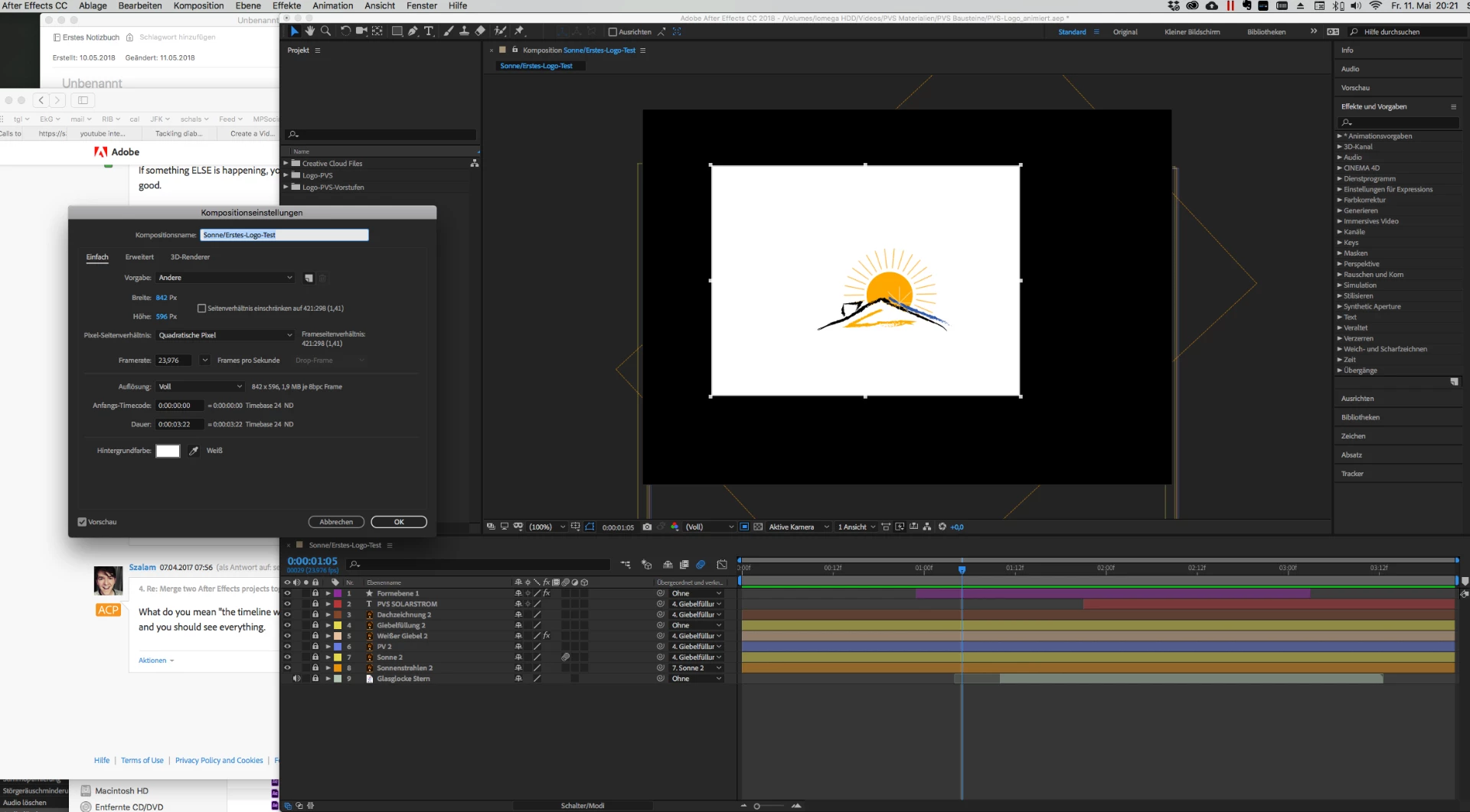
I made a first short video which I will merge with an other project. Unfortunately I set the wrong dimensions in the beginning. Please cf. screenshot. It's square brush 482:536, and I want to change it to 1920:1080 (Youtube's 9:16). But when I try, either the content becomes distorted, or everything gets awfully small. 🙂

How can I change the project dimensions, and then resize the whole project with its layers, without having to redo every relation between the layers?
This topic has been closed for replies.
Correct answer Andrew Yoole

Thanks, Rick, I already went through the tutorials and explanations there. But all those memberships and monthly payments are beginning to eat me up, so Lynda.com has to wait.

Meanwhile I will try to figure out what you meant by null and re-position.


Your "sun becomes an egg" comment means that you are changing the pixel aspect ratio of your comp.  You shouldn't be.  You mention YouTube as your delivery target, so you should be creating a comp that is 1920x1080 square pixels.

As mentioned above. you can use the Scale Composition script to rescale a comp.  But doing it manually may help to understand the process better.

*  Duplicate your original composition, so you still have the original if you break something.

•  Change the new composition settings to 1920 x 1080 SQUARE pixels.

•  Create a new Null Layer.  By default, it will be centred in the comp.

•  Select all layers that are not currently parented to another layer. (In your image above, thats layers 1, 4 and 9.)

•  Parent the selected layers to the new Null.

•  Scale and position the null until your comp layers are the correct scale and position.

•  Delete the Null layer if you want to.

You may need to adjust each layer one by one to correct any inconsistencies.

1 reply

Dave_LaRonde
Inspiring
May 11, 2018

You can make a 1920x1080, square-pixel comp at the frame rate you want to use for youtube, then you can select all the layers, copy them and paste them into the new comp.

BUT -- It appears that if you do this and scale up the layers that you will lose image quality.

stefanf51186509
Known Participant
May 11, 2018

Hi Dave, thank you. It took me a while to test this, and it was very interesting. But for my challenge it doesn't work - unfortunately now the content ist too small (same size as before, but in a larger frame), and the sun has become an egg ...

stefanf51186509
Known Participant
May 12, 2018

Beginners should start here: Basic AE

Make sure you vet your trainers. Most of the tutorial videos that are showing up on YouTube now are made by amateurs and a huge number of them don't know what they are doing. They promote inefficient and dead-end workflows and often give terrible advice. Before following along make sure that they know what they are talking about.

If you can scrape together a few dollars a Lynda.com membership is worth every penny, especially to a newbie...


Thanks, Rick, I already went through the tutorials and explanations there. But all those memberships and monthly payments are beginning to eat me up, so Lynda.com has to wait.

Meanwhile I will try to figure out what you meant by null and re-position.