


Change the source composition of a layer
I have a project structure as follows:
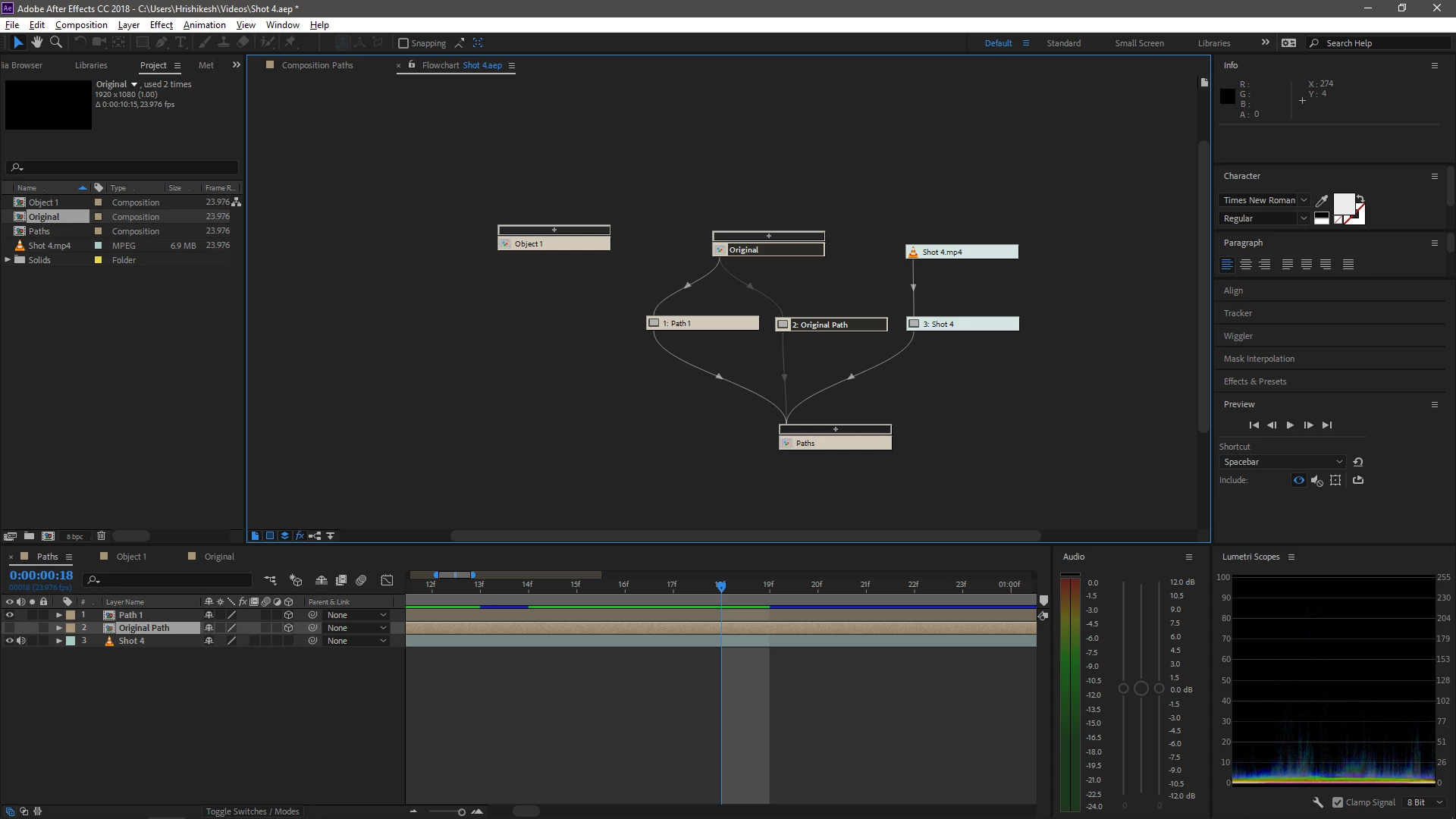
Going from the top, I have created a composition called 'Original' and pre-composed the layers in it - named it 'Original Path'. Then, I have made a new composition called 'Paths', added the pre-composed 'Original Path' composition in it as a layer, added some keyframes, 3D settings, etc. So, when I double click on 'Original Path' layer in the composition 'Paths', the composition named 'Original' opens. That's my base and I didn't want to disturb it and so, I duplicated the layer, named it 'Path 1'. Now, when I double click on 'Path 1', again the composition 'Original' opens up. So, if I make any changes in it, the changes are reflected in 'Original Path' and I don't want that. Thus, I made a duplicate of the composition 'Original' and named it 'Object 1'. However, I don't know how I can replace 'Original' with 'Object 1' when I double click on 'Path 1'. Basically, I want to edit the contents of the composition contained by the layer, but, keeping the original unchanged. How can I do it?
 AdChoices