


Exit
  • Global community
    • Language:
      • Deutsch
      • English
      • Español
      • Français
      • Português
  • 日本語コミュニティ
  • 한국 커뮤니티
0

Changing every single character's font size from another text layer with expressions

Community Beginner ,
Nov 30, 2021 Nov 30, 2021

Hi,


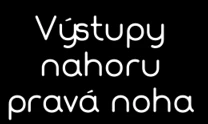
I have a problem with text expressions. I have a text layer which looks something like this:
jaroslavl44518579_1-1638304743116.png


You see the non-existant gap between ý and s? This is a font's bug and my solution every time is to put a space (" ") between them and lower the font size of the space so it looks something like this:
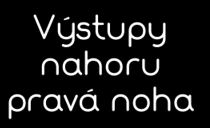
jaroslavl44518579_2-1638304977826.png

Well the problem is, that this text repeats itself.

I have a master comp where there is a text layer where i can change the text and here lies the problem. In compositions where the text layer is copied, I have it linked with the source text: comp("Uvod").layer("CVIK 1").text.sourceText and in the linked compositions in looks something like this: 

jaroslavl44518579_3-1638305310531.png

It uses the same font size for every character so the gap between ý and s is a normal space.

I need to link the font size of the master layer to the slaves. I have already tried to use this:

var sourceTextProperty = thisComp.layer("CVIK 13").text.sourceText
var newStyle = sourceTextProperty.getStyleAt(0,0);
newStyle.setText(sourceTextProperty);

but it looks like, it takes the style from the first character and applies it to all the characters and what I need is to transfer also the fontsize of the gap, which in the master's comp is much smaller font.


Yes, I can turn off the text.sourceText expression and copy the text in every comp but I'm trying to automate this issue, since once in a while this bug happens with the text font when I need to go in every single one of the compositions and turn off the expression and copy the text there. Is there any way to do this?


Thanks in advance.

TOPICS
Expressions , Scripting
1.4K
Translate
Report
Community guidelines
Be kind and respectful, give credit to the original source of content, and search for duplicates before posting. Learn more
community guidelines

correct answers 1 Correct answer

Community Expert , Dec 01, 2021 Dec 01, 2021

My solution, in this case, is to fix the font instated of keep finding a way every time in need to use the font, I face some similar issue before and I fix it by using a font editor and fixing the corrupted letter, there are a lot of font editor app like this free one https://fontforge.org/en-US/ 

Translate
LEGEND ,
Nov 30, 2021 Nov 30, 2021

No, there isn't. That's a limitation of the process. you don't have genuine access to the individual characters. as you already found out, this only realyl manipulates the properties fo the whole "block". The only real answer is to really find a better font as even your other glyphs look poorly balanced.. I'm sure you could find tons of similar ones, including full support for your Czech characters. Otherwise you could try to generate the text fully using source code and insert your space as a special character using stringFromCharCode() or similar methods, but it may be difficult to find the correct quarter/ third/ half spaces in fonts as they are not mandatory and many designers just don't define these glyphs.


Mylenium

Translate
Report
Community guidelines
Be kind and respectful, give credit to the original source of content, and search for duplicates before posting. Learn more
community guidelines
Community Beginner ,
Dec 01, 2021 Dec 01, 2021

Thanks so much for your answer, looking a new font isn't an option here since this font is everywhere, in every grafics on website, video, etc. But as other's pointed out, I will try to edit the font to fix that.


Translate
Report
Community guidelines
Be kind and respectful, give credit to the original source of content, and search for duplicates before posting. Learn more
community guidelines
Community Expert ,
Dec 01, 2021 Dec 01, 2021

My solution, in this case, is to fix the font instated of keep finding a way every time in need to use the font, I face some similar issue before and I fix it by using a font editor and fixing the corrupted letter, there are a lot of font editor app like this free one https://fontforge.org/en-US/ 

Translate
Report
Community guidelines
Be kind and respectful, give credit to the original source of content, and search for duplicates before posting. Learn more
community guidelines
Community Beginner ,
Dec 01, 2021 Dec 01, 2021

Thanks, I thought about doing this, but hoped it could be fixed within AE. 

Translate
Report
Community guidelines
Be kind and respectful, give credit to the original source of content, and search for duplicates before posting. Learn more
community guidelines
Community Beginner ,
Dec 01, 2021 Dec 01, 2021
LATEST

Thanks so much, it should be fixed now, the font forge really helped.


Translate
Report
Community guidelines
Be kind and respectful, give credit to the original source of content, and search for duplicates before posting. Learn more
community guidelines
Community Expert ,
Dec 01, 2021 Dec 01, 2021

If you can edit the Font OussK suggests I'd go with that option, but in case you can't do this, you could use:

text.sourceText.replace(/y s/g, "y  s");

This will add an extra space anywhere there is a "y s"


Translate
Report
Community guidelines
Be kind and respectful, give credit to the original source of content, and search for duplicates before posting. Learn more
community guidelines
Community Beginner ,
Dec 01, 2021 Dec 01, 2021

that extra space doesn't help, it makes this, the fontsize of the space needs to be lowered

jaroslavl44518579_0-1638379944896.png


Translate
Report
Community guidelines
Be kind and respectful, give credit to the original source of content, and search for duplicates before posting. Learn more
community guidelines