


Inspiring
March 23, 2022
Answered

changing the background color of 'project window' interface element

  • March 23, 2022
  • 1 reply
  • 807 views

Hi, i hope this makes sense.

i'm importing illustrator files into AFX and in the .AI files there are always layers of just stroked black lines and shapes.

when they appear in the window off the project window they can't be seen. i assume that is because the default background color for that thumbnail window(i don't know what's its official name is) is Black and the element on the imported layer is also black.

i have been recoloring all the black in Illustrator before importing and was wondering if there was another way.

can the background color of this interface element be changed?

i attached a screenshot of the issue and hope it shows what i'm talking about.

thank you for any help.
This topic has been closed for replies.
Correct answer nishu_kush

Hi martoons,


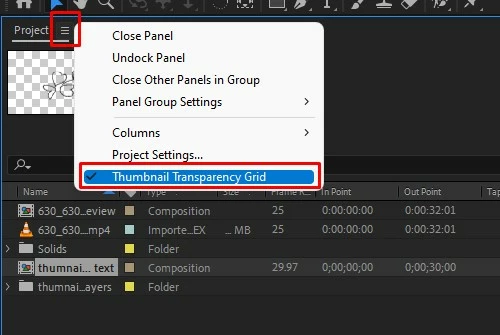
Sure there is a way. Click the hamburger menu of the Project panel and enable "Thumbnail Transparency Grid". Check out the screenshot for reference.

Let us know if this is what you're looking for.


Thanks,

Nishu

1 reply

nishu_kush
Community Manager
nishu_kushCommunity ManagerCorrect answer
Community Manager
March 24, 2022

Hi martoons,


Sure there is a way. Click the hamburger menu of the Project panel and enable "Thumbnail Transparency Grid". Check out the screenshot for reference.

Let us know if this is what you're looking for.


Thanks,

Nishu

martoonsAuthor
Inspiring
March 24, 2022

THAT'S IT!

Thank you very much.

And thank you for giving those 3 bars a name for me.

'Hamburger menu' is perfect.

G

nishu_kush
Community Manager
Community Manager
March 24, 2022

Glad to hear that helped. Thanks for updating the thread.

Feel free to reach out if there are any other questions.


Thanks,

Nishu