


Raymond_G
Participant
April 18, 2022
Answered

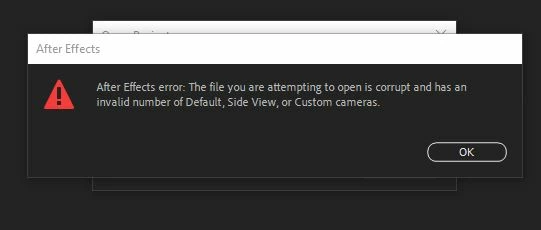
Corrupt file: invalid number of default, Side view or custom cameras.

  • April 18, 2022
  • 2 replies
  • 1084 views

after effects error: the file you are attempting to open is corrupt and has an invalid number of default, Side view or custom cameras.

Also appears in my autosaves.

Tried to import file into new project. Same issue.
The Main Comp is missing once project opens.
This topic has been closed for replies.
Correct answer RobinGillouin
I had the same problem just now on version 22.3. All my compositions were gone... 8 hours of work. Even on automatic backups!

I reinstalled version 22.2.1 and like magic, everything was back to normal!

Try downgrading your version, hope it works for you too! 

2 replies

RobinGillouinCorrect answer
Participant
May 9, 2022
I had the same problem just now on version 22.3. All my compositions were gone... 8 hours of work. Even on automatic backups!

I reinstalled version 22.2.1 and like magic, everything was back to normal!

Try downgrading your version, hope it works for you too! 
Raymond_G
Raymond_GAuthor
Participant
May 9, 2022

Hi RobinGillouin,

Same with me. An entire day of work gone and all my autosaves were "corrupt" as well.
Downgraded now to Version 22.3 and those "corrupt" autosaves are all working fine again.

Thank you.

Raymond_G
Raymond_GAuthor
Participant
May 9, 2022

Apologies I downgraded back to version 22.2.1 not 22.3

nishu_kush
Community Manager
Community Manager
April 18, 2022

Hi raymondg6203588,


Sorry for your issue.

What's the exact version of After Effects you're using? In which version of After Effects this project was created? Does it happen with multiple projects? If possible, please share the project file with us for testing. Feel free to DM me the download link.

We're here to help.


Thanks,

Nishu

Raymond_G
Raymond_GAuthor
Participant
May 9, 2022

Hi nishu_kush,

Thank you for your reply.
I am using Version 22.3.0 (Build 107)

I have managed to recreate the error.


So if I create two comps (Comp1 & Comp2) with a simple null that is 3D to activate the abilty to have 2 view ports of different angles open (Top/Active Camera View), I drag those two comps over the Create New Composition icon to create Comp3 as a Single Composition with a Still Duration of 0:00:00:00. I save the project and close. Then when I try re-open the project I get the error.

I have done this countless times in the past with no issue, other than in the latest version of AE.
Opening old projects gives me the same error where I used this method.
I haven't tried downgrading versions yet to see if the error still appears.

However, if I manually first create Comp3, by not dragging Comp1 and 2 over the Create New Composition icon. Then I drag Comp1 and 2 into Comp3, there are no issues.

I have attached the Test project file and a screen grab to help explain the situation.
Please let me know if I need to clarify anything further.

Thanks,
Raymond

OussK
Community Expert
Community Expert
May 9, 2022

I download your project and when I opened it I get the error then I just save it using the latest AE version 22.3 and then I open the project again and it opened without any error message, so try to update your after effects.