


Participating Frequently
February 3, 2022
Answered

Crashing while importing Photoshop files as Comps

  • February 3, 2022
  • 9 replies
  • 11828 views

I am having a problem where everytime I try to importat a Photoshop file as a Comp, it crashes.  I am import the same files as footage and they import fine.  It happens every time with all verisons of AE 22, up to 22.1.1.  The project it creates as a result of the crash as the comp created form the PS file, but nothing in it.   I have attached the crash warning.  anyone else seen this or found a solution?  My workaround it to importat each layer individually as footage.


Thanks,

Scott
Correct answer Saalvin Stephen

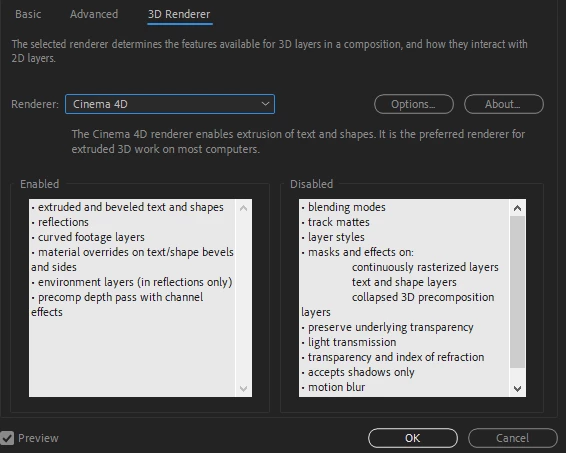
The fix is simple. Change the 3D Renderer from Cinema 4d to Classic Dd in composition settings 

All the layer settings are desabled in cinema4d renderer. Thats why its crashing.

Try this

9 replies

Participant
September 1, 2025

i try to import photoshop file but after effect crashes many times on same fike with different names.

nishu_kush
Community Manager
Community Manager
September 4, 2025

It could be the faulty file. Do you mind sharing it so that I can test on my end? Feel free to DM me the file if you prefer not to share it publicly.


Thanks,
Nishu

Participant
February 10, 2024

I tried to delete "AEGP" folder from "Plug-ins folder" and the psd file imported successfully.

There is some conflict between autodesk plugin and aftereffects.

Saalvin StephenCorrect answer
Participant
June 14, 2023

The fix is simple. Change the 3D Renderer from Cinema 4d to Classic Dd in composition settings 

All the layer settings are desabled in cinema4d renderer. Thats why its crashing.

Try this

DM_MSCH
Participant
June 14, 2023

I´m having the same problem, PSD Import freezes and crashes ae.
I´m not sure if the 3d Renderer is really the problem here, but where does one even change the
composition 3d Renderer on import? I always thought it imported as classic 3d by default.

Resetting the preferences works but how is that a solution? I can´t work on standard preferences, I need my custom preferences, some to allow plugins, some for workflow and some for company rules.
Someone said it has to do with the PSD being created on a Mac? Thats the case for me, our Team has both PCs and Macs. Please finally fix this.

Participant
February 10, 2024

Thank you! It worked!

Participant
November 25, 2022

Hey everyone, 
Been having this problem for a while, but I finally manage to fixed it. 

What I needed to do is uninstall AE and Media Encoder from the CC app, re-intall both softwares and when firt boot will ask if you want to migrate your preferences DO NOT transfer them. 
And the problem will be fixed. 


Greetings. 

Hope works for everyone. 

Participant
May 15, 2023

Works. Thanks. But 22 version have quicklier export PSD

Participant
November 10, 2022

Hi! I have the latest version of after effects (23.0) and it crashes every time, I can import layer by layer but not as a Compositon. It's getting very frustrating!

Participating Frequently
October 14, 2022

Hey I struggled with this today, I don't know if anyone still has the issue, but the workaround I discovered is using a plugin called Timelord from BattleAxe.  It allows you to effectively backend the programs and directly push layers from PS to AE.  Its made to do handframe animation I think, but this is a very useful feature in it and helped me solve my problem.  Its $45 on gumroad.

Hope this helps

Participant
November 2, 2022

Funny, I came here to find out why Timelord imports keep crashing AE. Windows 10 newest updates to all the Adobe line. I also can't import PS files as comps, only footage one layer at a time.

Participating Frequently
June 20, 2022

I am having the exact same problem at my work, where I use a Mac (can't say the computer's spcifications 'cause I'm at home right now).
And this issue just started ocurring suddenly last week. I tried updating everything to the lastest version, and nothing changed.
Now it just started happening at my home PC too (Windows 10, Intel Core i7-4790k, RAM 32gb, Nvidia Geforce 760). With the difference that it doesn't get to show the error message, it only keeps loading forever.
And the PS files I tried are in RGB and I tried with and without text layers.

Participating Frequently
June 20, 2022

Ok, I don't know what actually happened here, but I tried creating a random PS file with only some brush scribbles and importing as comp in AE and it worked.
Then I tried creating a new PS file, copying everything from the desired file, pasting it into the new one and importing back to AE. And for no seeming reason it worked.¯\_(ツ)_/¯

Participant
April 12, 2022

I don't know if you solve it but I was having the same issue, so the solution that I found was deleting the current version (22.2.1) and make a fresh install of the 22.0.0 version (You can make this within the Adobe Creative Cloud Desktop app). Since I have an iMac with M1 chip I thought the optimized version would work a little bit better, but no. 


Hope this can help you.


Community Expert
February 3, 2022

My first guess, something is going on in the Photoshop file. You have not provided any project or workflow details, AE version info, or system details so here is how to diagnose your problem.


Duplicate your Photoshop file and name the copy test. Open the file in Photoshop and verify that the color space is RGB. Check the frame size of the Photoshop file and make sure that it is reasonable for a video project. Take a look at all of the layers and look for Smart layers, 3rd party effects, or any other unusual things going on in a layer. Turn off or temporarily delete any suspicious layers, then save the file and try importing again. Keep deleting layers until you find the layer that is causing the problem.


When you figure out the problem layer try making changes that simplify things or use a different font. If you can't figure it out embed (please do not use the Drag & drop here feature) by copy and paste or use the toolbar to show us what is going on in the PSD. cropped screenshots are useless for diagnosing problems. We can probably help.

Participating Frequently
February 3, 2022

I don't think it is the .psd files, because I can import any layer as footage from any .psd file without a problem.  If a sumple 500x500 file with two layes, each a solid color in RGB space causes the problem.

Community Expert
February 3, 2022

Did you verify the PSD is RGB and not CMYK?

What build of AE? What OS? You have still given us nothing we can use to help you. I'm working on comps from PSD files nearly every day with no problems at all.