


Participating Frequently
September 13, 2012
Answered

CS6 Camera Tracker Points not Showing

  • September 13, 2012
  • 8 replies
  • 40975 views

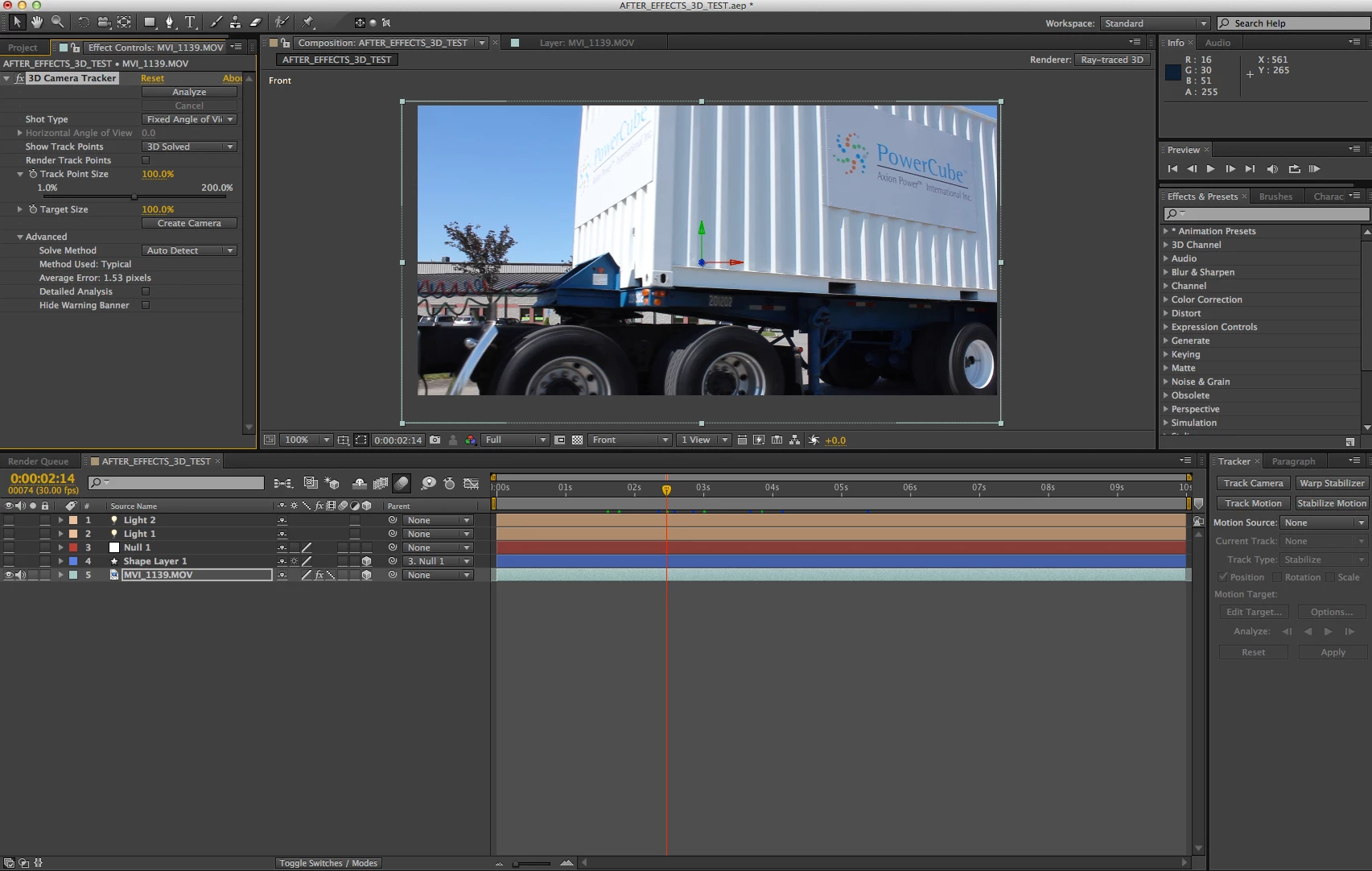
Hello, I am unable to get the points to show with the camera tracker. The tracking points show only when I check render track points but I am unable to move my mouse pointer over them to interact and assign anything to them. I have everything on the highest quality settings.

I attached a screenshot in case someone can see any setting I missed clicking on.

I have an iMac with:

Processor  2.4 GHz Intel Core 2 Duo

Memory  4 GB 667 MHz DDR2 SDRAM

Graphics  ATI Radeon HD 2600 Pro 256 MB

Software  Mac OS X Lion 10.7.4 (11E53)

Thank you,

Scott
This topic has been closed for replies.
Correct answer Felipe Ruiz Mendoza

I think I found the problem. I had it before, and it may be an easy one.

View>"Show Layer Controls

It is easy to hide them by mistake, and it hides your control points as well.

I hope this helps!

8 replies

hassek94492867
New Participant
July 3, 2020

It dosent show for me anyway. I have "active camera" on and "show layers control" selected. Still dont get any tracking points

Inspiring
June 11, 2020

It also seems to happen, when the tracker is unable to resolve parts in the beginning of the sequence. In that case, go to where the warning overlay starts to disappear and clip everything before. Then place the footage again, track, and splice the part you cut off back in.

New Participant
May 26, 2020

You're a legend, Felipe!

New Participant
February 11, 2018

You are a LIFE SAVER.

New Participant
December 24, 2017

Quite late to this, but the problem could also bee too much change in the video. I tried tracking a video with a lot of change in 40 frames and saw no points, but when i cut an 8-frame clip from the video and tracked, the points showed up

New Participant
May 18, 2016

few years late but that show layers control just saved me a stress tumour, couldn't find the solution anywhere else! many thanks

Felipe Ruiz Mendoza
Felipe Ruiz MendozaCorrect answer
New Participant
May 9, 2014

I think I found the problem. I had it before, and it may be an easy one.

View>"Show Layer Controls

It is easy to hide them by mistake, and it hides your control points as well.

I hope this helps!

mechaPhoneHome
Participating Frequently
June 16, 2015

Thats it!!!


Thanks!

Dave_LaRonde
Inspiring
September 13, 2012

Look at this....

...and this...

...and this, too....

...and as a reference, keep this handy.

Most AE features aren't very intuitive, and you need to get trained up.

Participating Frequently
September 13, 2012

Thank you Dave, I know how to use the camera tracker. The tracking points do not show up. I read in another thread to turn off open gl acceleration in my comp window to fix it but I do not see any settings in After XF to turn that off.

Thank you,

Scott

Dave_LaRonde
Inspiring
September 13, 2012

I just took a second look at your computer specs, and you only have 4 gigs.  That's nothing in AE terms.  You need to trick that thing out with memory.  I suspect you're tracking a clip that's longer than ever attemped before, and you're running out of RAM as AE analyzes the clip, leaving no track. points.

For now, turn off multiprocessing if it's on -- there's no way you can use it -- and you shouldn't have to worry about AE using Open GL; it's not an option any more.  Additionally, you should make sure your Radeon driver is fully updated; it too is a cause of AE not performing as advertised.