


Rafaaa
New Participant
April 26, 2021
Answered

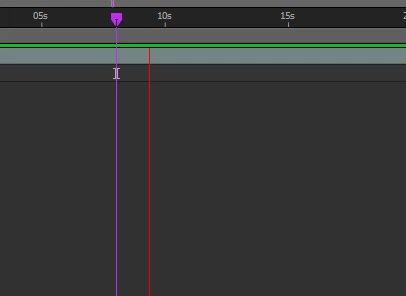
Current time indicator isn't moving when previewing video.
  • April 26, 2021
  • 2 replies
  • 9079 views

During the preview video Current Time Indicator (CTI) is not moving, but the thing that move is that Redline, does anyone know how to fix it? it is so annoying to see that Redline.

 

Correct answer nima38952709s3uk

Check the 'Show overlays and layer controls' button in the Preview window. (It has a square icon). It's as simple as that.

2 replies

nima38952709s3ukCorrect answer
Participating Frequently
January 14, 2025

Check the 'Show overlays and layer controls' button in the Preview window. (It has a square icon). It's as simple as that.

Igor Shipilov
New Participant
February 11, 2025

It really works, thank you a lot!

Roland Kahlenberg
Legend
April 26, 2021

What you are seeing is expected behavior or 'as designed'. The red line is the Preview Time Indicator. I don't think this behavior can be changed but you can try ALT+Click on the Reset Button (to the right of the Shortcut Menu) in the Preview Panel and see if this works for you.

Very Advanced After Effects Training | Adaptive & Responsive Toolkits | Intelligent Design Assets (IDAs) | MoGraph Design System DEV
Rafaaa
RafaaaAuthor
New Participant
April 26, 2021

Sadly this is not work :c

Roland Kahlenberg
Legend
April 27, 2021

Thanks for the update. For what it's worth, I've not heard of anyone that's complained of the Preview Time Indicator. Perhaps it's a better idea to get used to it and to better appreciate its purpose which is to provide a preview time indicator while keeping the CTI independent since there is an option to stop the preview where the CTI is placed. Hence, the CTI provides a landmark position so you know where the preview will stop; depending on which shortcut you use to stop the preview. HTH

Very Advanced After Effects Training | Adaptive & Responsive Toolkits | Intelligent Design Assets (IDAs) | MoGraph Design System DEV