


Answered
Current time indicator isn't moving when previewing video.
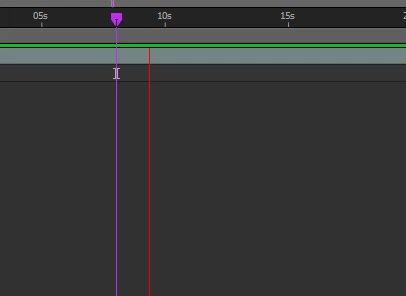 During the preview video Current Time Indicator (CTI) is not moving, but the thing that move is that Redline, does anyone know how to fix it? it is so annoying to see that Redline.

During the preview video Current Time Indicator (CTI) is not moving, but the thing that move is that Redline, does anyone know how to fix it? it is so annoying to see that Redline.
Check the 'Show overlays and layer controls' button in the Preview window. (It has a square icon). It's as simple as that.
Already have an account? Login
Enter your E-mail address. We'll send you an e-mail with instructions to reset your password.
 AdChoices