


Participant
October 16, 2022
Question

DINAMIC LINK

  • October 16, 2022
  • 2 replies
  • 185 views

HELP I GOT NO CLUE WAS GOIN ON I LOSE COLOR AND DETAILS FROM PREMIERE TO AE using ADOBELINK PLEASE ANY CLUE
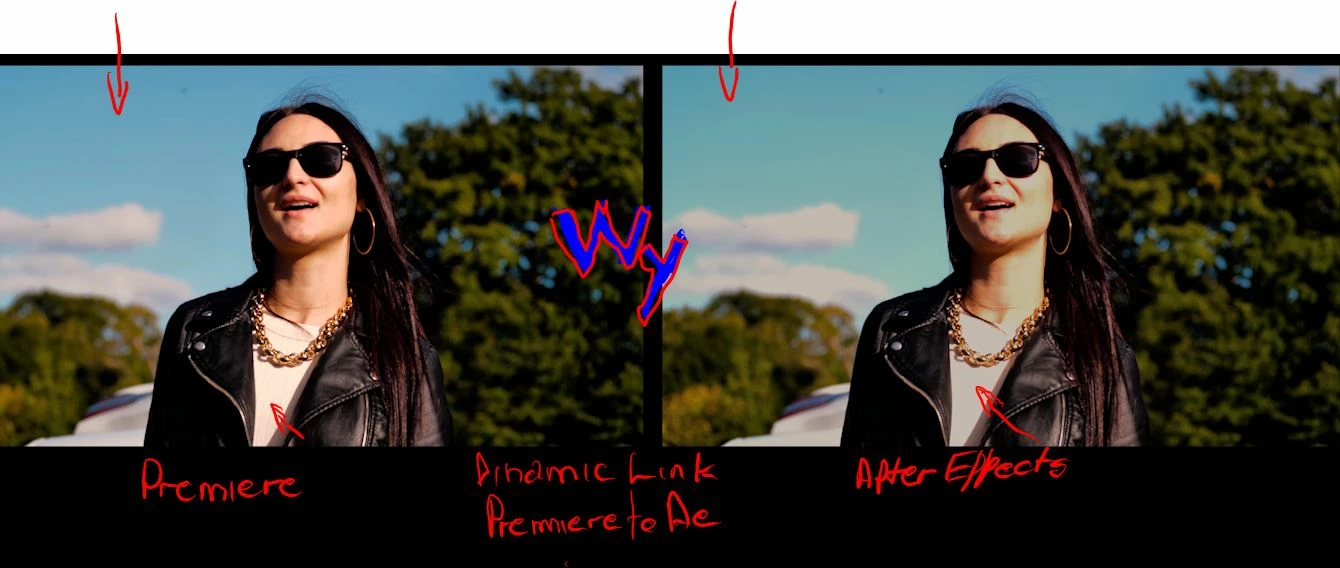
 ALL Version from 2020 until now on win 10 and mac<wen using lumeri (wich has no Highdinamic range box in AE) for no reason thas the econd thing i need to ask and the is to diferit image form premiere to AE usig nothing just "REPALCE WITH AE COMP" IS over expose in details you can not see them color is sifting,expose to all WY please help HOW TO FIX IT

This topic has been closed for replies.

2 replies

Mylenium
Legend
October 17, 2022

Without any info about your system, color settings, settings for hardware acceleration and so on we can't tell you much. To me it simply looks like you're messing up your 32bpc workflow because you haven't set up AE's color management options accordingly. That could easily explain the yellowish cast and the colors clipping out. Either that or your system's graphics hardware is not enough for Lumetri. Anyway, you need to provide much better information.


Mylenium

Community Expert
October 16, 2022

After you make your changes in AE save in AE and render that section in Premiere to see if the color comes back. It might just be the display not keeping up because of the linking.