New Participant
April 9, 2020
Answered

Drawing a 3-D line plot / path using x,y,z coordinates read-in from a csv file

  • April 9, 2020
  • 3 replies
  • 1887 views

Hey all, I hope someone can please give a neat answer to this thing I think should be trivial.

Firstly I'm a planetary scientist who animates for educational purposes on the side, so I'm coming from a kinda plotting/coding/data analysis background. The task below I thought would be super easy to do, but after asking two AE pros, checking maybe 50 pages of different websites, I've still no idea how to do it. (This is the first forum post I've made since 2006 or so, I really tried!)

1. I'm reading .csv with x,y,z coordinates for an object. In this case, the orbit of a satellite around a planet 
2. I can make the satelitte move in x,y,z... no problem
3. BUT... is it possible to use that same data (from 2.) to plot a line in 3d space to represent its orbit? The line ideally would also be 3d itself, or at least just stay the same thickness when panning around it with a camera.

I have a hacky way to do it with an add-on -- particular -- to generate particles along the path. I only did that on their 2-week trial though, and would like to do it with AE's own functions. 

Cheers! James

This topic has been closed for replies.
Correct answer JohnColombo17100380

Hi James,

This is John from the After Effects Engineering team. What you're looking to do is definitely possible with AE's native effects. You'll be able to build something which is similar to the approach you've already taken, but using the native CC Particle World effect instead of Particular, linking its Producer point to a Null which is already moving based on the .csv data.

The main "gotcha" with linking the Producer to the Null is that the X, Y, and Z Positions of the Producer aren't calculated in comp-space pixel values. You need an expression on each one doing slightly different calculations to correctly link the emitted particles to the location of the Null layer. Use the following the expression on the Position X, Y, and Z property in CC Particle World's "Producer" group to link them all to the layer defined on line 2. You will need to edit the layer name or pickwhip your Null so that it is defined as the "targetLayer" variable:


// Set the target layer whose Position path is determined by the data
var targetLayer = thisComp.layer("3D Null - Position is from Data");

// Find the targetLayer's location in 3D world space at the current time
var worldPosition = targetLayer.toWorld( targetLayer.anchorPoint, time );

// Check the index of the property and compute final expression
// for the correct X, Y, or Z axis
switch ( thisProperty.propertyIndex ) {
	case 17:
		( worldPosition[0] - thisComp.width / 2 ) / thisComp.width;
		break;
	case 18:
		( worldPosition[1] - thisComp.height / 2 ) / thisComp.width;
		break;
	case 19:
		worldPosition[2] / thisComp.width;
		break;
	default:
		throw [ 
			"Please only apply this expression to the X, Y, or",
			"Z Positions of a CC Particle World Producer."
		].join(" ");
}


I used a "switch" statement to make sure the expression does the right calculations on each property.


From there, the general approach is the same as with any particle effect drawing a line:

  • Set the Birth Rate high enough that no gaps are shown.
  • Set the Longevity high so that the particles don't fade away ( usually the length of the composition works well ).
  • Set nearly all the properties in the "Physics" group to zero so that your particles don't leave the path after they've been emitted ( unless this is part of the look you're going for. )


Please let us know if you encouter any issues with this setup or the expressions involved.


EDIT: I've attached a .gif of a camera orbiting the 3D path made by CC Particle World. The graph axes are Shape layer paths linked to 3D Nulls so that they are camera-aware, and the ground plane is a 3D Solid laid flat with the Grid effect applied.
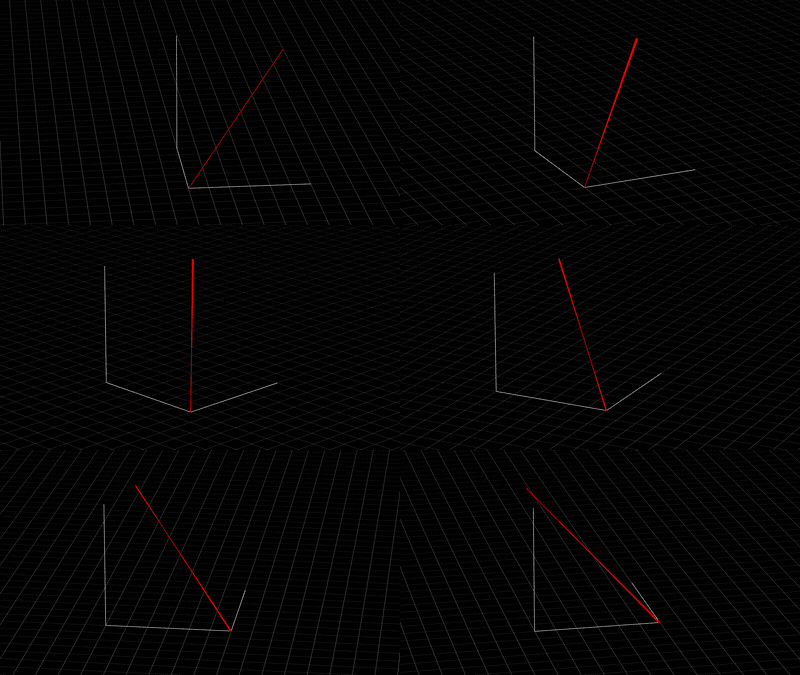


Thanks so much,

- John, After Effects Engineering

3 replies

JohnColombo17100380
Community Manager
JohnColombo17100380Community ManagerCorrect answer
Community Manager
April 10, 2020

Hi James,

This is John from the After Effects Engineering team. What you're looking to do is definitely possible with AE's native effects. You'll be able to build something which is similar to the approach you've already taken, but using the native CC Particle World effect instead of Particular, linking its Producer point to a Null which is already moving based on the .csv data.

The main "gotcha" with linking the Producer to the Null is that the X, Y, and Z Positions of the Producer aren't calculated in comp-space pixel values. You need an expression on each one doing slightly different calculations to correctly link the emitted particles to the location of the Null layer. Use the following the expression on the Position X, Y, and Z property in CC Particle World's "Producer" group to link them all to the layer defined on line 2. You will need to edit the layer name or pickwhip your Null so that it is defined as the "targetLayer" variable:


// Set the target layer whose Position path is determined by the data
var targetLayer = thisComp.layer("3D Null - Position is from Data");

// Find the targetLayer's location in 3D world space at the current time
var worldPosition = targetLayer.toWorld( targetLayer.anchorPoint, time );

// Check the index of the property and compute final expression
// for the correct X, Y, or Z axis
switch ( thisProperty.propertyIndex ) {
	case 17:
		( worldPosition[0] - thisComp.width / 2 ) / thisComp.width;
		break;
	case 18:
		( worldPosition[1] - thisComp.height / 2 ) / thisComp.width;
		break;
	case 19:
		worldPosition[2] / thisComp.width;
		break;
	default:
		throw [ 
			"Please only apply this expression to the X, Y, or",
			"Z Positions of a CC Particle World Producer."
		].join(" ");
}


I used a "switch" statement to make sure the expression does the right calculations on each property.


From there, the general approach is the same as with any particle effect drawing a line:

  • Set the Birth Rate high enough that no gaps are shown.
  • Set the Longevity high so that the particles don't fade away ( usually the length of the composition works well ).
  • Set nearly all the properties in the "Physics" group to zero so that your particles don't leave the path after they've been emitted ( unless this is part of the look you're going for. )


Please let us know if you encouter any issues with this setup or the expressions involved.


EDIT: I've attached a .gif of a camera orbiting the 3D path made by CC Particle World. The graph axes are Shape layer paths linked to 3D Nulls so that they are camera-aware, and the ground plane is a 3D Solid laid flat with the Grid effect applied.


Thanks so much,

- John, After Effects Engineering

New Participant
April 11, 2020

Hi John,

This is amazing support, thank you so much! You gave the code and even a gif to show it works, so nice!

I will give this a go today 🙂

Cheers,
James

Braniac
April 10, 2020

Turning 3D coordinates into a 3D motion path may be possible but since AE's 3D world has no Z depth on a layer getting a 2D path from X and Y coordinates would be a lot easier. You could then add Z information on a separate layer. 


The person that could probably answer this question right off the top of his head would be Dan Ebberts. You might want to try searching the forum for his posts or send him a PM. I'm sure he will respond if he has the time. I don't know anybody better equipped to handle this kind of problem. 

Mylenium
Braniac
April 9, 2020

AE doesn't do any genuin e 3D geometry beyond the extruded text. Your approach using Particular is spot on. Alternatively you could of course also use Trapcode TAO for geometry-based paths. Otherwise this is simply a case of "You may be wasting your time with AE." You will always run into these limitations somewhere, be that the actual data input, rendering the data or things like hitting limits on particle counts, resolution etc.. In the long run you may not be able to avoid moving on to genuine 3D programs or building custom plots with MathLab or whatever.


Mylenium

New Participant
April 10, 2020

Hey Mylenium, this is good to know! Sometimes it's simply difficult to know "if something is known at all".  

I don't really want to pay for trapcode etc just for this one thing, but maybe I could find other functions I like with it.

Do you think Blender could handle this easier?

Thanks for your answer!
James

Mylenium
Braniac
April 10, 2020

I'm sure Blender can do this on some level, though I don't have much experience how to create custom generators using Python or manipulate the basic particle system this way (along with my overall knowledge of Blender being rather spotty). I'm sure if you do a bit of digging on Blender-centric forums you can get that answered easily.


Mylenium
