


Inspiring
October 4, 2025
Answered

error message - unable to start after effects 2025 on Macbook Pro M4 (2024)

  • October 4, 2025
  • 4 replies
  • 640 views

Hi Adobe Experts

can't start Adobe after effects on my new macbook pro M4 - always get the same error - see my attached warning and shutdown-message by starting the tool. - thanx for some helping adivces how to start -


i did already the safe start - don't work also i've deleted every not compatable plugins. -

deleted also every older versions - no chance - thanx for help. 


adobe tutorials and online help desks dont show helpful answers and guidance. -


This is the error message:


 Zuletzt protokollierte Meldung: Transmit plugin „DeckLinkTransmit“ ist während des Aufrufs von „tmResult ML::TransmitEntry::Startup(const dvacore::UTF16String &, const tmModule *, tmStdParms *, tmPluginInfo *)“ abgestürzt.. 
 

Correct answer Schmidtworks

Hey Folks


Solution for the problem is found.

Now both tools are able to launch: Premiere Pro 2025 and After Effects 2025 on Macbook Pro M4


This is the path to bugfix.

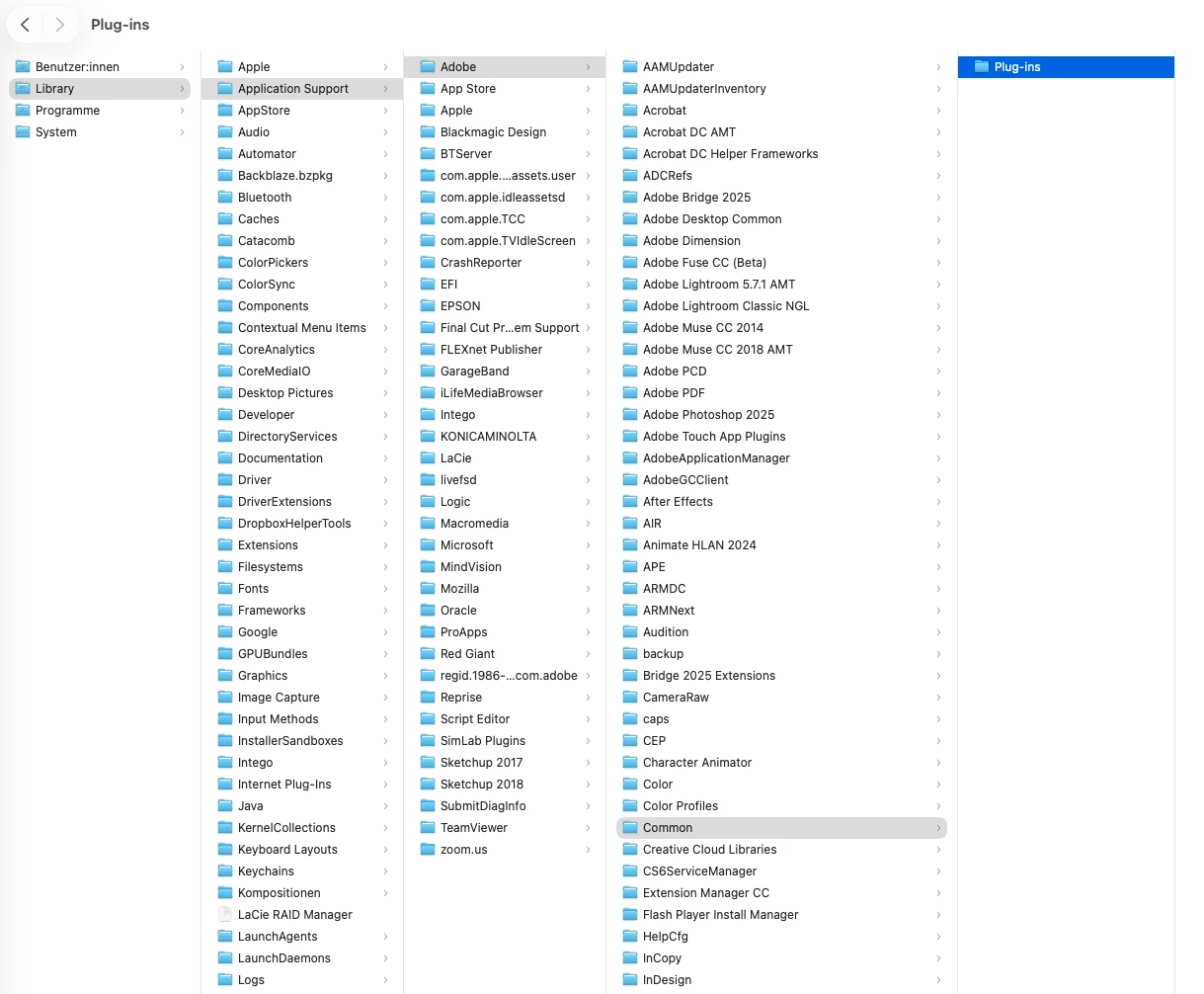
delete the content in the "plug-ins" folder - following this path:

Library/Application Support/Adobe/Common/Plug-ins -

then the content inside this folder "plug-ins" should be checked and deleted. 


good to know 😉 - see added screenshot.


4 replies

bbb_999
Adobe Employee
Adobe Employee
October 6, 2025

The message you're seeing says that Blackmagic's Transmit plugin is crashing. 


SchmidtworksAuthorCorrect answer
Inspiring
October 4, 2025

Hey Folks


Solution for the problem is found.

Now both tools are able to launch: Premiere Pro 2025 and After Effects 2025 on Macbook Pro M4


This is the path to bugfix.

delete the content in the "plug-ins" folder - following this path:

Library/Application Support/Adobe/Common/Plug-ins -

then the content inside this folder "plug-ins" should be checked and deleted. 


good to know 😉 - see added screenshot.


jane-e
Community Expert
Community Expert
October 4, 2025

@Schmidtworks 


Duplicate posts merged to one thread


Jane

Inspiring
October 4, 2025
Hi Adobe Experts

I can't launch Premiere Pro 2025.
See attached screenshot.

Creative Cloud and all Adobe applications are up to date and are constantly updated.
The programs should run stably and crash-free on a latest-generation MacBook Pro M4 (2024).

I urgently need qualified troubleshooting and support.


Inspiring
October 4, 2025

these are the hardware facts of my Macbook Pro M4 - if relevant ?!

Inspiring
October 4, 2025

Hi Adobe Experts


can't start Adobe after effects on my new macbook pro M4 - always get the same error - see my attached warning and shutdown-message by starting the tool. - thanx for some helping adivces how to start - i did already the safe start - don't work also i've deleted every not compatable plugins. - deleted also every older versions - no chance - thanx for help. 


if possible send me your solution path al