


New Participant
March 18, 2019
Answered

Exporting WebM with a transparent background and glow

  • March 18, 2019
  • 5 replies
  • 189040 views

So, I made alerts for my Twitch channel awhile back that were perfect, but now I can't remember how I exported them. I want a WebM that when exported it supports varying levels of opacity of transparency so that it exports looking like this:

Not like this:

I need it to be WebM so that's it supported by the website I'm uploading my alerts to (Streamlabs).

I'm using Adobe Media Encoder to export it, here are the settings I thought would work:
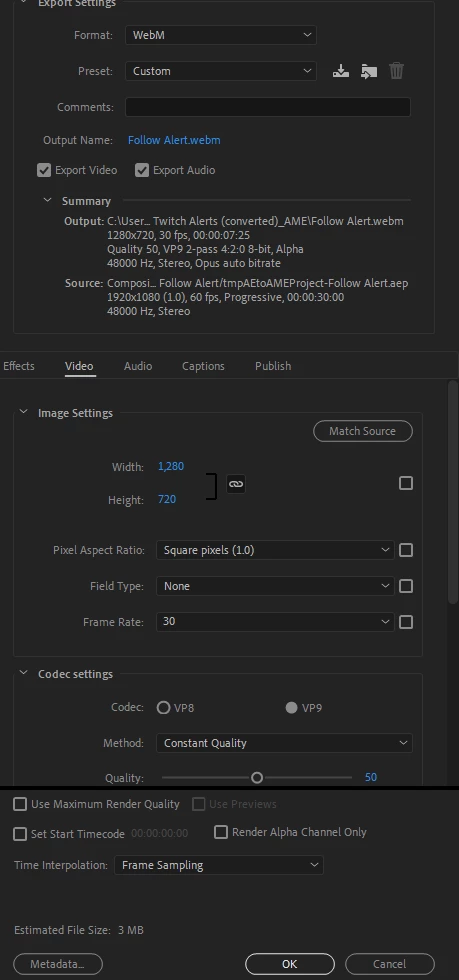
Let me know how I can make this work.

Just to clarify: I want the background to be transparent and have a glow still on some objects.
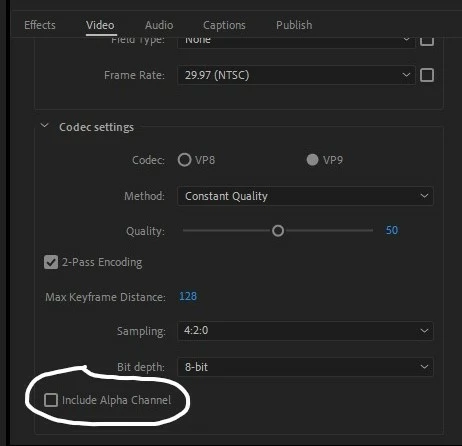
    This topic has been closed for replies.
    Correct answer Scuffed Productions

    I just want to vouch this fix. Got a webm with alpha. File was still a bit bigger than expected. (3.2mb) on a 2 second transition, but I am sure I could have tweeked it. My assumption here is the author has not updated the adobe exchange to the latest version and some change in the version is hiding the alpha checkbox. By going back to v14.3 and using legacy install from creators website I was able to get the desired result. Thank you for the fix. I'll stay on this version until I know there is an update to the plug-in.

    5 replies

    Known Participant
    January 11, 2021

    I was attempting to do this on my end and unfortunately this fix is no longer working. Must have been an update?

    - Kale
    Participating Frequently
    January 12, 2021

    Do you mean seeing the "Include Alpha Channel" box? Whenever Media Encoder updates it keeps disappearing. I have to keep re-installing the codec whenever there is a new update in order for that box to come back again. Try that? (Annoying, I know, *sigh*) 

    Known Participant
    January 16, 2021

    I'm to a point where I just went ahead and I disabled Automatic Updates/. If I need to use a program. I'll check for an update before I try using it...

    - Kale
    danielcarino
    New Participant
    August 14, 2020

    In case someone is revisiting for 2020 this with the Adobe Me update 14.3.1 this happened again.

    I reverted back to  Me v14.3 uninstalled and i actually took off the adobe exchange version of the plugin and went to the same maker's site directly and used the legacy installer. This made it much easier to uninstall and reinstall till I saw the checkbox again, since the newest updates to adobe makes it really annoying to find the exchange unlike before from the CC desktop app like it used to when it was the smaller version.

    Also YES, webm does support alpha channels, I've done this for multiple streamers including rebrands of my own streeam 5 times using webm it DOES support alpha, so i'm sorry Vinay_D you need to update your responce as it's giving false information on the codec. Even with the base settings of being in 4.2.0 rather than 4.4.4 all my exports when using the Include Alpha. Also as far as "use a format that supports it." Webm for Streaming is the lightest and results in lowest latency for streaming in terms of data transfer for streaming a lot of the other alpha supporting codecs are too high in file size to transfer and will cause skipped frames and or just laggy stream. 

    New Participant
    August 19, 2020

    Out of curiosity, how do you roll back to the 14.3 from 14.3.1? I'm having the same issue, exporting to webm, but cant get the alpha channel to work because i need webm for streams

    New Participant
    August 25, 2020

    You go to the cloud app. Click the three dot menu next to Me and select other versions. Click the version you want and it will uninstall the current and replace it.

    New Participant
    September 17, 2019

    I'm using Adobe CC 2019 and I don't have the WebM as an option in Media Encoder 😞

    New Participant
    September 25, 2019
    To do this you can download the webm plugin for either premiere or AME here: https://www.fnordware.com/WebM
    New Participant
    April 8, 2019

    I had similar issues with .webm exports. Or so I thought until recently. For me at least it was a simple oversight, not with the file itself but how I previewed the export. What software are you using to preview your file, and are you certain it properly supports .webm preview?

    Here's the same file previewed in VLC and OBS.

    VCL:

    OBS:

    New Participant
    August 5, 2019

    That is proper answer! Browsers and streaming platforms read this format very differently than normal media player.

    OussK
    Community Expert
    March 19, 2019

    you must select the Include alpha channel from the video settings

    New Participant
    March 21, 2019

    But that's the thing. I tried that, but that second picture is what happens when I export it, even with include alpha channel checked.

    Vinay Dwivedi
    Adobe Employee
    Adobe Employee
    March 21, 2019

    WebM format doesn't support Alpha channels. So, use any format that supports alpha like Quicktime and then convert it to WebM.