


Participating Frequently
January 31, 2020
Answered

expression result must be of dimension 2 not 1+sourceReacTatTime

  • January 31, 2020
  • 3 replies
  • 41853 views

Hi I'm trying to create a responsive textbox

Eventhough Im following EAbrahams instruction I got the following

message

this script is under shape layer, Rectangle/Rectangle Path/ Size and 'text' is the text layer

t=thisComp.layer("text").sourceRectAtTime();
w=t.width;
h=t.height;

(w,h)

expression result must be of dimension 2 not 1
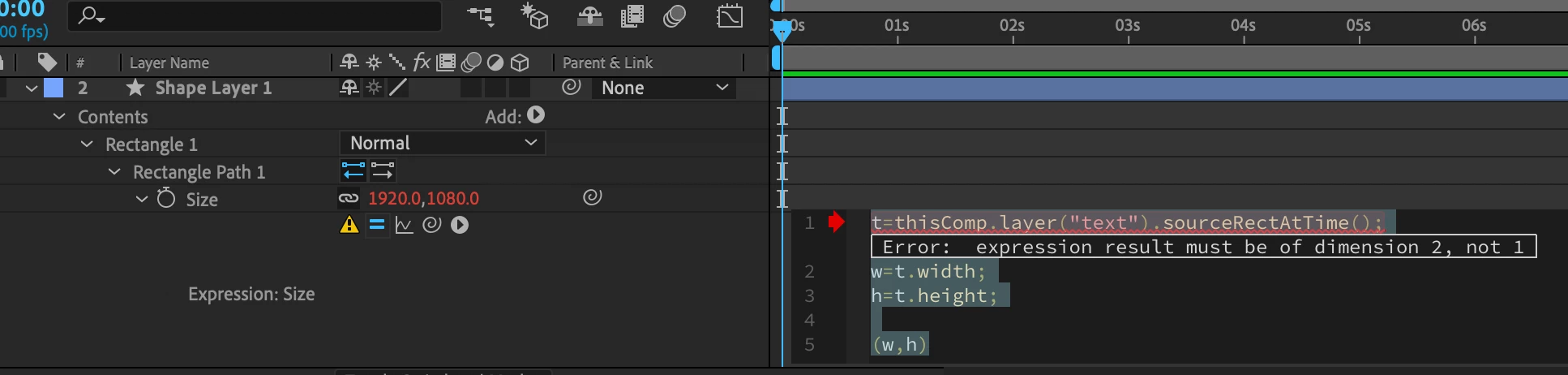
where is the bug in this ?

even if I try other the other guys script(https://www.youtube.com/watch?v=CVliDoNgoCg)

var t=thisComp.layer("text");
var w=t.sourceRectAtTime().width;
var h=t.sourceRectAtTime().height;

(w,h)

I got the same "expression result must be of dimension 2 not 1" message, Im a noob, but this is surreal.

If anyone have an idea, it would be appreciated.

Correct answer Roland Kahlenberg

Use square brackets [ ] when defining an array. So, type [w,h] instead of (w,h).

3 replies

Participating Frequently
June 21, 2023

Hello everyone, I have a similar problem! I have been following the tutorial that I've linked below to create a responsive text box animation because i wanted to change the width through the timeline smoothly. 


In the video, he wrote the following expressions on the scale;


originalBoxWidth = 1920;
targetWidth = effect("Textbox Width")("Slider");
s = targetWidth / originalBoxWidth;

value = s;


I followed the tutorial perfectly until this point and I got the "expression result must be of dimension 2, not 1" error on the first line but on the video it works just fine. 


I am new to the expressions and need some guidance to work this out. I couldn't find any other tutorial for the said effect so if you could recommend another way, it is also appreciated. 


https://www.youtube.com/watch?v=FpVPabZw3vU


Thank you!

Mugen777
Inspiring
June 21, 2023

Short answer, last line is "value * s" so you misread that ^^ 

Long answer that can help you in the future, some values like position are not singular values like 1 or 5 etc, they are "coordinates". (I probably remember the name wrong but it's been a while :/) 

As you can see, scale is (X,Y) in this case, so the expression should give a similar result as well. When you write "value = s", the value become a singular number which leads to that specific error. 

For beginners that error is something you can see frequently, so I wanted to explain what you should look for next time you see it and hopefully fix it yourself with ease. 

Good luck ^^ 

Participating Frequently
June 23, 2023

Thank you so much; I never realised the typo there! Also, thank you for the explanation; it made me understand the concept better and helped a lot!

Best wishes!

Mugen777
Inspiring
January 31, 2020

As far as i know, you should use square brackets "[]" instead of normal brackets "()". 

Roland Kahlenberg
Roland KahlenbergCorrect answer
Brainiac
January 31, 2020

Use square brackets [ ] when defining an array. So, type [w,h] instead of (w,h).

Very Advanced After Effects Training | Adaptive & Responsive Toolkits | Intelligent Design Assets (IDAs) | MoGraph Design System DEV
Participating Frequently
January 31, 2020

thanks 🙂