



Expressions : accessing Text property (fontSize) from another layer
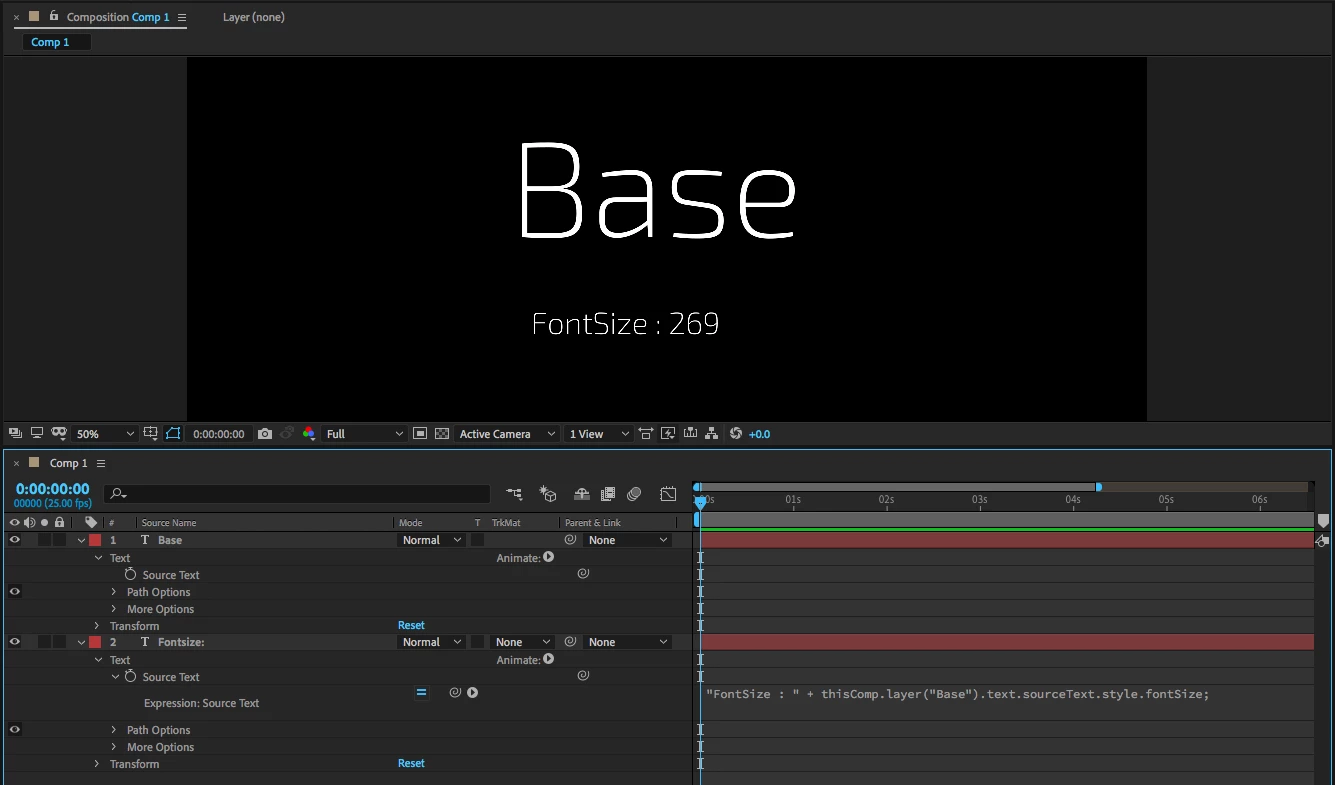
I'm trying to read the font size of one Text layer ("Base") to another Text layer ("Target").
When I use the following on the sourcetext of the Base layer, it returns the font size - as expected - in its own layer (of course) :
style.fontSize;However, when I try to read this property to the Target layer, by using the following on the sourcetext of layer Target, I keep getting an error "Cannot read property 'fontSize' of undefined". I've tried various permutations of the syntax, but no luck.
// First try, no luck. Error.
"FontSize : " + thisComp.layer("Base").style.fontSize;

//Maybe it needs the sourceText property? Nope, no luck either. Error
"FontSize : " + thisComp.layer("Base").sourcetext.style.fontSize;

//Maybe I need to specify it's a property of Text? Hmm, that returns "undefined" but no error.
"FontSize : " + thisComp.layer("Base").text.sourceText.style.FontSize;

//What if it's a property of Text directly? Let's see ... Error.
"FontSize : " + thisComp.layer("Base").text.style.FontSize;
I'm running out of options here.
Sure, I could add a Controller Null layer with an expression Slider control, and then add this in the sourcetext of every layer that use that size, but just like BurgerKing : "I want it my way .." 😉
style.setFontSize(thisComp.layer("Null 1").effect("Null - Fontsize Control Slider")("Slider")); Is it a bug? Am I asking too much?
Anyone? Anyone? Bueller? Anyone? 😉
 AdChoices