Yiannis72
Inspiring
June 20, 2015
Answered

Frame blending icons explanation

  • June 20, 2015
  • 2 replies
  • 30785 views

Hello!

     In Adobe After Effects CC 2014 I cannot understand which of the following icons is for advanced pixel motion blending method. Could you help me on this?

I am attaching the relevant picture files.

Thank you!!

Yiannis.
This topic has been closed for replies.
Correct answer adamneer

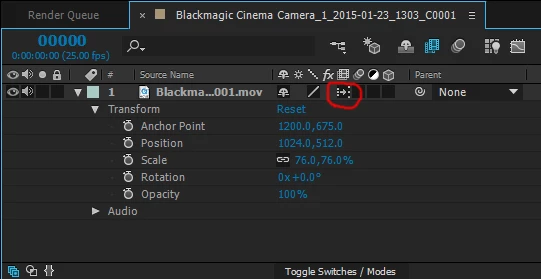
I believe picture 1 (the film frames icon) indicates standard tweened frame blending (combined frames using dissolved opacity)

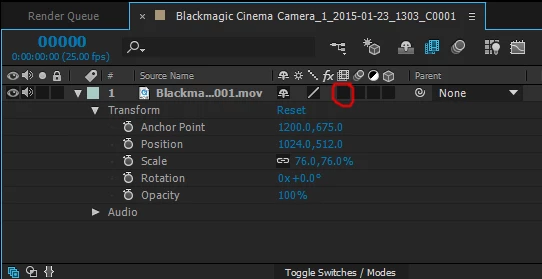
picture 2 (forward arrow icon) indicates pixel motion frame blending

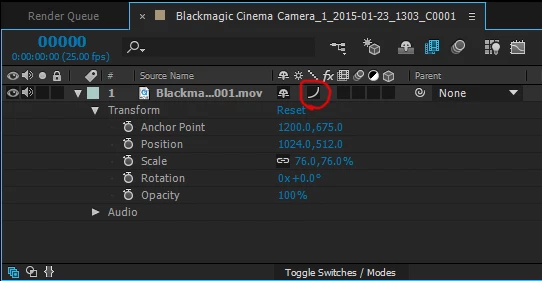
picture 3 means no frame blending enabled

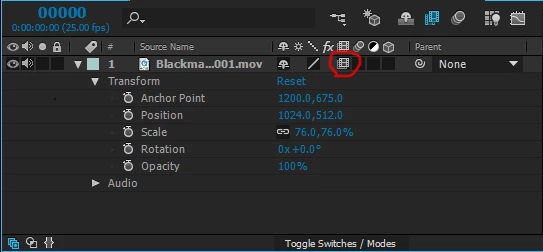
picture 4 (curvy line) indicates bicubic sampling for layer quality.  This is a newer feature added in 2014 which greatly improves the quality of scaling/rotating a layer.  I always enable this for any scaled or rotated footage.

2 replies

adamneer
adamneerCorrect answer
Participating Frequently
June 21, 2015

I believe picture 1 (the film frames icon) indicates standard tweened frame blending (combined frames using dissolved opacity)

picture 2 (forward arrow icon) indicates pixel motion frame blending

picture 3 means no frame blending enabled

picture 4 (curvy line) indicates bicubic sampling for layer quality.  This is a newer feature added in 2014 which greatly improves the quality of scaling/rotating a layer.  I always enable this for any scaled or rotated footage.

Mylenium
Brainiac
June 21, 2015

Adam is correct. This is also explained in the help files, though it seems the page hasn't been updated to include all info:

After Effects Help | Managing layers

Mylenium

Inspiring
June 21, 2015

Mylenium wrote:

Adam is correct. This is also explained in the help files, though it seems the page hasn't been updated to include all info:

After Effects Help | Managing layers

Mylenium

Thanks, guys! I knew what they meant back when they were still the solid slash and the dotted slash, but Adobe changed the icons with CC2014 (I think it was CC2014?); at the time, I actually went searching for an explanation of the icons online,but couldn't find anything.

Inspiring
June 20, 2015

I find this super confusing, as well. Can anyone enlighten us?