


Known Participant
May 1, 2023
Question

Have Shape Curve Along A Path Turning.

  • May 1, 2023
  • 2 replies
  • 829 views

Hello.👋


- I created a Path for a Shape to follow. The path has height and width.

(Custom View (from the Top))
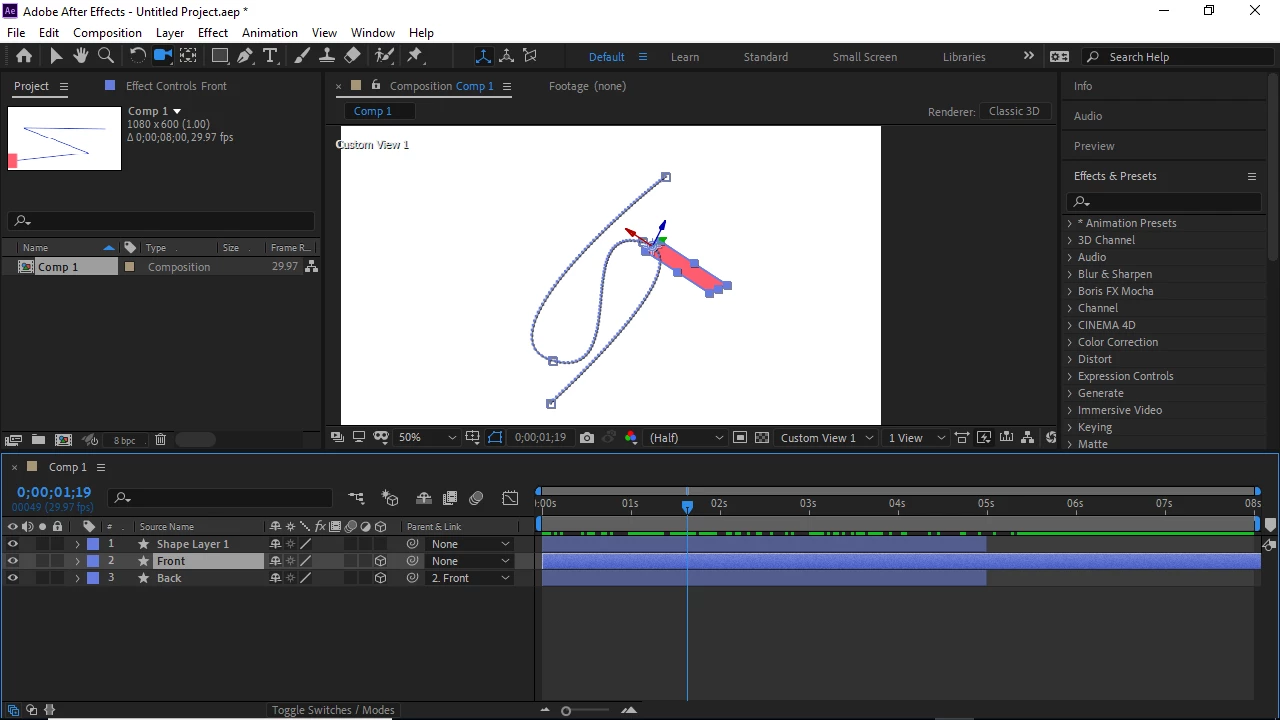
 

- When the shape gets to a turning point, I want it to curve along the path; something of this nature.

 

I want the whole body of the shape to move along the path, not just the anchor point. Is this possible to execute?

This topic has been closed for replies.

2 replies

Adobe Expert
May 2, 2023

Are you matching the movement to a bent layer using the C4D Rendering engine? I that is the case, you'll have to open at least two views, Active Camera and Top or Left, then you'll have to manipulate the path to follow the curve.


If you are just using the Classic 3D rendering engine, you still have to use two views to create the curved motion path. It takes some fiddling, but it can be done. 


You can also use parenting and a null at the center of the arc. 


Unfortunately, there is no easy way to draw a path on a curved layer and have another layer follow that curved path.

Adobe Expert
May 1, 2023

I'd try selecting the layer in the timeline and go to the top of the interface/Layer/Transform/Auto Orient/Orient along path. You may have to rotate your graphic to get it to face the right way.