

purnesho22022000
Participant
January 11, 2019
Answered

How can i Render Faster In After Effects Using GPU? I am Using Nvidia GTX 1050Ti Graphic Card.

  • January 11, 2019
  • 3 replies
  • 1876 views

How can i Render Faster In After Effects Using GPU? I am Using Nvidia GTX 1050Ti Graphic Card.

    This topic has been closed for replies.
    Correct answer imeilfx

    Short asnwer: You can't.
    Lobnger:  AE is a piece of software that is mostly using CPU for rendering so there is nothing that you can do to delegate tasks that CPU is taking care of to your GPU because that is not possible.
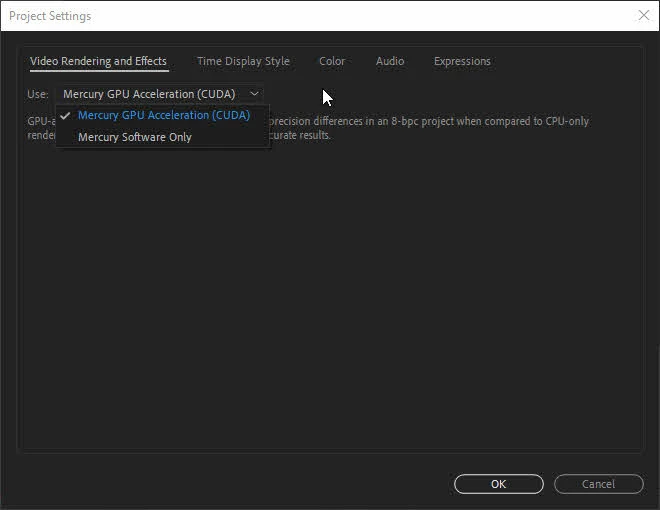
    There are some things that can go faster with GPU (there are not many of them in AE) and to do that you have to turn on your Mercury Render Engine by going to File>Project settings and check CUDA on
    3 replies

    DigitalSpatula
    Inspiring
    January 11, 2019

    The only way to render faster in AE using your GPU is to use GPU accelerated effects. Most features of AE use the CPU (and only one at that) so clock speed is the single most important way to speed up your renders. Using a SSD for your cache is helps with reading and writing data which is a common bottleneck in AE usage.

    Hope this helps,

    Steve

    imeilfx
    imeilfxCorrect answer
    Inspiring
    January 11, 2019

    Short asnwer: You can't.
    Lobnger:  AE is a piece of software that is mostly using CPU for rendering so there is nothing that you can do to delegate tasks that CPU is taking care of to your GPU because that is not possible.
    There are some things that can go faster with GPU (there are not many of them in AE) and to do that you have to turn on your Mercury Render Engine by going to File>Project settings and check CUDA on

    January 11, 2019

    Moving from The Lounge to After Effects