



How can I use layer axis versus world axis to animate?
Hi all,
I'm open to alternate ways to approach this.
I'm trying to create a sphere using several images. Say, 200 images, arranged in 3d space so they face outwards and are all forming one large sphere. Pretty standard thing (like the glowing blue droid apps sphere in the android commercials, like this).
I used Red Giants PlaneSpace to quickly make a sphere. I wish to 'explode' the sphere so all pictures move away from the spheres center, but in a staggered and random way rather than all at once.
I thought this would be easier as I see each layers orientation changed each layers axis. Thus the the layers Z-axis points away from the center.
Example:
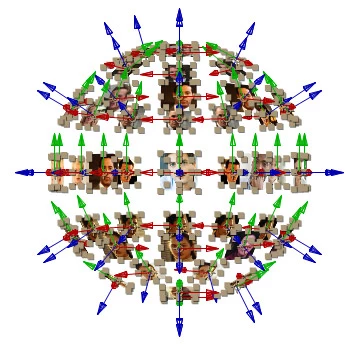
I tried using a simple linear expression to update the Z axis over 20 seconds to its current position minus 2000, like this:
amt=linear(time, index, index+20, position[2], position[2] - 2000);
transform.position = [position[0],position[1],amt];
This updates the Z-axis position but it's based on the world axis (or comp axis), not the layers axis. The layer axis I refer to is the axis widget that appears when you select a 3d layer and the red/green/blue 3-way axis widget appears.
How can I get the expression to use the layers axis rather than world?
Is there another approach to this? I'm definitely not up to date on 3d trig enough to write a formula to plot a course away from a specific 3d point. Hopefully there's a simple way to do it that I overlooked.
I will add that I did tie all of the 200 pictures to a null, scaled the null and it does push all the pictures away. I also added an inverse scale expression so they stay the same size as they originally were instead of scaling up with the null. However I really want to make them explode in a random fashion rather than "all at once" and I need to get away from the null scaling concept for that to have access to each individual picture.
Thanks!
 AdChoices