clauderozsa
Known Participant
October 26, 2021
Question

How to add a double color on a 3d column in after effects via element 3d

  • October 26, 2021
  • 1 reply
  • 429 views

Hi everybody.

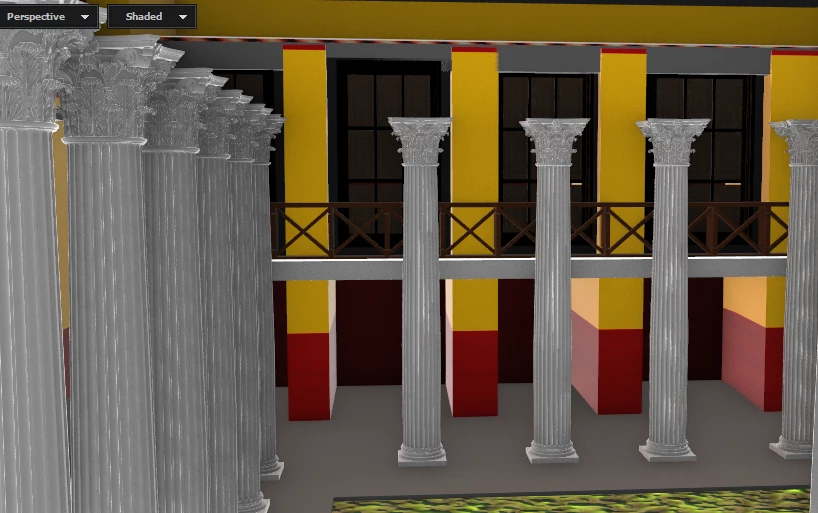
I have a problem creating this column type: The base of the column should be read while the remaining will use a marble texture. I should do this element 3D as to get finally the same pattern as the exterior walls  of the building which are red and yellow. (see the second picture). I've tried different methods but I always get the whole column in red. The only method which could apparently solve my problem is to duplicate the column, eliminate the capital of the second one and keep the cylinder and reduce its height to match the base heigt in red.

I'm sure there is a way to solve this much more simply but cant find the solution. Moreover I cant ask Videocopilot's users as the forum has been closed for an indefinite period of time. I checked tutorials on YouTube without success either. Can anyone here suggest a way to do my effect. Thanks in advance

Claude

This topic has been closed for replies.

1 reply

Mylenium
Legend
October 26, 2021

This would have to be built into the texture. Not sure what more you would need to know here. Of course you can also create a hard separation based on a polygon selection, but that would require an excursion to a 3D program, though probably that may be necessary, anyway, as from your description it sounds like the default UVs of your obhject are a mess or non-existant. If you can't fix it by changing mapping types in E3D, you may indeed have to load the object in Blender or such and clean it up.


Mylenium

clauderozsa
Known Participant
October 26, 2021

Hi Mylenium; I have tried creating a bicolor texture but whatever orientation I give to the image and when I use the UV parameters to move the position of the texture I either get a fully red or a fully white marble colum. On a plane surface like the walls shown on the second picture it works but not on a cylinder apparently... As I wrote i cheated in the past by duplicating th colums with two different heights or by using for the lower one a red cylinder but not only this is not very practical, it increase the weighr of the whole project which is already quite big! 

ShiveringCactus
Community Expert
Community Expert
October 26, 2021

This is what I get with the method I Had used in the past:


I think you're going to have to model the columns in C4D first, then bring them into Element.


Create two materials (doesn't have to contain textures, as you'll update them in Element)

Use the Polygons tool and the select tool and holding SHIFT, select all the lower areas of the column you want to be red.  Once all selected, drag the red texture onto them.

Save and import to element: