


Participating Frequently
September 17, 2018
Answered

How to apply gradient on a 3d object in After Effects?

  • September 17, 2018
  • 2 replies
  • 16331 views

Hi,
I would like to make an animated .gif logo out of an .ai file. To achieve this, I'm following this tutorial: Make your 2D logo 3D - After Effects Tutorial - YouTube .

It's working so far, but when I make the outer shape 3d, the gradients disappears and becomes grey. I've tried adding a gradient ramp effect, as shown in the link below but no luck yet.
http://i65.tinypic.com/20rs4d4.png

This topic has been closed for replies.
Correct answer Roei Tzoref

Thanks for your reply. I'm fairly new to After Effects, do you mean right click > layer styles > gradient overlay?


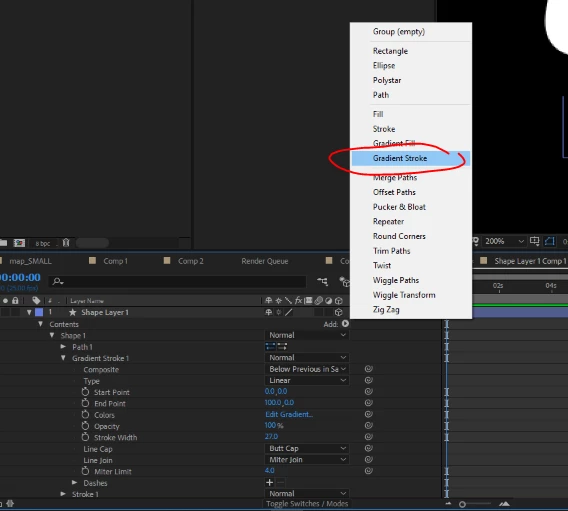
Not layer style. Toggle the shape layer hierarchy and you will see an add button where you could add a gradient stroke.

but if you plan to extrude the shape it's not supported for extruded shapes

2 replies

VeuglemseAuthor
Participating Frequently
September 18, 2018

Extruding text and shape layers in After Effects this guide says that gradients aren't supported on 3d layers. However, I wanted to fix it by adding two lights (spot) on my 3d object. One yellow light at the top left, and one blue light at the bottom right. However, I want my OMKT (white) part to stay white.

Does anyone know how to achieve this?

Roei Tzoref
Legend
September 18, 2018

If you plan to extrude them then no, gradient stroke are not supported. as to the lights issue, you could separate the part you wish to be uneffected by the light and in its material options set accept lights to off.

VeuglemseAuthor
Participating Frequently
September 18, 2018

Thanks! Turning the light off for that material worked. I'll post the link to my image in this thread when it's rendered.

VeuglemseAuthor
Participating Frequently
September 17, 2018

The link might be wrong, this is the right one: http://oi65.tinypic.com/20rs4d4.jpg

Roei Tzoref
Legend
September 17, 2018

do you need the raytraced 3d renderer? if not, change it to classic 3d and see if this helps.

if that doesn't work highlight the layer and press UU and send another screenshot (show before and after). don't use external links simply drag and drop here or copy paste from the clipboard.

Roei Tzoref
Legend
September 17, 2018

Thanks for your reply. This is the before screenshot. I've changed the renderer and found out it turns grey when I right click the layer > Create > Create shapes from vector layer.


Now it's more clear. Ai gradients do no cross over to Ae when you create shape from vector layer. You can rebuild them in Ae. In your example by using a gradient stroke (in the shape layer add->gradient stroke).